Zaloguj się, aby dodać tę pozycję do listy życzeń, zacząć ją obserwować lub oznaczyć jako ignorowaną

Program z wczesnym dostępem

Zaangażuj się w powstawanie programu.

Uwaga: ten program oferowany w formie wczesnego dostępu nie został jeszcze ukończony i może (choć nie musi) ulec dalszym zmianom. Jeśli program w jego obecnym stanie nie interesuje cię, sugerujemy poczekać, by zobaczyć, czy prace nad nim będą kontynuowane. Dowiedz się więcej.

Od twórców:

Dlaczego wczesny dostęp?

„This app is guided by community feedback, so time is needed to experiment with new features. Stability and reliability need more diverse systems testing and bug reporting to be of 1.0 release quality.”

Mniej więcej jak długo program będzie w fazie wczesnego dostępu?

„3-7 months”

W jaki sposób planowana pełna wersja będzie się różnić od tej z wczesnego dostępu?

„Improved stability and reliability, an expanded feature set, and the same core functionality.”

Jaki jest obecny stan wersji z wczesnego dostępu?

„Functional on all tested systems. Polished UI, extensible user customization, and support for many games.”

Czy cena programu ulegnie zmianie podczas i po wczesnym dostępie?

„The price may increase at full release.”

Jak zamierzacie włączyć społeczność w wasz proces tworzenia?

„Much of the content will be user-generated, and community feedback will directly guide development.”
Więcej
Polski język nie jest obsługiwany

Ten produkt nie obsługuje twojego lokalnego języka. Przed zakupem zapoznaj się z listą obsługiwanych języków, która znajduje się poniżej.

Pobierz Proximity Core Demo + Friend's Pass

Kup Proximity Core


Zgłoś błędy i zostaw swoją opinię o tym programie na forach dyskusyjnych

Zobacz wszystkie dyskusje

O tym programie

Proximity Core adds proximity voice chat, audio sources, and waypoints to supported games. It runs as a separate desktop app alongside your games. No mods installed or even game restarts required

Game support comes from bridges that provide the player and world information used by each feature. Support varies by game and bridge. Use the free demo to test your games before buying.

Proximity Voice Chat

Voices are positioned using player locations reported by the game bridge and become quieter with distance. Built in is Steam Audio's HRTF, which allows you to hear whether a voice is beside, behind, above, or below you. Headphones are recommended.

Every player in voice chat must run Proximity Core and connect it to the game. No separate voice server or port forwarding is required.

Parties and Open Session

Create a Party with a Steam invite or Party code. Players in this party will remain together as long as they stay connected.

You can also Open your networking Session. When the connected bridge supports it, Open Session mode automatically connects you with other Proximity Core players detected to be in the same in-game multiplayer session who also have Open Session mode enabled.

Audio Sources and Scenes

Import your own audio and place audio sources in the game world from the Sound Stage. Play music, ambience, playlists, loops, and cues from fixed positions with distance-based volume. Effect zones change how audio sounds within an area. Radio zones allow you to speak with players at any distances over specific channels.

Scenes save your audio sources, zones, and waypoints for each game.  All non-audio source objects may be synced among your party.

Waypoints and Game Overlay

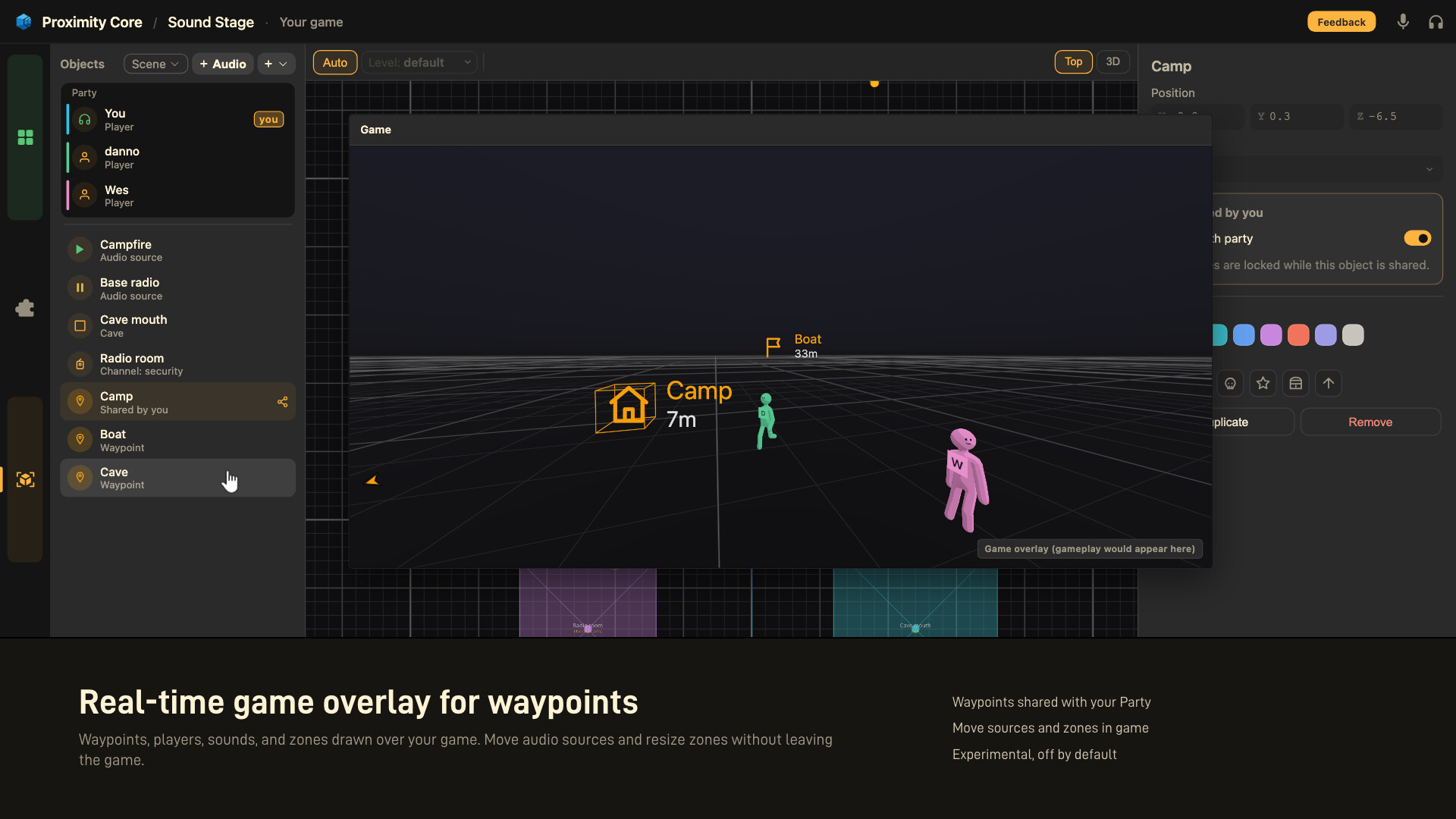
Place waypoints in the game world and view them through the game overlay window. The overlay can also help you to modify the sound scene from within your game.

The game overlay window is experimental, off by default, and requires borderless or windowed mode on your game. Overlay support varies by bridge.

Game Support and Bridges

Proximity Core can scan your installed games. When a compatible bridge is available, select it in the Library and click Connect while the game is running.

Every bridge runs in the same restricted sandbox. Bridges cannot write directly to game memory or files, call arbitrary game functions, make network requests, or launch other programs.

Experimental broad-support bridges for Unity and Unreal games are included, but compatibility and stability varies by game. Game-specific community bridges can be installed from Steam Workshop. You can also create and publish your own bridges.

A dedicated mod may provide deeper support for one game. Proximity Core provides the same audio and visual tools across multiple supported games without installing a separate mod into each game.

Anti-Cheat

Many bridges read game memory to find player and world information. Anti-cheat software may flag this interaction, and a game's rules may prohibit it. A flag can lead to an account warning or ban.

Proximity Core blocks memory-reading bridges when it detects known anti-cheat software. Detection can fail, so check the game's rules and do not rely on this protection. Bridges that do not read game memory are often much more limited and unreliable. If your intended goal is to use this app only for Anti-Cheat protected titles, this app is likely not for you.

Early Access and Free Demo

Spatial audio, proximity voice, scenes, Parties, overlay, Open Session, bridges, and Workshop publishing are available in Early Access. Game compatibility, the game overlay window, and authoring tools may change during development. Many bug fixes will occur during this time.  If you expect a fully polished and stable product, you should wait until full release.

The free demo offers all the main functionality of the full app. Some features may be limited. Demo feature restrictions may be altered in the future.

Oświadczenie w sprawie treści generowanych przez SI

Producenci opisują, jak ich gra korzysta z treści generowanych przez SI, w następujący sposób:

Non-english text is translated with DeepL currently. No AI images or audio are included.

Wymagania systemowe

    Konfiguracja minimalna:
    • System operacyjny: Windows 10
    • Procesor: Intel Core i3-4130 / AMD FX-4300
    • Pamięć: 2 GB RAM
    • Miejsce na dysku: 500 MB dostępnej przestrzeni
    • Karta dźwiękowa: DirectX compatible soundcard
    • Dodatkowe uwagi: Works on x64 and ARM computers. Only supports x86/x64 games
    Konfiguracja zalecana:
    • Dodatkowe uwagi: Wired or low latency wireless stereo headphones for full experience
Filtry recenzji