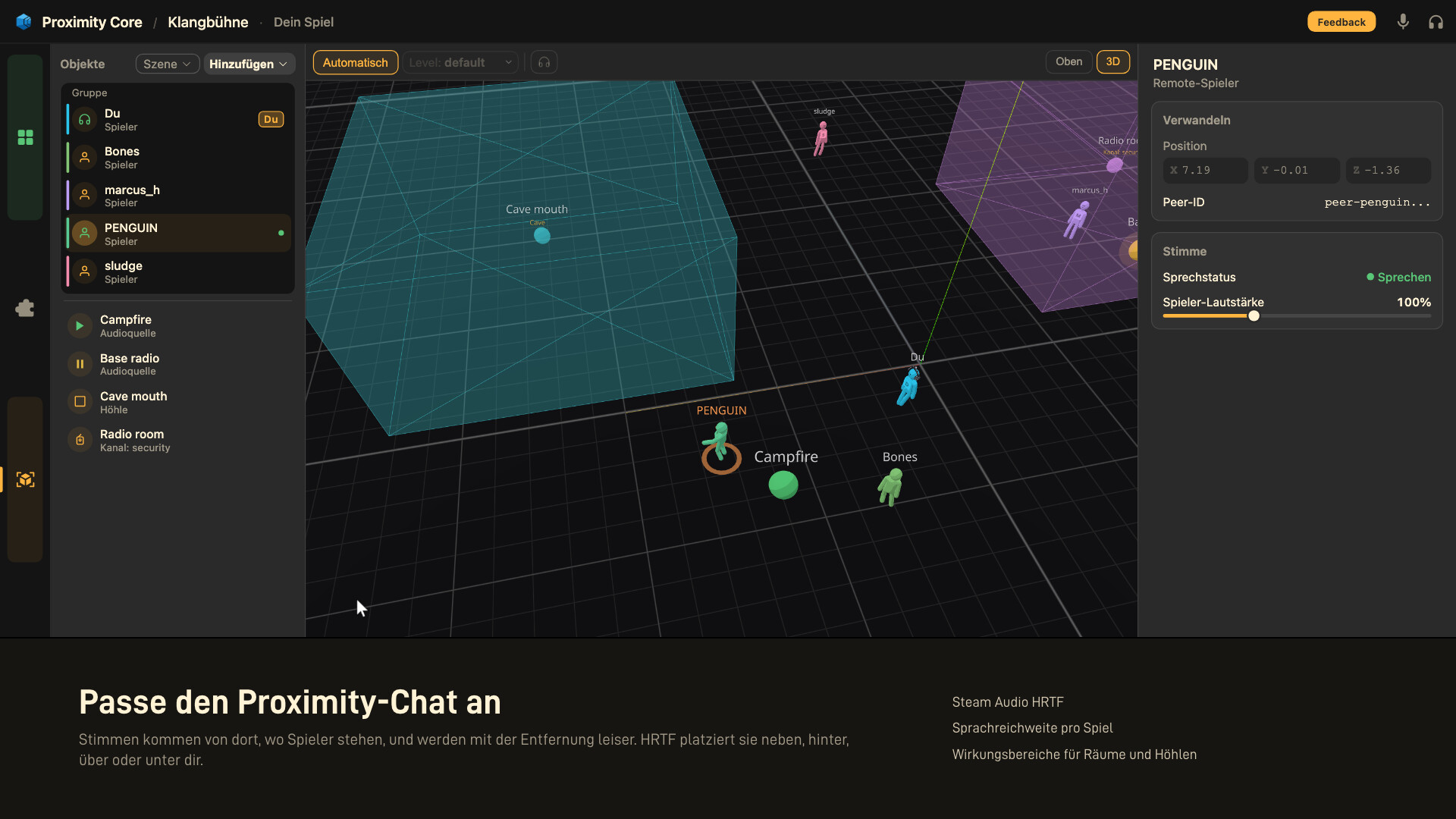
Proximity voice chat for most games, no mods, no servers, no complex setup. Add spatial music and ambience to your game. All audio rendered in 3D from in-game position data, without touching game files.

Melden Sie sich an, um dieses Produkt zu Ihrer Wunschliste hinzuzufügen, zu abonnieren oder als „Ignoriert“ zu markieren.

Early Access-Software

Bringen Sie sich in die Entwicklung ein.

Hinweis: Diese Early Access-Software ist noch nicht fertig und könnte sich in Zukunft verändern. Wenn Ihnen die Software im aktuellen Zustand nicht gefällt, sollten Sie abwarten und sehen, ob sich die Software weiterentwickelt. Mehr erfahren

Was die Entwickler zu sagen haben:

Wozu Early Access?

„Since this app is highly community-focused, gathering feedback early is very important and allows room for large overhauls before being locked into the consistent behavior expected of a full release. While the app has been tested on numerous devices prior to launch, it remains inherently unpredictable due to its interaction with other programs and the operating system. As a result, community feedback and bug reports are crucial before moving toward a fully stable release.“

Wie lange wird diese Software ungefähr den Early Access-Status haben?

„3-5 months“

Wie soll sich die Vollversion von der Early Access-Version unterscheiden?

„The overall goals and core concept of the app are planned to remain the same. At this stage, it’s difficult to be entirely certain what will change, as Early Access will focus heavily on community feedback and ideas. The full version is expected to be very similar to the Early Access version, but with many bug fixes and an expanded feature set. While not guaranteed, support for Linux and macOS is also planned for the full release.“

Was ist der derzeitige Stand der Early Access-Version?

„Fully functional on all tested systems. Polished UI. Very extensible user customization of UI theming and App behavior. Works with many games already“

Wird diese Software während und nach Early Access unterschiedlich viel kosten?

„The price may raise minimally at full release.“

Wie werden Sie versuchen die Community in den Entwicklungsprozess miteinzubeziehen?

„This app is built upon community feedback and development since much of its content will be user generated.“
Weiterlesen

Am Spieltest von Proximity Core Playtest teilnehmen

Wenn Sie den Zugriff anfordern, werden Sie benachrichtigt, sobald der Entwickler weitere Teilnehmer annimmt.
Dieses Spiel ist noch nicht auf Steam verfügbar

Bald verfügbar

Interesse? Fügen Sie das Spiel Ihrer Wunschliste hinzu und erhalten Sie eine Benachrichtigung, wenn es verfügbar ist.
 
Alle Diskussionen anzeigen

In den Diskussionsforen können Sie Fehler melden und Feedback zur Software abgeben

Über diese Software

Proximity Core adds a spatial audio layer to your games: proximity voice chat, positional music, and ambient sound zones, all rendered with Steam Audio's HRTF so you can pinpoint sounds above, below, and behind you.

No mods required. No game files modified. Launch, connect, play.

How It Works

Proximity Core runs as a separate application alongside your game. It reads player and world data through a lightweight bridging system that never modifies game files or game logic. Audio is rendered locally using Steam Audio, so each player hears spatial sound based on their own in-game position.

When you close Proximity Core, nothing remains. Your game stays completely vanilla.

Automatic Session Detection

For many supported games, Proximity Core automatically detects when you're in the same multiplayer session as another player. It reads networking identifiers from the game's own multiplayer system, such as lobby IDs, server addresses, and session tokens, and connects players without manual invites.

If auto-detection isn't available for a particular game, you can create a custom session manually. Custom sessions aren't tied to the game's connection lifecycle, so your group stays connected even if the game session ends or changes.

Peer-to-Peer Networking

All voice and position data is synced directly between players through Proximity Core's own networking layer, built on Steam's relay infrastructure. There are no dedicated servers to set up, no port forwarding, and no IP addresses exposed. Sessions start instantly with no configuration required.

Spatial Audio

All audio is spatialized using Steam Audio's head-related transfer function. Voices and sound sources have realistic distance falloff, directional positioning, and vertical separation. A player above you sounds distinct from one beside you. Note: Users have the ability to disable sound directionality or use basic panning instead.

Sound Zones and Music

Place sound sources and ambient zones in 3D space to build custom soundscapes. Set up background music playlists that fade with distance, ambient loops tied to locations, or positional audio cues. Scenes can be saved, loaded, and shared.

Game Bridges

Proximity Core connects to games through bridges: small scripts that read player position, orientation, world state, and session information. Bridges can provide context like what level or dimension a player is in, whether they're underwater, and other details that shape the audio experience.

Bridges cannot modify game memory or alter game behavior. Most bridges run in-process (through our GameLink scripting framework) for performance but have no ability to meaningfully write to game state.

Bridges are easily downloaded through a built in catalog system. If your game isn't supported yet, you can write a bridge using the Lua scripting API and publish it to the official catalog or a community driven one.

Engine-Level Support

Some bridges work for a wide selection of games by taking advantage of similarities in their base architecture. For many Unity and Unreal Engine titles, Proximity Core can automatically detect player positions without a dedicated per-game bridge given that you have downloaded a corresponding broad support bridge. Results vary by title, but a large number of games work with no additional configuration.

Why Not Mods?

Mods can offer deep integration with specific games, but they typically require per-game installation, ongoing maintenance, and sometimes dedicated voice servers with open ports. If a game doesn't have a proximity chat mod, there's no alternative.

Proximity Core takes a different approach. A single application covers many games without installing into any of them. No server setup, no port forwarding, no game files touched. It also enables capabilities most mods don't provide, like positional music and ambient sound zones that work across any supported title.

If a dedicated mod better fits your needs, you can always use that instead. Proximity Core is designed to be the fastest way to add spatial audio to games that don't have it.

Anti-Cheat and Competitive Games

Proximity Core does not fully support games with anti-cheat systems. Competitive and anti-cheat-protected titles are limited in what information can be safely accessed.

A highly experimental computer vision feature can attempt to read player positions from the positional indicators on screen(such as minimaps), which may allow limited use with some competitive titles without interacting with game memory. However, this is not guaranteed to work reliably. Do not purchase Proximity Core if your primary use case involves anti-cheat-protected games.

Always verify that a game does not use anti-cheat and that it does not violate the games TOS before using Proximity Core's GameLink(memory based) bridging system, even if the application does not explicitly warn you.

Early Access

Proximity Core is in Early Access. Core features are functional and tested, but compatibility and tooling will continue to improve.

Game support grows primarily through community-created bridges and engine-level improvements. A free demo is available for testing compatibility with your games before purchasing.

If you're looking for a fully polished product, you may want to wait for the full release. If you want to explore spatial audio in new ways and help shape something new, Early Access is the place to start.

Systemanforderungen

    Mindestanforderungen:
    • Setzt 64-Bit-Prozessor und -Betriebssystem voraus
    • Betriebssystem: Windows 10
    • Prozessor: Intel Core i3-4130 / AMD FX-4300
    • Arbeitsspeicher: 2 GB RAM
    • Speicherplatz: 250 MB verfügbarer Speicherplatz
    • Soundkarte: DirectX compatible soundcard
    Empfohlen:
    • Setzt 64-Bit-Prozessor und -Betriebssystem voraus
    • Betriebssystem: Windows 10/11
    • Prozessor: Intel Core i5-6500 / AMD Ryzen 3 1200
    • Arbeitsspeicher: 4 GB RAM
    • Speicherplatz: 10 GB verfügbarer Speicherplatz
    • Soundkarte: DirectX compatible soundcard
    • Zusätzliche Anmerkungen: Wired or low latency wireless stereo headphones for full experience
Für dieses Produkt gibt es keine Rezensionen

Sie können Ihre eigene Rezension für dieses Produkt verfassen, um Ihre Erfahrungen mit der Community zu teilen. Nutzen Sie den Bereich über den Schaltflächen zum Kaufen, um Ihre Rezension zu verfassen.