Discover the ultimate "Video Converter Supreme" – your reliable companion for fast, easy, and high-quality video conversions!

로그인하셔서 게임을 찜 목록에 추가하거나, 팔로우하거나 또는 제외로 지정하세요.

한국어(을)를 지원하지 않습니다

이 제품은 귀하의 로컬 언어를 지원하지 않습니다. 구매하기 전에 아래에 있는 지원하는 언어 목록을 확인해주세요.

Video Converter Supreme 구매

주간 할인! 2026년 3월 2일 까지

-10%
$19.99
$17.99
 

소프트웨어 정보

Discover the ultimate "Video Converter Supreme" – your reliable companion for fast, easy, and high-quality video conversions!


Would you like to effortlessly convert your videos into the perfect format for any device? Video Converter Supreme makes this possible! With this powerful tool, you can convert your movies into optimal formats in no time, ensuring the best playback on smartphones, tablets, smart TVs, or other devices. You’ll benefit from a user-friendly interface that delights both beginners and professionals.

What can "Video Converter Supreme" do?

  • Resolutions up to 4K

  • Optimal playback for most standard devices

  • Convert to different formats comfortably

  • Excellent quality in all video formats

  • Easy handling

  • Extract audio tracks for e.g. ringtones or other projects

  • Conversion to AVI, MKV, MPEG, WMV, MP4, VOB, MOV

  • Fast conversion using GPU

  • Extract soundtrack to MP3, AAC, FLAC, OGG, WMA

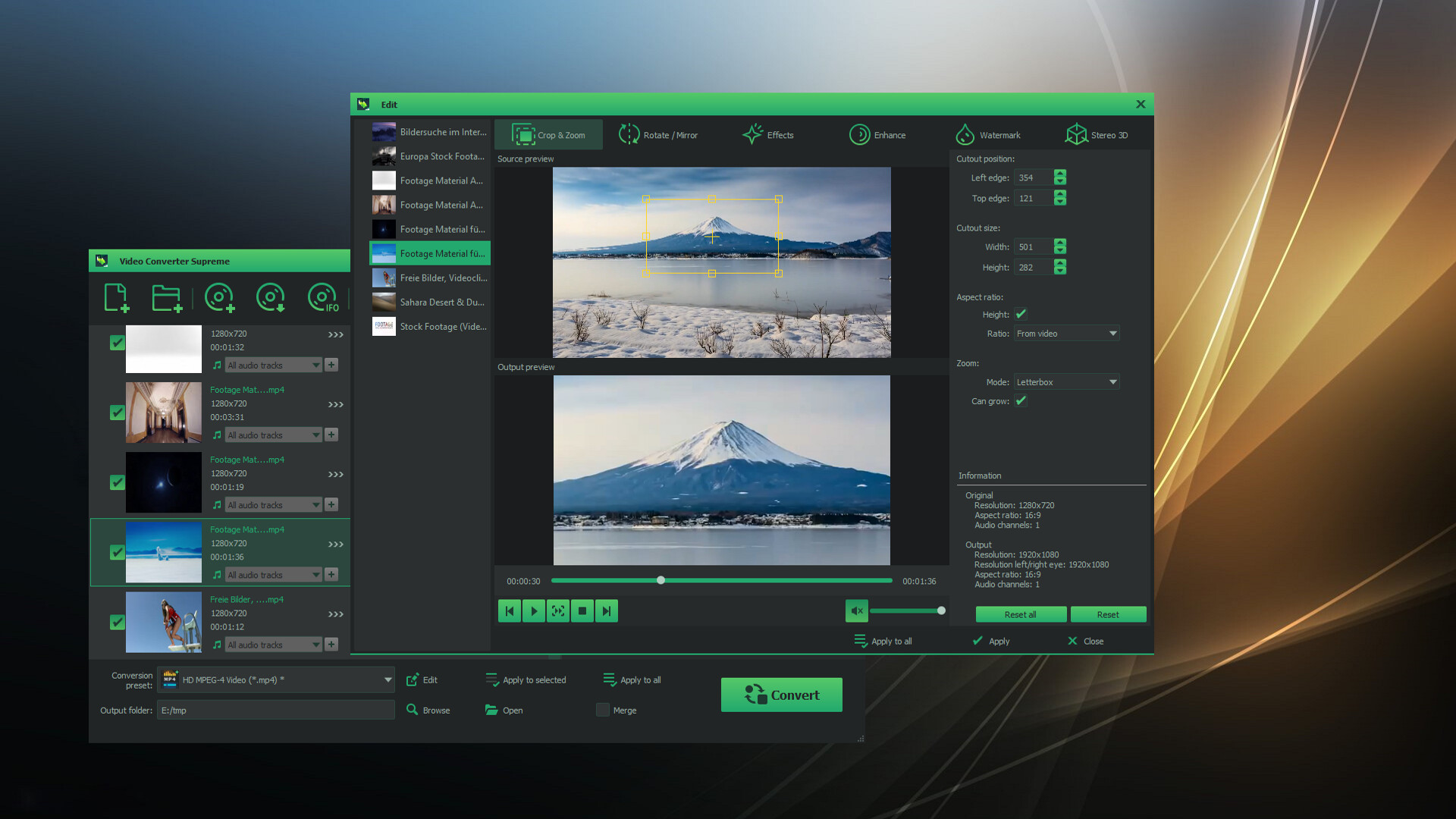
  • Video editing included: brightness, contrast, gamma, sharpness, saturation, flip, rotate, watermark, 3D stereo

  • Video editing with preview and multiple cut tracks

  • Batch processing of various tasks

  • Merge multiple sequences or movies

"Video Converter Supreme" is designed to be user-friendly, making it an ideal tool for both beginners and experts.

The "Video Converter Supreme" is so easy to use that even beginners can operate it effortlessly. Simply add your videos, select the desired clips or settings, start the conversion – and you're done! For professionals, the tool offers advanced features for even greater control.

Easy post-processing

Achieve the best results with smart video editing!
With the integrated video editing features, you can optimize your videos before converting. Too dark? Too bright? No problem! Adjust brightness, contrast, or saturation in just a few clicks. Want to watch your video in 3D? Convert it to a 3D format with just a few steps. Thanks to the live preview, you can see exactly how the final result will look – ensuring perfect results every time.

시스템 요구 사항

    최소:
    • 64비트 프로세서와 운영 체제가 필요합니다
    • 운영 체제 *: Windows 8 / 10 / 11
    • 프로세서: Intel Core i3
    • 메모리: 2 GB RAM
    • 그래픽: Onboard Graphics card
    • 저장 공간: 200 MB 사용 가능 공간
    • 사운드카드: Onboard Soundcard
    권장:
    • 64비트 프로세서와 운영 체제가 필요합니다
    • 운영 체제 *: Windows 8 / 10 / 11
    • 프로세서: Intel Core i3
    • 메모리: 4 GB RAM
    • 그래픽: Onboard Graphics card
    • 저장 공간: 200 MB 사용 가능 공간
    • 사운드카드: Onboard Soundcard
* 2024년 1월 1일부터 Steam 클라이언트는 Windows 10 이상 버전만 지원합니다.

Video Converter Supreme에 대한 사용자 평가 사용자 평가 정보 환경 설정

종합 평가:
사용자 평가 2개 (평가 2개)


특정 날짜 범위에 속하는 평가를 보려면, 위의 그래프에서 선택 항목을 클릭한 후 드래그하거나 원하는 바를 클릭하세요.


평가를 작성한 시점의 사용자 플레이 시간을 기준으로 평가를 필터링:


최소 시간 없음 ~ 최대 시간 없음

선택한 표시 순서로 평가 보기


자세한 정보
필터
게임과 관련없는 평가 활동 제외
플레이 시간:
주로 Steam Deck에서 플레이
운영 체제:
CPU:
GPU:
기기 유형:
위에서 설정한 필터 조건에 맞는 평가가 없습니다
다른 평가를 보려면 위에서 필터를 조정해주세요
평가 불러오는 중...