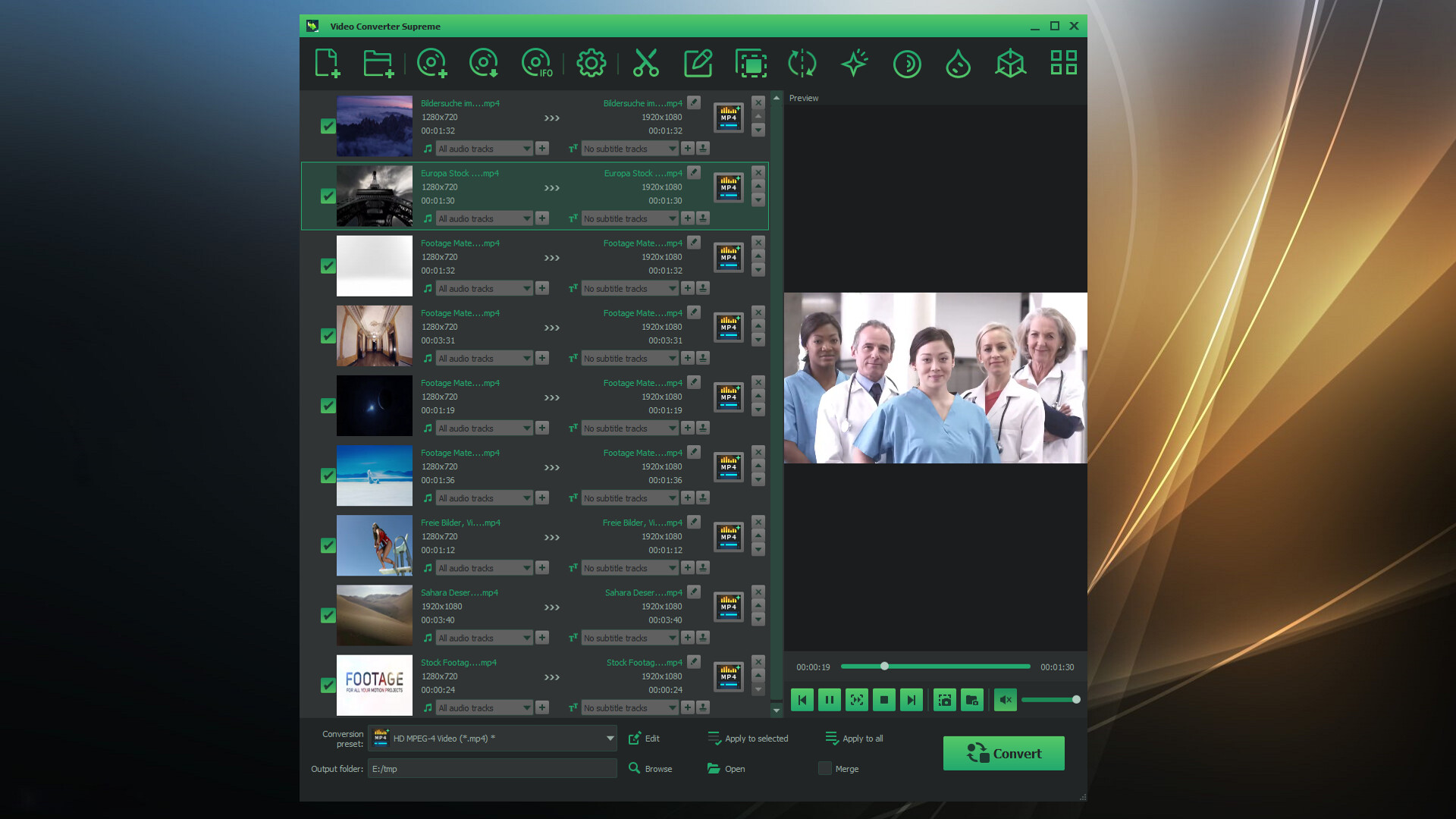
Discover the ultimate "Video Converter Supreme" – your reliable companion for fast, easy, and high-quality video conversions!

Abyste si mohli tento produkt přidat do seznamu přání, začít ho sledovat nebo ho zařadit mezi ignorované, musíte se nejprve přihlásit.

Čeština není podporována

Tento produkt nepodporuje Váš místní jazyk. Seznam podporovaných jazyků je k dispozici níže na této stránce.

Zakoupit Video Converter Supreme


Informace o softwaru

Discover the ultimate "Video Converter Supreme" – your reliable companion for fast, easy, and high-quality video conversions!


Would you like to effortlessly convert your videos into the perfect format for any device? Video Converter Supreme makes this possible! With this powerful tool, you can convert your movies into optimal formats in no time, ensuring the best playback on smartphones, tablets, smart TVs, or other devices. You’ll benefit from a user-friendly interface that delights both beginners and professionals.

What can "Video Converter Supreme" do?

  • Resolutions up to 4K

  • Optimal playback for most standard devices

  • Convert to different formats comfortably

  • Excellent quality in all video formats

  • Easy handling

  • Extract audio tracks for e.g. ringtones or other projects

  • Conversion to AVI, MKV, MPEG, WMV, MP4, VOB, MOV

  • Fast conversion using GPU

  • Extract soundtrack to MP3, AAC, FLAC, OGG, WMA

  • Video editing included: brightness, contrast, gamma, sharpness, saturation, flip, rotate, watermark, 3D stereo

  • Video editing with preview and multiple cut tracks

  • Batch processing of various tasks

  • Merge multiple sequences or movies

"Video Converter Supreme" is designed to be user-friendly, making it an ideal tool for both beginners and experts.

The "Video Converter Supreme" is so easy to use that even beginners can operate it effortlessly. Simply add your videos, select the desired clips or settings, start the conversion – and you're done! For professionals, the tool offers advanced features for even greater control.

Easy post-processing

Achieve the best results with smart video editing!
With the integrated video editing features, you can optimize your videos before converting. Too dark? Too bright? No problem! Adjust brightness, contrast, or saturation in just a few clicks. Want to watch your video in 3D? Convert it to a 3D format with just a few steps. Thanks to the live preview, you can see exactly how the final result will look – ensuring perfect results every time.

Systémové požadavky

    Minimální:
    • Vyžaduje 64bitový procesor a operační systém
    • OS *: Windows 8 / 10 / 11
    • Procesor: Intel Core i3
    • Paměť: 2 GB RAM
    • Grafická karta: Onboard Graphics card
    • Pevný disk: 200 MB volného místa
    • Zvuková karta: Onboard Soundcard
    Doporučené:
    • Vyžaduje 64bitový procesor a operační systém
    • OS *: Windows 8 / 10 / 11
    • Procesor: Intel Core i3
    • Paměť: 4 GB RAM
    • Grafická karta: Onboard Graphics card
    • Pevný disk: 200 MB volného místa
    • Zvuková karta: Onboard Soundcard
* Od 1. ledna 2024 podporuje klient služby Steam pouze systém Windows 10 a novější.

Uživatelské recenze produktu Video Converter Supreme Informace o recenzích Vaše předvolby

Všechny recenze:
2 uživatelských recenzí (2 recenzí)


Pro zobrazení recenzí z daného časového rozmezí ho tažením vyberte v grafu výše nebo přímo klikněte na určitý sloupec.


Recenze budou filtrovány dle odehraného času uživatelů v době jejich psaní.


Žádné minimumŽádné maximum

Recenze budou zobrazeny ve vybraném pořadí.


Více informací
Filtry
Nesouvisející recenze jsou vyloučeny
Odehraný čas:
Recenze primárně ze zařízení Steam Deck
Operační systém:
CPU:
GPU:
Typ zařízení:
Filtrům neodpovídají žádné další recenze
Abyste viděli všechny recenze, upravte filtry výše
Načítání recenzí...