Fast / Responsive Alt Tab replacement. Enjoy Customizable Themes, Layouts, Window Previews, Shader driven visuals and more. Featuring Alt Tab layouts such as Wheel, Tower 3D, Classic, List, and more. Download Themes right from the in-app Steam Workshop, or Customize your own in the Theme Editor.

Sign in to add this item to your wishlist, follow it, or mark it as ignored

Early Access Software

Get involved with this software as it develops.

Note: This Early Access software is not complete and may or may not change further. If you are not excited to use this software in its current state, then you should wait to see if it progresses further in development. Learn more

What the developers have to say:

Why Early Access?

“Alt Tab Toolkit is already a powerful and highly functional replacement for the default Windows app switcher.

Early Access allows us to prioritize what our community wants most, whether it's new theme options, plugin support, QOL features, or deeper OS integrations.

We believe the best productivity tools are shaped by the people who use them every day. We hope that early access, combined with community feedback will help us achieve the best product possible.

An app of this magnitude is bound to have bugs, especially under many different machine conditions. Early access users will help us navigate this.”

Approximately how long will this software be in Early Access?

“12+ months”

How is the full version planned to differ from the Early Access version?

“Over the period of Early Access, our goal is to continuously enhance the overall quality and polish. We plan for the full version to be more feature-rich, with a more refined UI and user experience. We also aim to offer more UI alternatives and customization options based on community feedback”

What is the current state of the Early Access version?

“The app is already in a fully functional state.
It comes out of the box with a multitude of themes, the theme editor,
Steam workshop support and more.

For a full list of already implemented features, check out the "About this software" section of the store page.

*It is possible that theme files, or layouts could become broken or unusable at some point(s) when updates are released during early access; However, we plan on working carefully to mitigate that issue as much as possible.

Some things could likely be optimized in the future, but the app already uses low amounts of system resources.”

Will this software be priced differently during and after Early Access?

“It's possible the price will increase after early access is finished. We plan for the 1.0 version to have more features, more polish, better stability, and the benefit of months of community feedback and development work.”

How are you planning on involving the Community in your development process?

“The community is absolutely vital to this entire process.
We want to hear you feedback, and work to improve the quality of this app for everyone.
We plan on communicating with the community through Steam, Reddit, and Discord.”
Read more

Buy Alt Tab Toolkit

SPECIAL PROMOTION! Offer ends October 8

-67%
$7.49
$2.47

Buy Alt Tab Power Pack

Includes 2 items: Alt Tab Toolkit, Alt Tab Toolkit - Power Tools

-20%
-56%
$9.98
$4.37
 

Report bugs and leave feedback for this software on the discussion boards

See all discussions

About This Software

Upgrade your task switching workflow with this powerful and customizable experience.

Utilize alternative layouts like Wheel, List, Tower (3D) and more.

The switcher has been tailor made around Efficiency First. The speed at which the switcher appears and disappears is highly optimized, even with the large amount of visuals. 

Amazingly deep and powerful rendering capabilities. (Now with High Performance DirectX Rendering!)

Visuals can be interactive based on the system

i.e. Influenced by Audio or System Metrics like Cpu usage, and much more

Visuals may also opt to use many types of media - png, gif, mp4, more

Animated UI: Don't confuse this with pixel or vertex shader animations! This is the physical animating of the alt tab UI elements themselves. These are built in, and optional. 

UI Elements are powered by Pixel and Vertex Shaders (Pixel Shader 5.0),

Themes are easily shared via the Steam Workshop.

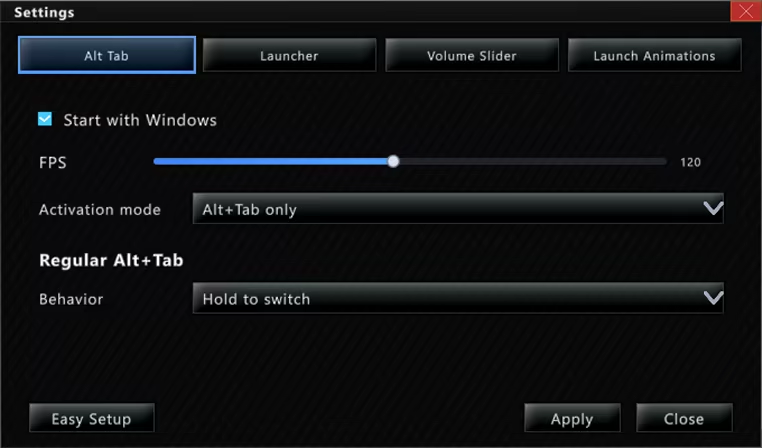
Frame rate is adjustable up to 240FPS 

Improved Navigation: Navigate the Alt Tab menu using keys, mouse clicks, or Mouse Wheel Scrolling.

'Alt Tab' Hotkey and behavior can be customized

Lock / Toggle Alt Tab Window: Option to make the alt tab window "toggle on" instead of staying visible only while alt is held.


Custom App Icons: App Icons can be substituted for custom images, including animated ones. (These custom app icons are used universally in this app, including DLC features like app launch animations, and the app launcher)


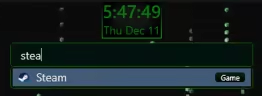
Searchbar / Filter: Any time you type while the alt tab window is open it automatically begins typing in the searchbar. This acts as a filter (i.e. typing "Th" would filter to windows like "Theme Editor"). For DLC owners, the search bar doubles as an app launcer, using the same apps you have registered with the app launcher itself.
Tags may also be applied to any "App item" (i.e. "Game") and will be included in search filtering


Blacklist Support: Hide certain windows from appearing in your Alt Tab window at all! (Toggleable) 

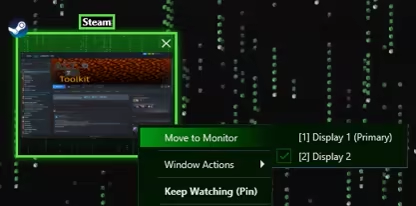
Move Monitors: Swiftly change what monitor a given window resides on

Keep Watching: This feature displays the contents of a given window in a duplicate window, which may become transparent and click-thru on hover. Awesome for single monitor work flows and watching a video while working, or quickly duplicating a screen for a multi monitor setup.

System Requirements

    Minimum:
    • Requires a 64-bit processor and operating system
    • OS: 10, 11
    • Processor: 1.66 GHz Intel i5 or equivalent
    • Memory: 2 GB RAM
    • Graphics: NVIDIA GeForce GTX 660 or equivalent
    • Storage: 100 MB available space
    Recommended:
    • Requires a 64-bit processor and operating system
    • OS: 10, 11
    • Processor: 2 GHz Intel i7 or equivalent
    • Memory: 8 GB RAM
    • Graphics: NVIDIA GeForce GTX 1060 or equivalent
    • Storage: 1024 MB available space
Review Filters