Can’t speak in multiplayer games or online chats? Type, hit Enter, and speak through text-to-speech instantly. Perfect for late nights, lost voices, shy moments— let your keyboard be your voice.

Увійдіть до акаунта, щоби додати цей продукт до списку бажаного чи позначити як ігнорований.

українська мова недоступна

Цей продукт не підтримує вашу мову. Будь ласка, перегляньте список підтримуваних мов перед купівлею.

Придбати Text To Speech


Про цю програму

A simple yet powerful text-to-speech utility designed to help you communicate effortlessly — even when speaking out loud isn’t an option.

Whether your spouse is asleep, you’ve lost your voice to a winter cold, or you just prefer typing over talking, this tool has you covered. It runs fully offline using your PC’s built-in voices, no subscriptions and no waiting — just instant speech whenever you need it.

Floating Text Box

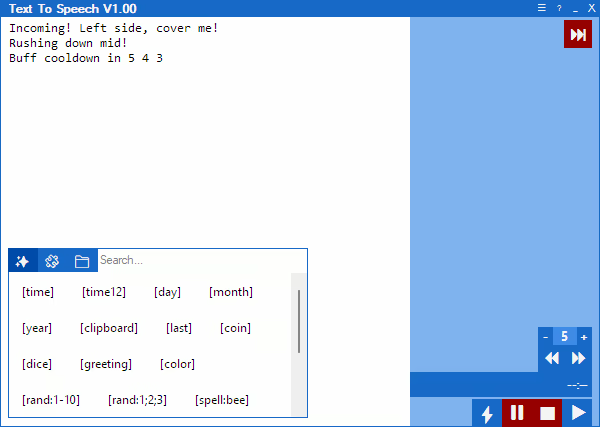
Type your message into a user-friendly floating text box and press Enter to have it spoken aloud instantly — letting you become the keyboard warrior you were always meant to be.

Macros

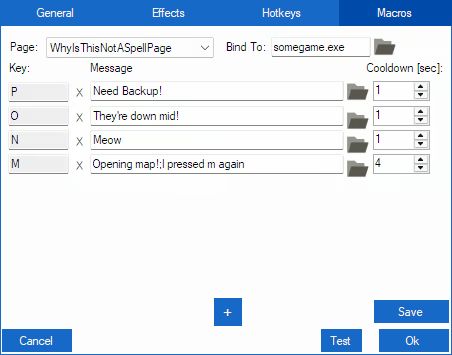
Speed up communication with macros, allowing you to trigger phrases, play audio files, or repeat messages with a single key press. Perfect for in-game callouts or fast-paced situations where timing matters.

Hotkeys

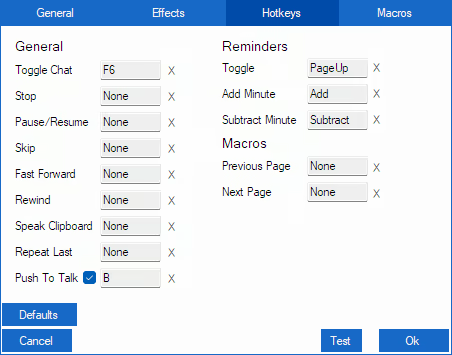
Hotkeys put instant control at your fingertips — speak messages, pause, stop, skip, or repeat speech, manage reminders, and navigate macro pages — all with a single press, keeping communication fast and effortless.

Clip Recording & Sound Playback

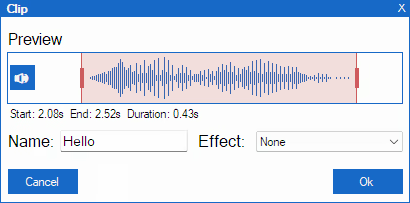
Record audio for a set [Clip Time] with a hotkey, then trim start/end, name your clip, apply voice effects, and save for later replay.

You can also play custom sound files directly from the app — trigger them instantly with hotkeys or macros.

Know the feeling when someone quotes your text, but you can’t copy-paste their voice back at them? Now you can — shove your friends’ voices right back at them!


Reminders

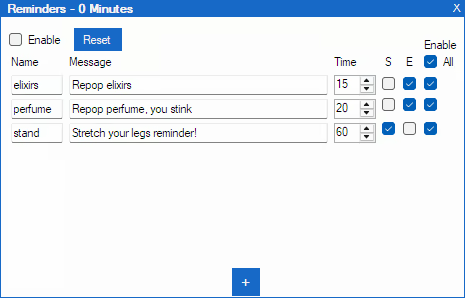
The built-in reminder system lets you set recurring spoken messages. Track cooldowns, buff timers, or keep your team informed during intense gameplay — your keyboard warrior never misses a beat.

Additional features include

  • Built-in Windows voices — works fully offline, fast, no subscriptions.

  • AI voices — neural voices are downloadable, work offline, sound natural, no subscriptions needed.

  • Pitch, speed, and volume control.

  • Voice effects to add personality.

  • Message history with replay, copy, and export options.

  • Macro pages for organized workflows.

  • Optional audio driver to bridge audio between applications.

Note from Developer

As a gamer with social anxiety, I programmed this tool to help myself socialize and enjoy gaming more fully. I’ve used it personally for several years, it’s tailored specifically to the challenges of gaming while relying on text-to-speech. It makes in‑game communication easier, faster, and more natural.

Розкриття інформації щодо вмісту, згенерованого ШІ

Розробники так описують використання в грі вмісту, згенерованого штучним інтелектом:

This app supports downloadable AI voices powered by the open-source Piper text-to-speech engine.

Voices sound natural and are generated locally on your device — no subscriptions, no API keys, and no pay-per-character limits.

Each voice is downloaded on first use. You can preview available voices here:
https://rhasspy.github.io/piper-samples/

Системні вимоги

    Мінімальні:
    • ОС: Windows 10
    • Процесор: Dual-core 2.0 GHz
    • Оперативна пам’ять: 4 GB ОП
    • Місце на диску: 200 MB доступного місця
    • Додаткові примітки: Additional storage required for downloadable voice models (50–150 MB per voice)
    Рекомендовані:
    • ОС: Windows 10
    • Процесор: Quad-core 2.5 GHz or better
    • Оперативна пам’ять: 8 GB ОП
    • Місце на диску: 1 GB доступного місця
    • Додаткові примітки: Additional storage required for downloadable voice models (50–150 MB per voice)

Користувацькі рецензії на Text To Speech Про рецензії користувачів Ваші вподобання

Усі рецензії:
Рецензій: 1 (усього 1)


Щоб переглянути рецензії за певний проміжок часу, виберіть його на графіку вище або клацніть відповідний стовпчик.


Сортуйте рецензії за показником награного часу на момент написання рецензії:


Без мінімуму до Без максимуму

Показувати рецензії у вибраній послідовності


Дізнатися більше
Фільтри
Виключення рецензійної активності «не за темою»
Ігровий час:
Переважно на Steam Deck
Operating System:
CPU:
GPU:
Device Type:
Більше немає рецензій, що збігаються із фільтрами вище
Скоригуйте фільтри вгорі, щоби бачити більше рецензій
Завантаження рецензій…