Can’t speak in multiplayer games or online chats? Type, hit Enter, and speak through text-to-speech instantly. Perfect for late nights, lost voices, shy moments— let your keyboard be your voice.

Abyste si mohli tento produkt přidat do seznamu přání, začít ho sledovat nebo ho zařadit mezi ignorované, musíte se nejprve přihlásit.

Čeština není podporována

Tento produkt nepodporuje Váš místní jazyk. Seznam podporovaných jazyků je k dispozici níže na této stránce.

Stáhnout Text To Speech Demo

Zakoupit Text To Speech


Informace o softwaru

A simple yet powerful text-to-speech utility designed to help you communicate effortlessly — even when speaking out loud isn’t an option.

Whether your spouse is asleep, you’ve lost your voice to a winter cold, or you just prefer typing over talking, this tool has you covered. It runs fully offline using your PC’s built-in voices or downloadable neural AI voices, with no subscriptions and no waiting — just instant, natural speech whenever you need it.

Voices

Choose from multiple speech engines depending on your needs:

  • Microsoft / Windows voices – instant, built-in voices.

  • Piper – high-quality offline neural voices.

  • Kokoro fast, modern neural voices with excellent clarity, with support for voice mixing to create unique combinations.

  • Kitten - lightweight neural voices with impressive quality.

Download voices on demand and switch between them anytime.

Floating Text Box

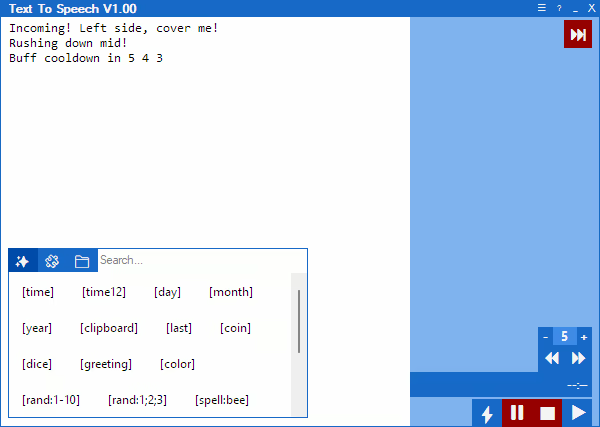
Type your message into a user-friendly floating text box and press Enter to have it spoken aloud instantly — letting you become the keyboard warrior you were always meant to be.

Live Chat Integration

Connect Twitch chat or YouTube live chat and send approved messages straight into the normal text-to-speech queue.

Filter what gets read with mention targeting, moderator or broadcaster checks, duplicate and command blocking, link cleanup, message length limits, and spam control. You can also add pretext for voice or speed macros so live chat can be spoken differently from regular messages.

Macros

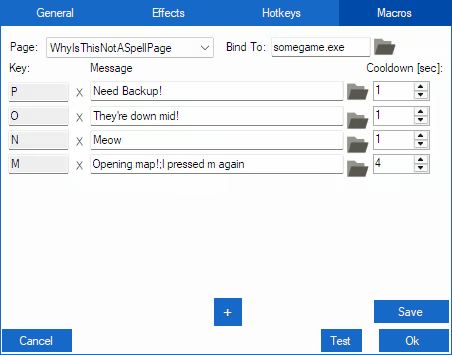
Speed up communication with macros, allowing you to trigger phrases, play audio files, or repeat messages with a single key press. Perfect for in-game callouts or fast-paced situations where timing matters.

Hotkeys

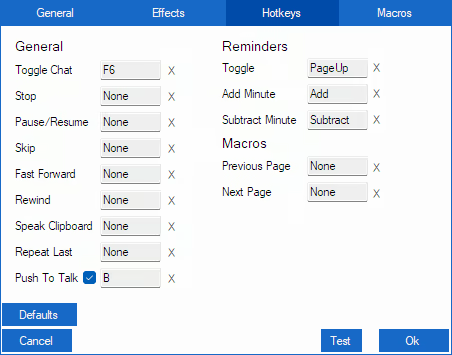
Hotkeys put instant control at your fingertips — speak messages, pause, stop, skip, or repeat speech, manage reminders, and navigate macro pages — all with a single press, keeping communication fast and effortless.

Clip Recording & Sound Playback

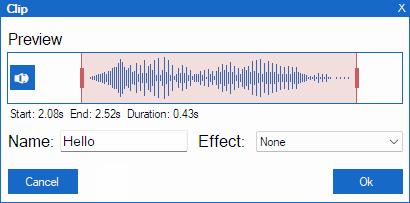
Record audio for a set [Clip Time] with a hotkey, then trim start/end, name your clip, apply voice effects, and save for later replay.

You can also play custom sound files directly from the app — trigger them instantly with hotkeys or macros.

Know the feeling when someone quotes your text, but you can’t copy-paste their voice back at them? Now you can — shove your friends’ voices right back at them!


Reminders

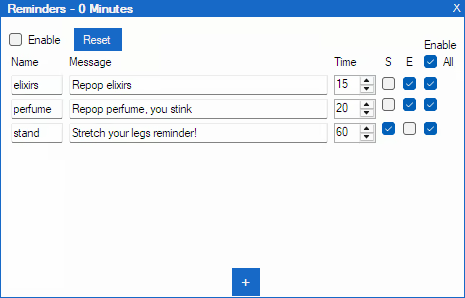
The built-in reminder system lets you set recurring spoken messages. Track cooldowns, buff timers, or keep your team informed during intense gameplay — your keyboard warrior never misses a beat.

Additional features include

  • Multiple speech engines: Windows voices, Piper and Kokoro neural voices.

  • AI voices: Piper and Kokoro voices run locally, sound natural, no subscriptions needed.

  • Adjust pitch, mood, energy, speed, and volume for each voice.

  • Voice effects to add personality.

  • Twitch chat integration with filters, spam control, and optional macro pretext.

  • Message history with replay, copy, and export to reusable WAV audio files.

  • Macro pages for organized workflows.

  • Optional audio driver to bridge audio between applications.

Note from Developer

As a gamer with social anxiety, I programmed this tool to help myself socialize and enjoy gaming more fully. I’ve used it personally for several years, it’s tailored specifically to the challenges of gaming while relying on text-to-speech. It makes in‑game communication easier, faster, and more natural.

Informace o obsahu vytvářeném AI

Jak využití obsahu vytvářeného AI v tomto produktu popisují jeho vývojáři:

This app supports downloadable AI voices powered by Piper and Kokoro text-to-speech engines.

Voices sound natural and are generated locally on your device — no subscriptions and no pay-per-character limits.

Systémové požadavky

    Minimální:
    • Vyžaduje 64bitový procesor a operační systém
    • OS: Windows 10 64 bit
    • Procesor: Dual-core 2.0 GHz
    • Paměť: 4 GB RAM
    • Pevný disk: 1 GB volného místa
    • Dodatečné poznámky: Additional storage required for downloadable voice models (50–150 MB per voice)
    Doporučené:
    • Vyžaduje 64bitový procesor a operační systém
    • OS: Windows 10 64 bit
    • Procesor: Quad-core 2.5 GHz or better
    • Paměť: 8 GB RAM
    • Pevný disk: 2 GB volného místa
    • Dodatečné poznámky: Additional storage required for downloadable voice models (50–150 MB per voice)

Uživatelské recenze produktu Text To Speech Informace o recenzích Vaše předvolby

Všechny recenze:
2 uživatelských recenzí (2 recenzí)


Pro zobrazení recenzí z daného časového rozmezí ho tažením vyberte v grafu výše nebo přímo klikněte na určitý sloupec.


Recenze budou filtrovány dle odehraného času uživatelů v době jejich psaní.


Žádné minimumŽádné maximum

Recenze budou zobrazeny ve vybraném pořadí.


Více informací
Filtry
Nesouvisející recenze jsou vyloučeny
Odehraný čas:
Recenze primárně ze zařízení Steam Deck
Operační systém:
CPU:
GPU:
Typ zařízení: