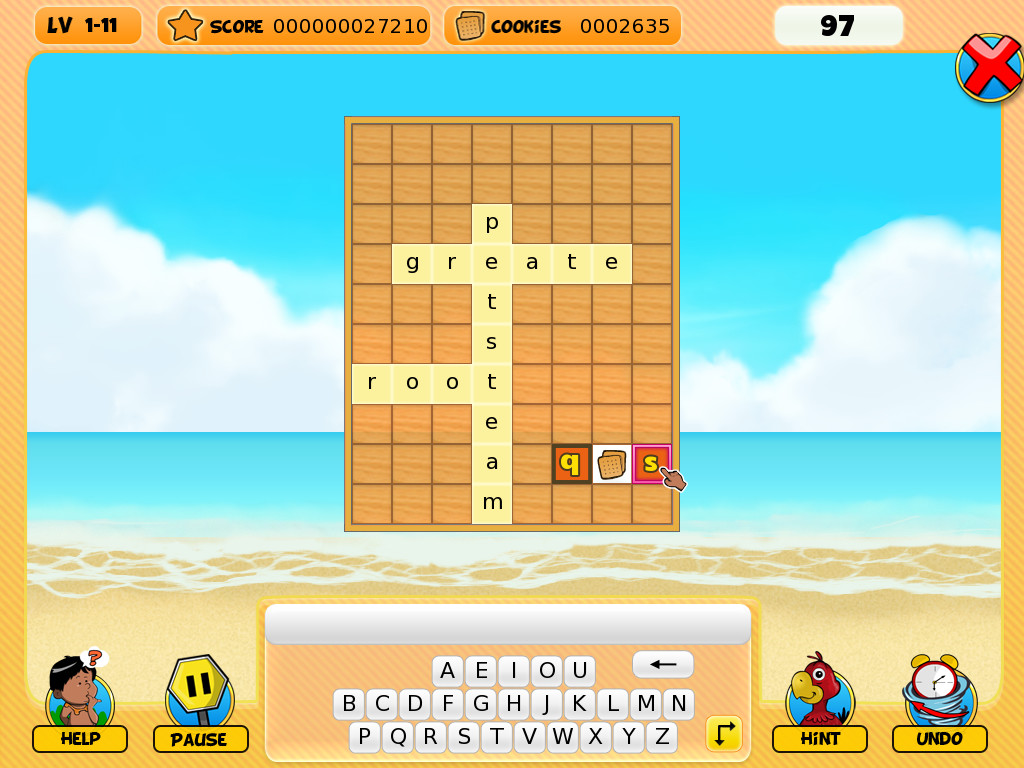
NagiQ is a game for lovers of words and brain challenges. More than 100 boards with mystic letters that must be connected with words. Help Nagi recover all of the letters and prove you're the legendary living dictionary.
Veröffentlichung:
5. Mrz. 2020
Entwickler:
Publisher:
Tags

Melden Sie sich an, um dieses Produkt zu Ihrer Wunschliste hinzuzufügen, zu abonnieren oder als „Ignoriert“ zu markieren.

Entdecken Sie die gesamte Kollektion von IKIGames auf Steam

NagiQ kaufen


Infos zum Spiel

NagiQ is a family-friendly word game. In NagiQ you think of English words and place them on a board, vertically or horizontally, trying to connect your words with some special, mystic letters already placed on the board. There are more than 100 levels grouped into 5 islands, and each island introduces variations to the basic gameplay:

  • Mindia Island: For completing Mindia’s boards we only have to conquer all of the mystic letters already placed on the board.
  • Vulcania Island: Vulcania’s boards contain bugs! Hopefully, not "programming bugs," but little creatures on cells of the board. We have to surround those bugs with letters, and also catch all of the mystic letters.
  • Nuntel Island: These boards have a timer! Don't worry, though, as the timer fully restarts with each word you place on the board.
  • Raspit Island: This island introduces an additional requirement, as any new word you place on the board will have to include orange tiles. Each time you play a new word on the board some of its letters will have their tiles colored orange. And your next words will have to include at least one of such letters in orange tiles.
  • Partok Island: An island whose boards combine challenges from previous islands.

Controls
  • Type a word with your keyboard. If the word is accepted by the game's dictionary then use your mouse to place the word on free cells of the board. Your word can overlap cells which are already occupied by a letter, but only if letters match. You can also use your mouse to type your word with the on-screen keyboard, but using a real keyboard is much faster.
  • Press the space bar to switch the orientation of your word (vertically or horizontally). Alternatively, do a right click with your mouse inside the board.
  • Press the backspace key to delete the last letter of the word you're currently typing. Alternatively, do a right click with your mouse outside the board.
  • Press the escape key to clear the word you're currently typing.
  • Press the enter key to place a word on the board. Or simply do a left click on the board.
The game has a little on screen keyboard which also has special buttons for some of these actions, such as changing the orientation of a word.

Systemanforderungen

    Mindestanforderungen:
    • Betriebssystem *: Windows 7 or newer
    • Prozessor: 1 GHz or better
    • Arbeitsspeicher: 500 MB RAM
    • Speicherplatz: 50 MB verfügbarer Speicherplatz
* Ab dem 1. Januar 2024 unterstützt der Steam-Client nur noch Windows 10 und neuere Versionen.
Für dieses Produkt gibt es keine Rezensionen

Sie können Ihre eigene Rezension für dieses Produkt verfassen, um Ihre Erfahrungen mit der Community zu teilen. Nutzen Sie den Bereich über den Schaltflächen zum Kaufen, um Ihre Rezension zu verfassen.