NagiQ is a game for lovers of words and brain challenges. More than 100 boards with mystic letters that must be connected with words. Help Nagi recover all of the letters and prove you're the legendary living dictionary.
發行日期:
2020 年 3 月 5 日
開發人員:
發行商:
標籤

登入以將此項目新增至您的願望清單、關注它,或標記為已忽略

在 Steam 上查看 IKIGames 的所有作品
不支援繁體中文

本產品尚不支援您的目前所在地的語言。購買前請先確認語言支援清單。

購買 NagiQ


關於此遊戲

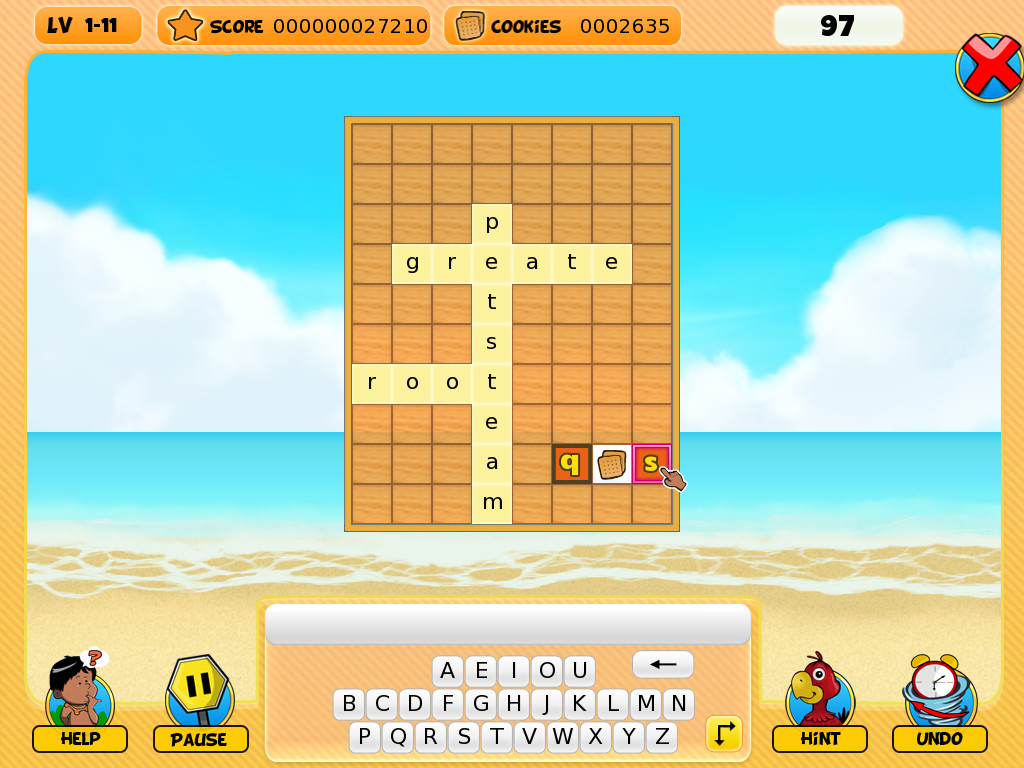
NagiQ is a family-friendly word game. In NagiQ you think of English words and place them on a board, vertically or horizontally, trying to connect your words with some special, mystic letters already placed on the board. There are more than 100 levels grouped into 5 islands, and each island introduces variations to the basic gameplay:

  • Mindia Island: For completing Mindia’s boards we only have to conquer all of the mystic letters already placed on the board.
  • Vulcania Island: Vulcania’s boards contain bugs! Hopefully, not "programming bugs," but little creatures on cells of the board. We have to surround those bugs with letters, and also catch all of the mystic letters.
  • Nuntel Island: These boards have a timer! Don't worry, though, as the timer fully restarts with each word you place on the board.
  • Raspit Island: This island introduces an additional requirement, as any new word you place on the board will have to include orange tiles. Each time you play a new word on the board some of its letters will have their tiles colored orange. And your next words will have to include at least one of such letters in orange tiles.
  • Partok Island: An island whose boards combine challenges from previous islands.

Controls
  • Type a word with your keyboard. If the word is accepted by the game's dictionary then use your mouse to place the word on free cells of the board. Your word can overlap cells which are already occupied by a letter, but only if letters match. You can also use your mouse to type your word with the on-screen keyboard, but using a real keyboard is much faster.
  • Press the space bar to switch the orientation of your word (vertically or horizontally). Alternatively, do a right click with your mouse inside the board.
  • Press the backspace key to delete the last letter of the word you're currently typing. Alternatively, do a right click with your mouse outside the board.
  • Press the escape key to clear the word you're currently typing.
  • Press the enter key to place a word on the board. Or simply do a left click on the board.
The game has a little on screen keyboard which also has special buttons for some of these actions, such as changing the orientation of a word.

系統需求

    最低配備:
    • 作業系統 *: Windows 7 or newer
    • 處理器: 1 GHz or better
    • 記憶體: 500 MB 記憶體
    • 儲存空間: 50 MB 可用空間
* 自 2024 年 1 月 1 日(PT)起,Steam 用戶端僅支援 Windows 10 及更新版本。
此產品無任何評論

您可以撰寫評論來與社群分享您對於本產品的看法。請使用本頁面中位於購買按鈕上方的區塊來進行評論的編寫。