NagiQ is a game for lovers of words and brain challenges. More than 100 boards with mystic letters that must be connected with words. Help Nagi recover all of the letters and prove you're the legendary living dictionary.

로그인하셔서 게임을 찜 목록에 추가하거나, 팔로우하거나 또는 제외로 지정하세요.

IKIGames 프랜차이즈 게임을 모두 확인하세요!
한국어(을)를 지원하지 않습니다

이 제품은 귀하의 로컬 언어를 지원하지 않습니다. 구매하기 전에 아래에 있는 지원하는 언어 목록을 확인해주세요.

NagiQ 구매


게임 정보

A Classic Challenge for Word Lovers

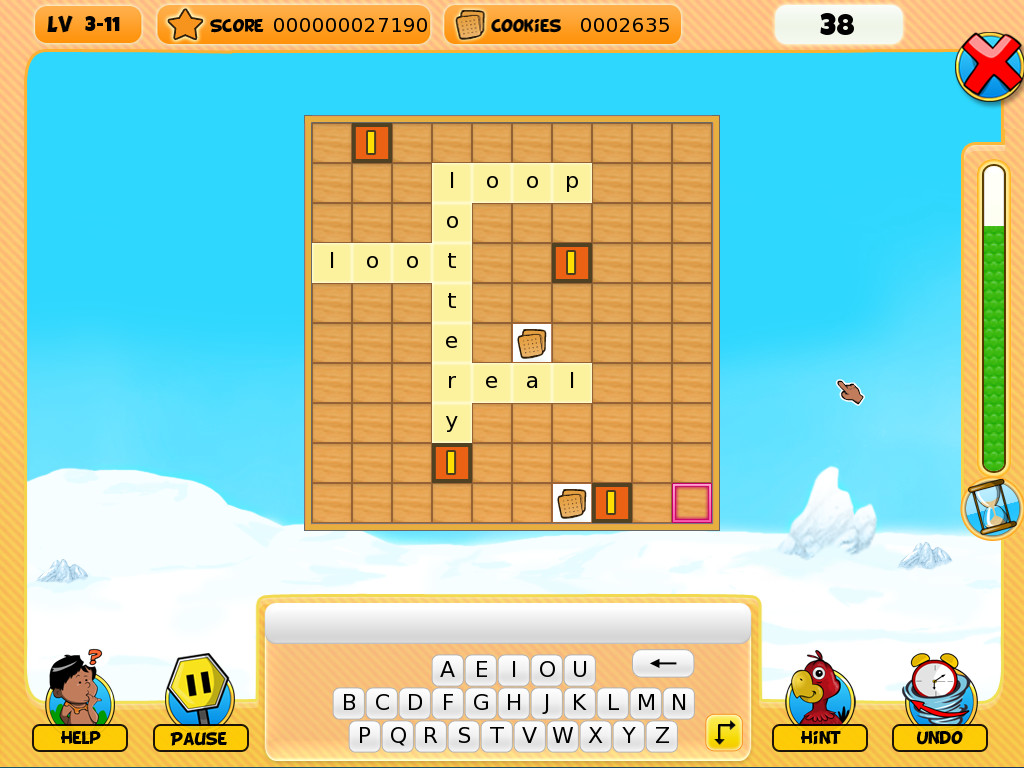
NagiQ is a hand-drawn word game that pairs a family-friendly aesthetic with a challenging experience for those who love a mental workout! In NagiQ you think of English words and place them on a board, vertically or horizontally, trying to connect your words with some special, mystic letters already placed on the board.

Note to Players

  • A Real Challenge: Don't let the cute graphics fool you—while the themes are appropriate for all ages, the puzzles are designed to be a significant mental workout. Success requires a strong vocabulary and sharp spatial planning, especially as you reach the later islands.

  • Control Preference: While playable with a mouse, NagiQ is optimized for keyboard typists. Using a physical keyboard is much faster.

  • Classic Display: This is a classic title with a 4:3 aspect ratio. On 16:9 widescreen monitors, the game will display with side bars to preserve the original hand-drawn art.

NagiQ Islands

There are more than 100 levels grouped into 5 islands, and each island introduces variations to the basic gameplay:

  • Mindia Island: For completing Mindia’s boards we only have to conquer all of the mystic letters already placed on the board.

  • Vulcania Island: Vulcania’s boards contain bugs! Hopefully, not "programming bugs," but little creatures on cells of the board. We have to surround those bugs with letters, and also catch all of the mystic letters.

  • Nuntel Island: These boards have a timer! Don't worry, though, as the timer fully restarts with each word you place on the board.

  • Raspit Island: This island introduces an additional requirement, as any new word you place on the board will have to include orange tiles. Each time you play a new word on the board some of its letters will have their tiles colored orange. And your next words will have to include at least one of such letters in orange tiles.

  • Partok Island: An island whose boards combine challenges from previous islands.

Controls

  • Type a word with your keyboard. If the word is accepted by the game's dictionary then use your mouse to place the word on free cells of the board. Your word can overlap cells which are already occupied by a letter, but only if letters match. You can also use your mouse to type your word with the on-screen keyboard, but using a real keyboard is much faster.

  • Press the space bar to switch the orientation of your word (vertically or horizontally). Alternatively, do a right click with your mouse inside the board.

  • Press the backspace key to delete the last letter of the word you're currently typing. Alternatively, do a right click with your mouse outside the board.

  • Press the escape key to clear the word you're currently typing.

  • Press the enter key to place a word on the board. Or simply do a left click on the board.

The game has a little on screen keyboard which also has special buttons for some of these actions, such as changing the orientation of a word.

시스템 요구 사항

    최소:
    • 운영 체제 *: Windows 7 or newer
    • 프로세서: 1 GHz or better
    • 메모리: 500 MB RAM
    • 저장 공간: 50 MB 사용 가능 공간
* 2024년 1월 1일부터 Steam 클라이언트는 Windows 10 이상 버전만 지원합니다.
이 제품에는 아직 평가가 없습니다.

이 제품의 평가를 직접 써서 자신의 경험을 커뮤니티와 공유할 수 있습니다. 구매 버튼 위의 기입란을 이용하여 자신만의 평가를 써 보세요.