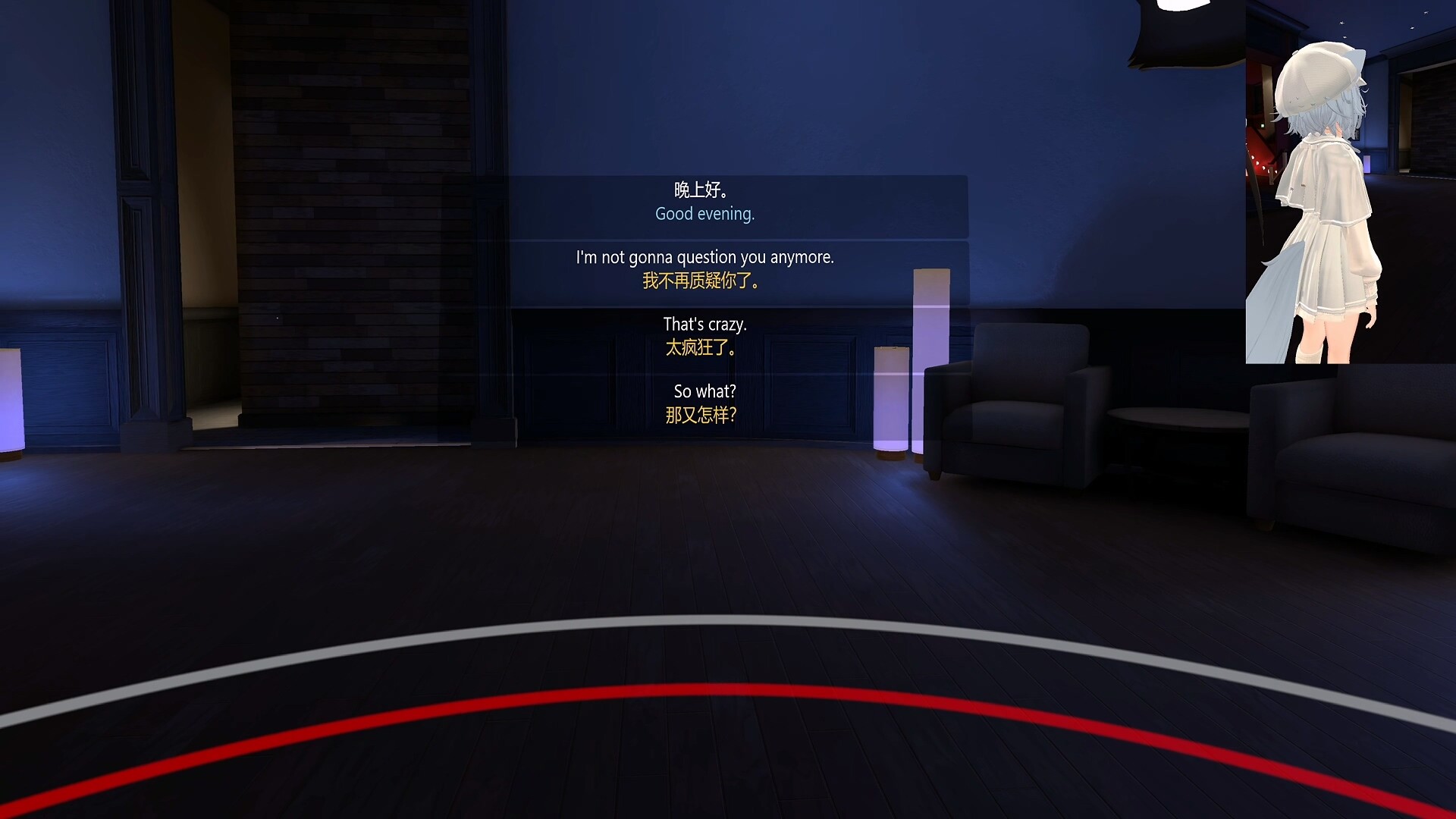
Real-time VR translation. Via OCR, it converts foreign game and app text using machine, LLM, and offline engines, overlays results on the original, transcribes live voice into subtitles, and sends to VRChat Chatbox. 30 languages, multilingual UI, full controller support.

Sign in to add this item to your wishlist, follow it, or mark it as ignored

VR Only

Buy OVR Overlay Translator


About This Software

Break Language Barriers, Immerse Without Limits

OVR Overlay Translator — Make the Virtual World Truly Universal

Tired of breaking out of your VR experience because of foreign-language interfaces, instructions, or conversations? Whether you are exploring a popular overseas VR game, using professional VR software in a foreign language, or socializing with players around the world, language should never stand in your way.

OVR Overlay Translator is a powerful companion application built specifically for virtual reality. Through advanced local OCR (Optical Character Recognition) technology, local speech recognition (ASR), and a range of mainstream translation services, it both recognizes and translates on-screen text in the VR world into your native language and overlays it clearly in your view. It can also transcribe and translate in-game audio and your own voice in real time, displaying them as subtitles — so you can understand games, applications, and social content seamlessly without ever taking off your headset.

Core Features

High-Precision OCR Text Recognition

  • Capture text from VR apps, game interfaces, virtual screens, or your environment with a single screenshot.

  • Uses local high-efficiency recognition models for fast, accurate results, with automatic depth and perspective adaptation so the output aligns with what's in front of you.

Powerful Multi-Language Translation Engine

  • Integrates machine translation, LLM large-model translation, and local offline translation, supporting translation across 30 languages.

  • Source and target languages are fully customizable to suit diverse needs.

Smart In-VR Overlay Display

  • Translation results are shown as clear, customizable text boxes that intelligently overlay the original text in your VR scene.

  • Display style (background, position, depth) is adjustable, ensuring accessible information without breaking immersion.

Real-Time Voice Translation (Subtitles)

  • Recognizes in-game speaker audio or your microphone input, transcribing and translating it in real time as overlaid subtitles.

  • Runs entirely locally with no audio upload, keeping your privacy safe; results can also be sent straight to VRChat Chatbox for smoother cross-language communication.

Convenient Controller Interaction

  • Fully supports VR controllers: turn translation on/off, frame a specific area to recognize, and switch languages on the fly.

  • Intuitive interactions mean no keyboard is needed — stay fully immersed in the VR world.

Multi-Language UI Support

  • The interface natively supports Chinese, English, Japanese, and more, ready out of the box for a comfortable localized experience.

Where It Fits

  • Play overseas VR games: Understand quest tips, item descriptions, and story dialogue completely.

  • Use international VR software: Easily operate foreign-language professional apps, creative tools, or educational software.

  • Join multilingual VR social spaces: In VRChat and beyond, understand voice and text from players worldwide in real time — and have your words translated to others.

  • Learn and work more efficiently: Read foreign-language documents, web pages, or tutorials in VR and break down information barriers.

Say goodbye to language frustration and immerse yourself deeply in every virtual journey. OVR Overlay Translator is your essential companion for exploring an unbounded digital world.

Get it now and start your accessible, barrier-free VR experience!

AI Generated Content Disclosure

The developers describe how their game uses AI Generated Content like this:

This software uses generative AI to provide real-time text and speech translation. It recognizes on-screen text via OCR, then calls AI large language models that you configure (such as DeepSeek, GPT, Qwen, Doubao, etc.) or the built-in local translation model (Hy-MT2) to generate real-time translations, shown in the VR overlay. Translation results are for reference only, are not guaranteed to be accurate, and do not constitute professional advice.

System Requirements

    Minimum:
    • Requires a 64-bit processor and operating system
    • OS: Windows 10 1809
    • Memory: 16 GB RAM
    • Graphics: GeForce GTX 1060 6GB / Radeon RX 470 8GB
    • DirectX: Version 11
    • Network: Broadband Internet connection
    • Storage: 10 GB available space
    • VR Support: SteamVR only
    • Additional Notes: Windows 7/8 is unsupported
    Recommended:
    • Requires a 64-bit processor and operating system
    • OS: Windows 10/11
Review Filters