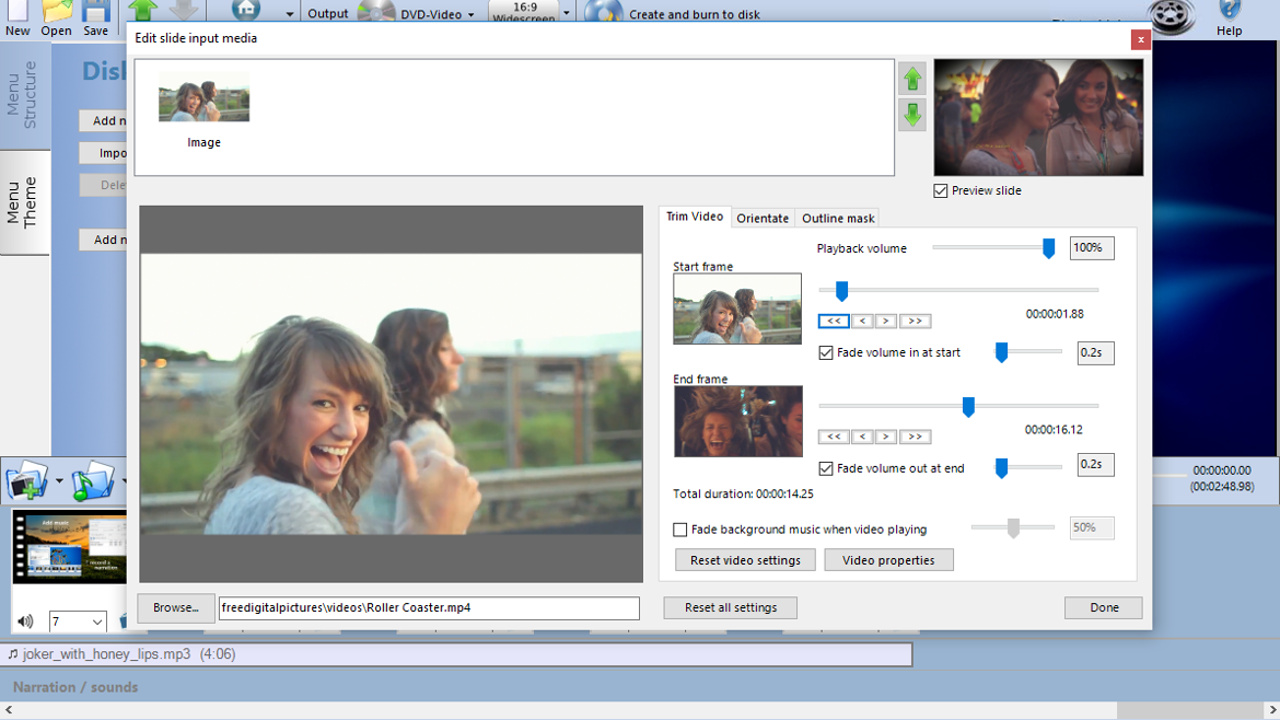
Create a stunning slideshow from your photos and video clips. Burn to DVD, Blu-ray or as a video file for sharing online or to watch on your favourite device. Simply add your photos, video clips and music to the PhotoVidShow editor. Tweak and customise and then author your video slideshow masterpiece.
Позначки

Увійдіть до акаунта, щоби додати цей продукт до списку бажаного чи позначити як ігнорований.

українська мова недоступна

Цей продукт не підтримує вашу мову. Будь ласка, перегляньте список підтримуваних мов перед купівлею.

Запустити PhotoVidShow

Вільний доступ
 

Про цю програму

PhotoVidShow v4.5 (2018 edition), Photo slideshow maker software


Perfect application for creating a slideshow with your photos and video clips. From holidays, weddings, birthdays, special occasions, a special memorial for someone or for creating a presentation video.

  • Easily create a stunning slideshow and burn to DVD, Blu-ray or as a video for sharing online.
  • Import your photos, video and music files. All common formats supported including .jpg .mov, .mp4, mp3 & m4a
  • Add caption text, credits, overlays, motion effects, transitions & many stunning design effects
  • Burn DVDs with interactive menus. Super easy to use editor, ideal for beginner to the professional
  • Works on Windows 10,8,7. Online video tutorials, friendly technical support to assist in anyway. Free lifetime updates to software

PhotoVidShow is an incredible application for creating professional but completely customisable photo and video slideshows that can be either burnt to a DVD or Blu-Ray disc and viewed on TV or created as a video file for sharing online. PhotoVidShow is designed to be user friendly, so absolutely no previous knowledge is required in order to create stunning slideshows.

PhotoVidShow can:-
- Burn your slideshow to a DVD or Blu-ray disc with interactive menus that can be played in a stand-alone player and watched on TV.
- Create a HD video (720p / 1080p), transferred to a USB stick, inserted into the TV USB slot and played on TV
- Create a video file that can be played on a computer, tablet or smart phone
- Create a video that can be shared online including youtube or facebook

Rapidly build up your slideshow by adding photos and video clips to the storyboard. PhotoVidShow will automatically add a pan and zoom effect to your photos giving it motion and looking professional - Or why not use one of the slide animations to really make your slideshow stand out.

PhotoVidShow offers extensive features allowing you to completely customise your slideshow. Why not add transitions, stylish text, clip-art, motion and filter effects like an old film effect. Or why not add a vignette border to your slides. When mastering a disc, PhotoVidShow has a fully editable disc menu editor with a selection of themes to choose from.

Bring your slideshow alive with a background soundtrack - simply add your favourite music tracks to the storyboard. PhotoVidShow also allows you to record your own narration.

This super easy to use application is perfect for making that memorable slideshow.

Системні вимоги

    Мінімальні:
    • ОС *: Windows 7/8/10
    • Процесор: Celeron
    • Оперативна пам’ять: 2 GB ОП
    • Відеокарта: Intel HD integrated graphics or similar
    • DirectX: версії 9.0c
    • Місце на диску: 2 GB доступного місця
    Рекомендовані:
    • ОС *: Windows 7/8/10
    • Процесор: Intel I5
    • Оперативна пам’ять: 4 GB ОП
    • Відеокарта: Dedicated graphics card
    • DirectX: версії 11
    • Місце на диску: 10 GB доступного місця
* З 1 січня 2024 року клієнт Steam буде підтримувати лише Windows 10 чи новіші версії цієї ОС.

Користувацькі рецензії на PhotoVidShow Про рецензії користувачів Ваші вподобання

Усі рецензії:
схвальні (усього 15)


Щоб переглянути рецензії за певний проміжок часу, виберіть його на графіку вище або клацніть відповідний стовпчик.


Сортуйте рецензії за показником награного часу на момент написання рецензії:


Без мінімуму до Без максимуму

Показувати рецензії у вибраній послідовності


Дізнатися більше
Фільтри
Виключення рецензійної активності «не за темою»
Ігровий час:
Переважно на Steam Deck
Operating System:
CPU:
GPU:
Device Type:
Більше немає рецензій, що збігаються із фільтрами вище
Скоригуйте фільтри вгорі, щоби бачити більше рецензій
Завантаження рецензій…