Create a stunning slideshow from your photos and video clips. Burn to DVD, Blu-ray or as a video file for sharing online or to watch on your favourite device. Simply add your photos, video clips and music to the PhotoVidShow editor. Tweak and customise and then author your video slideshow masterpiece.

Inicia sesión para agregar este artículo a tu lista de deseados, seguirlo o marcarlo como ignorado.

No disponible en Español (Latinoamérica)

Este artículo no está disponible en tu idioma. Consulta la lista de idiomas disponibles antes de realizar la compra.

Utilizar PhotoVidShow

Free to Play
 

Acerca de este software

PhotoVidShow v4.5 (2018 edition), Photo slideshow maker software


Perfect application for creating a slideshow with your photos and video clips. From holidays, weddings, birthdays, special occasions, a special memorial for someone or for creating a presentation video.

  • Easily create a stunning slideshow and burn to DVD, Blu-ray or as a video for sharing online.
  • Import your photos, video and music files. All common formats supported including .jpg .mov, .mp4, mp3 & m4a
  • Add caption text, credits, overlays, motion effects, transitions & many stunning design effects
  • Burn DVDs with interactive menus. Super easy to use editor, ideal for beginner to the professional
  • Works on Windows 10,8,7. Online video tutorials, friendly technical support to assist in anyway. Free lifetime updates to software

PhotoVidShow is an incredible application for creating professional but completely customisable photo and video slideshows that can be either burnt to a DVD or Blu-Ray disc and viewed on TV or created as a video file for sharing online. PhotoVidShow is designed to be user friendly, so absolutely no previous knowledge is required in order to create stunning slideshows.

PhotoVidShow can:-
- Burn your slideshow to a DVD or Blu-ray disc with interactive menus that can be played in a stand-alone player and watched on TV.
- Create a HD video (720p / 1080p), transferred to a USB stick, inserted into the TV USB slot and played on TV
- Create a video file that can be played on a computer, tablet or smart phone
- Create a video that can be shared online including youtube or facebook

Rapidly build up your slideshow by adding photos and video clips to the storyboard. PhotoVidShow will automatically add a pan and zoom effect to your photos giving it motion and looking professional - Or why not use one of the slide animations to really make your slideshow stand out.

PhotoVidShow offers extensive features allowing you to completely customise your slideshow. Why not add transitions, stylish text, clip-art, motion and filter effects like an old film effect. Or why not add a vignette border to your slides. When mastering a disc, PhotoVidShow has a fully editable disc menu editor with a selection of themes to choose from.

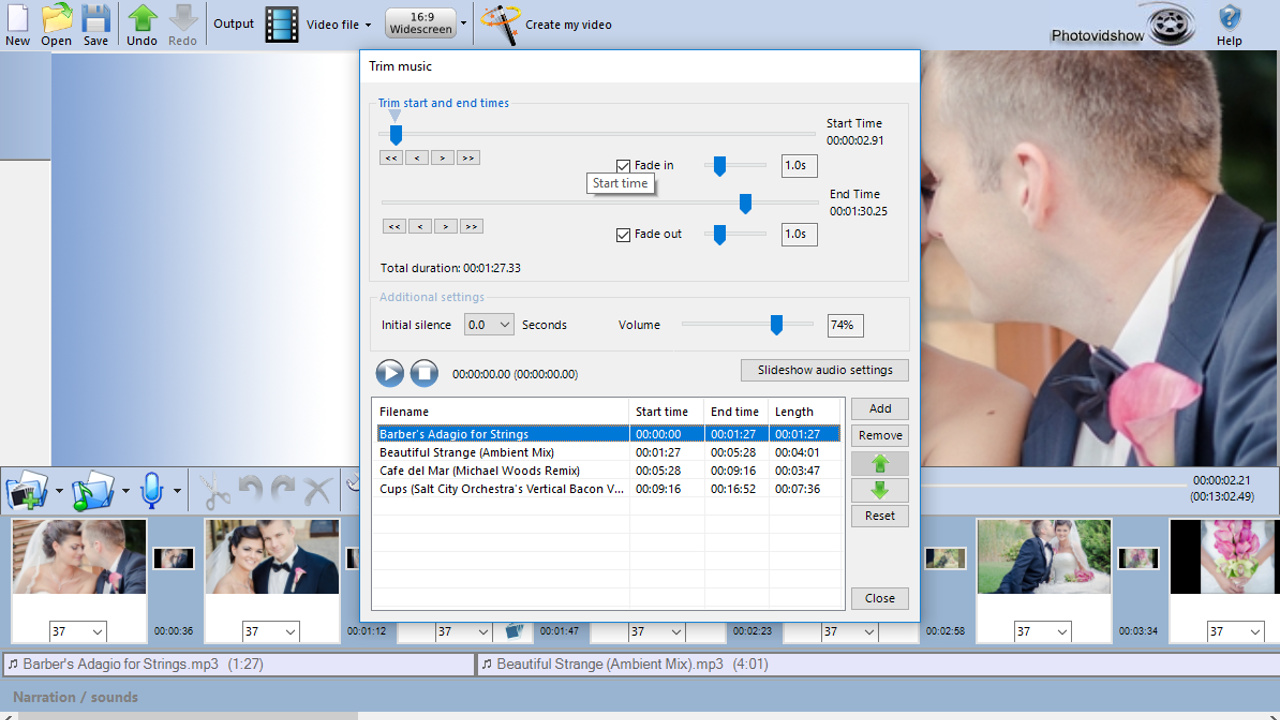
Bring your slideshow alive with a background soundtrack - simply add your favourite music tracks to the storyboard. PhotoVidShow also allows you to record your own narration.

This super easy to use application is perfect for making that memorable slideshow.

Requisitos del sistema

    Mínimo:
    • SO *: Windows 7/8/10
    • Procesador: Celeron
    • Memoria: 2 GB de RAM
    • Gráficos: Intel HD integrated graphics or similar
    • DirectX: Versión 9.0c
    • Almacenamiento: 2 GB de espacio disponible
    Recomendado:
    • SO *: Windows 7/8/10
    • Procesador: Intel I5
    • Memoria: 4 GB de RAM
    • Gráficos: Dedicated graphics card
    • DirectX: Versión 11
    • Almacenamiento: 10 GB de espacio disponible
* A partir del 1 de enero de 2024, el cliente de Steam solo será compatible con Windows 10 y versiones posteriores.

Reseñas de usuarios para PhotoVidShow Sobre las reseñas de usuarios Tus preferencias

Reseñas generales:
Positivas (15 reseñas)


Para ver las reseñas correspondientes a un intervalo de fechas, haz clic y arrastra en uno de los gráficos de arriba para crear una selección o haz clic en una barra específica.


Filtrar las reseñas según el tiempo de juego del usuario cuando se escribió la reseña:


Sin mínimo a Sin máximo

Mostrar las reseñas en el orden seleccionado


Más información
Filtros
Excluyendo actividad de reseñas fuera de tema
Tiempo de juego:
Jugado principalmente en Steam Deck
Operating System:
CPU:
GPU:
Device Type:
No hay más reseñas que coincidan con los filtros establecidos arriba.
Ajusta los filtros de arriba para ver otras reseñas.
Cargando reseñas...