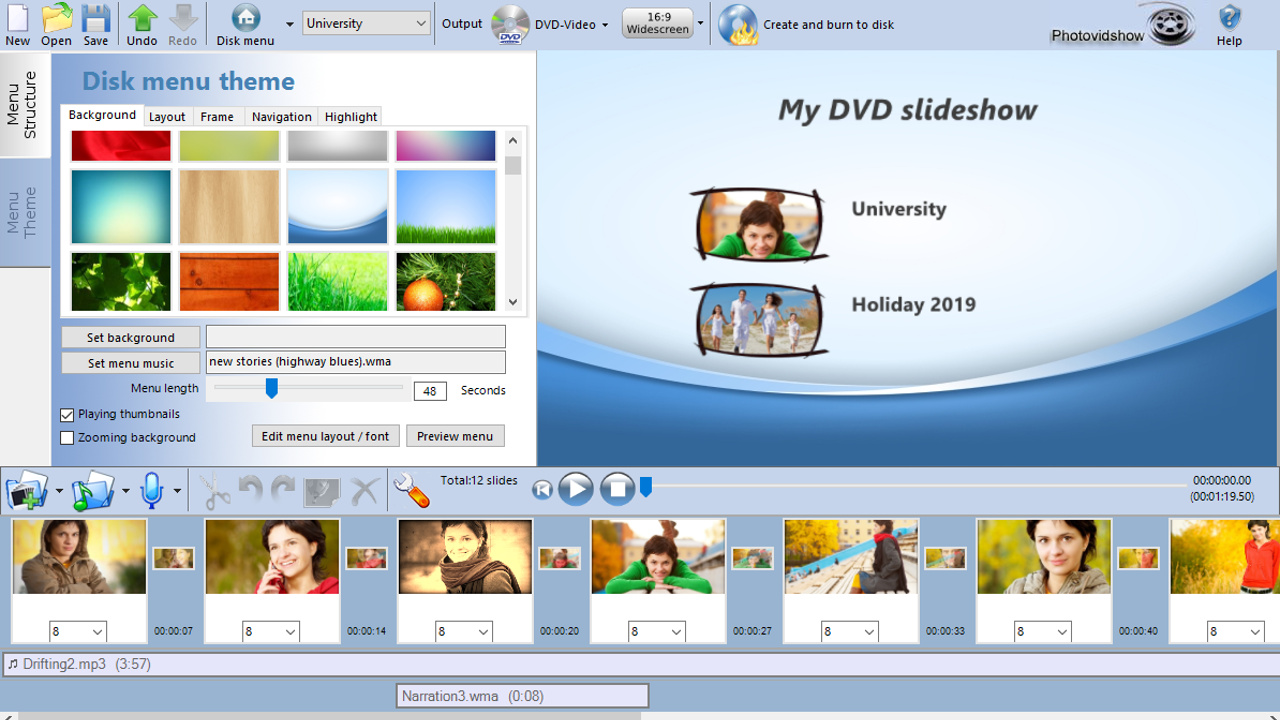
Create a stunning slideshow from your photos and video clips. Burn to DVD, Blu-ray or as a video file for sharing online or to watch on your favourite device. Simply add your photos, video clips and music to the PhotoVidShow editor. Tweak and customise and then author your video slideshow masterpiece.

想要将此项目添加至您的愿望单、关注它或标记为已忽略,请先登录

不支持简体中文

本产品尚未对您目前所在的地区语言提供支持。在购买请先行确认目前所支持的语言。

使用 PhotoVidShow

免费开玩
 

关于此软件

PhotoVidShow v4.5 (2018 edition), Photo slideshow maker software


Perfect application for creating a slideshow with your photos and video clips. From holidays, weddings, birthdays, special occasions, a special memorial for someone or for creating a presentation video.

  • Easily create a stunning slideshow and burn to DVD, Blu-ray or as a video for sharing online.
  • Import your photos, video and music files. All common formats supported including .jpg .mov, .mp4, mp3 & m4a
  • Add caption text, credits, overlays, motion effects, transitions & many stunning design effects
  • Burn DVDs with interactive menus. Super easy to use editor, ideal for beginner to the professional
  • Works on Windows 10,8,7. Online video tutorials, friendly technical support to assist in anyway. Free lifetime updates to software

PhotoVidShow is an incredible application for creating professional but completely customisable photo and video slideshows that can be either burnt to a DVD or Blu-Ray disc and viewed on TV or created as a video file for sharing online. PhotoVidShow is designed to be user friendly, so absolutely no previous knowledge is required in order to create stunning slideshows.

PhotoVidShow can:-
- Burn your slideshow to a DVD or Blu-ray disc with interactive menus that can be played in a stand-alone player and watched on TV.
- Create a HD video (720p / 1080p), transferred to a USB stick, inserted into the TV USB slot and played on TV
- Create a video file that can be played on a computer, tablet or smart phone
- Create a video that can be shared online including youtube or facebook

Rapidly build up your slideshow by adding photos and video clips to the storyboard. PhotoVidShow will automatically add a pan and zoom effect to your photos giving it motion and looking professional - Or why not use one of the slide animations to really make your slideshow stand out.

PhotoVidShow offers extensive features allowing you to completely customise your slideshow. Why not add transitions, stylish text, clip-art, motion and filter effects like an old film effect. Or why not add a vignette border to your slides. When mastering a disc, PhotoVidShow has a fully editable disc menu editor with a selection of themes to choose from.

Bring your slideshow alive with a background soundtrack - simply add your favourite music tracks to the storyboard. PhotoVidShow also allows you to record your own narration.

This super easy to use application is perfect for making that memorable slideshow.

系统需求

    最低配置:
    • 操作系统 *: Windows 7/8/10
    • 处理器: Celeron
    • 内存: 2 GB RAM
    • 显卡: Intel HD integrated graphics or similar
    • DirectX 版本: 9.0c
    • 存储空间: 需要 2 GB 可用空间
    推荐配置:
    • 操作系统 *: Windows 7/8/10
    • 处理器: Intel I5
    • 内存: 4 GB RAM
    • 显卡: Dedicated graphics card
    • DirectX 版本: 11
    • 存储空间: 需要 10 GB 可用空间
* 2024 年 1 月 1 日(PT)起,Steam 客户端将仅支持 Windows 10 及更新版本。

PhotoVidShow 的顾客评测 关于用户评测 您的偏好

总体评测:
好评 (15 篇评测)


要查看某个日期范围内的评测,请在上方图表中点击并拖动选定的范围或是点击某特定时间柱。


按用户的游戏时间筛选此评测撰写时的评测:


无最低限制无最高限制

按选择的显示顺序显示评测


了解更多
筛选条件
排除跑题评测活动
游戏时间:
大部分在 Steam Deck 上
Operating System:
CPU:
GPU:
Device Type:
无其他评测符合上述筛选条件
调整上方筛选条件以查看其它评测
加载评测中…