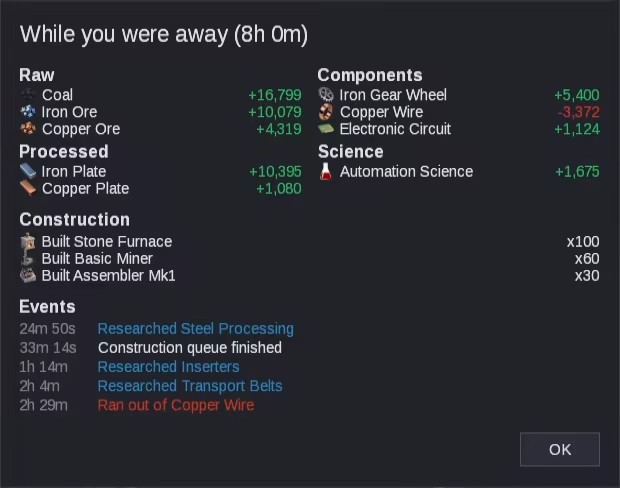
A semi-idle factory management game. Mine ore, craft components, then research and automate your way to launching a rocket. There is no world to route resources through. Buildings pull from and deposit into one global pool. Even when you are gone, you still have a Factory In Progress.

Connectez-vous pour ajouter cet article à votre liste de souhaits, le suivre ou l'ignorer

Français non disponible

Ce produit n'est pas disponible dans votre langue. Veuillez consulter la liste des langues disponibles ci-dessous avant de l'acheter.

Ce jeu n'est pas encore disponible sur Steam

Date de sortie prévue : 3 déc. 2026

Ce jeu prévoit d'être disponible dans 2 semaines

Ce produit vous intéresse ? Ajoutez-le à votre liste de
souhaits et recevez une notification lors de sa sortie.
 

À propos de ce jeu

Factory In Progress is a semi-idle game about research, automation, and management. Your goal is to launch a rocket. To get there you will research new technologies, automate your factory, and manage your resources.

There is no world to route resources through like a traditional factory builder game. All resources in this game automatically flow through a global resource pool. You and your buildings have access to the resources at all times. Buildings will automatically deposit into and draw from the resource pool as they need.

Mine

Start by mining ore by hand. Later on you can use Mining Drills to automate the process. There are 12 different ore types to be discovered throughout the game.

Craft

Smelt ore into plates with a furnace, and craft plates into components to start building your factory. Some things you can craft by hand, but others you will need to automate in an Assembler.

Research

Build research labs and feed them science packs to unlock new buildings, recipes, and upgrades. Six science packs, each harder to make than the last, lead from your first miner to a rocket silo.

Power and fluids

Pump water, boil it into steam, and run steam engines to generate power. With more research you can move on to oil refining, chemistry, solar, and nuclear power. Fluids like water, steam, and oil are never stored as units like other resources. Instead they are measured as a rate of flow, so make sure your supply keeps up with your demand.

Expand

Every ore has a limited number of nodes. Build radar scanners to survey for more so your factory can keep growing.

Organize

With the Factory Management research you can group identical buildings together, gather whole production lines into Blocks, and file Blocks into Folders. Save a Block as a Blueprint and build it again anywhere with one paste.

Offline Progress

Your factory keeps running while the game is closed. Take advantage of your offline time by queueing up a large build or upgrading a production line while you are away.

Features

  • Over 50 resources and 25 buildings

  • Over 70 technologies to research

  • Offline progress, toggleable in settings

  • An in-game wiki covering every resource, building, and mechanic

  • 27 Steam achievements and Steam Cloud saves

Notification de contenu généré par IA

L'équipe de développement décrit l'utilisation de contenu généré par IA dans le jeu comme suit.

I am a solo developer. The game’s artwork began as generative AI output, and I edited every image by hand.

Configuration requise

    Minimale :
    • Système d'exploitation et processeur 64 bits nécessaires
    • Système d'exploitation : Windows 10 64-bit
    • Processeur : 64-bit dual-core, 2GHz
    • Mémoire vive : 4 GB de mémoire
    • Graphiques : Any GPU with OpenGL 2.0 support - integrated graphics are fine
    • Espace disque : 300 MB d'espace disque disponible
    • Notes supplémentaires : Minimum resolution 1280x720
    Recommandée :
    • Système d'exploitation et processeur 64 bits nécessaires
    • Système d'exploitation : Windows 10 or 11, 64-bit
    • Processeur : 64-bit quad-core, 2.5 GHz
    • Mémoire vive : 8 GB de mémoire
    • Graphiques : Any GPU with OpenGL 2.0 support
    • Espace disque : 300 MB d'espace disque disponible
    • Notes supplémentaires : 1920x1080 display recommended - the interface is designed at 1080p