Write your plot in a simple form or as plain text, and Comicalizer lays out a full chapter of manga storyboards: panels, camera angles, poses, expressions, speech balloons and effect lines. Direct each shot with real film and manga terms, fine-tune any panel, and export layered PSD files.

Sign in to add this item to your wishlist, follow it, or mark it as ignored

Early Access Software

Get involved with this software as it develops.

Note: This Early Access software is not complete and may or may not change further. If you are not excited to use this software in its current state, then you should wait to see if it progresses further in development. Learn more

What the developers have to say:

Why Early Access?

“Comicalizer is a tool for turning plots into manga storyboards. We are releasing it in Early Access so that people who actually draw manga can use it, and we can grow it based on their feedback about missing staging terms and rough edges.”

Approximately how long will this software be in Early Access?

“We expect about a year.”

How is the full version planned to differ from the Early Access version?

“Before the full release we plan to work on the following (plans may change):
- Reflect staging terms that are currently only recognized and reported (such as double-page spreads, bleeds and figures breaking out of panels) in the drawings
- Add more background rooms and built-in characters
- Expand effect lines and screentone options
- Improve usability based on your feedback”

What is the current state of the Early Access version?

“You can already use the whole workflow: building storyboards from a plot, editing each panel, flow across pages, backgrounds, sound effect lettering, and PNG, PSD and ZIP export. Some staging terms, such as double-page spreads and bleeds, are recognized and reported but not yet reflected in the drawings.”

Will this software be priced differently during and after Early Access?

“Comicalizer itself is free during Early Access and will stay free after the full release. We may later offer optional paid downloadable content (DLC), such as additional characters, but the core features will remain free.”

How are you planning on involving the Community in your development process?

“We welcome requests and bug reports in the Steam discussions, and we will share what we have adopted in our update notes.”
Read more
This game is not yet available on Steam

Coming soon

Interested?
Add to your wishlist and get notified when it becomes available.
 

Report bugs and leave feedback for this software on the discussion boards

See all discussions

About This Software

Write a plot, get a storyboard

Write your plot, and Comicalizer builds a full chapter of manga storyboards ("name"): panel layouts, camera angles, poses, expressions, speech balloons and effect lines.
Write the plot in a simple form with drop-down menus, or as plain text (txt or md). Each time you edit it, only the panels that changed are rebuilt.

Direct with real film and manga terms

Write terms such as "medium close-up", "low angle", "shot reverse shot" or "same-position shot" in your plot, and the panel is staged that way.
Panels you leave open are staged automatically by rule, and you can ask for another option as many times as you like.

Polish every panel

  • Select a panel to adjust the shot, camera, poses, gaze, expressions, body direction, speech balloons and effect lines
  • Move the camera by hand with a 3D preview
  • Lock the panels you like. They stay as they are when other panels are rebuilt
  • Write your edits back into the plot
  • Compare six page options side by side

Flow across pages

Each page picks up from the last panel of the previous page.
If a page-turn reveal or cliffhanger lands in the wrong place, Comicalizer tells you where to break the page.

Characters and backgrounds

  • Up to six characters per page, drawn as the built-in 3D characters or as simple mannequins
  • Choose 3D rooms for backgrounds: a classroom, a bedroom or a living room
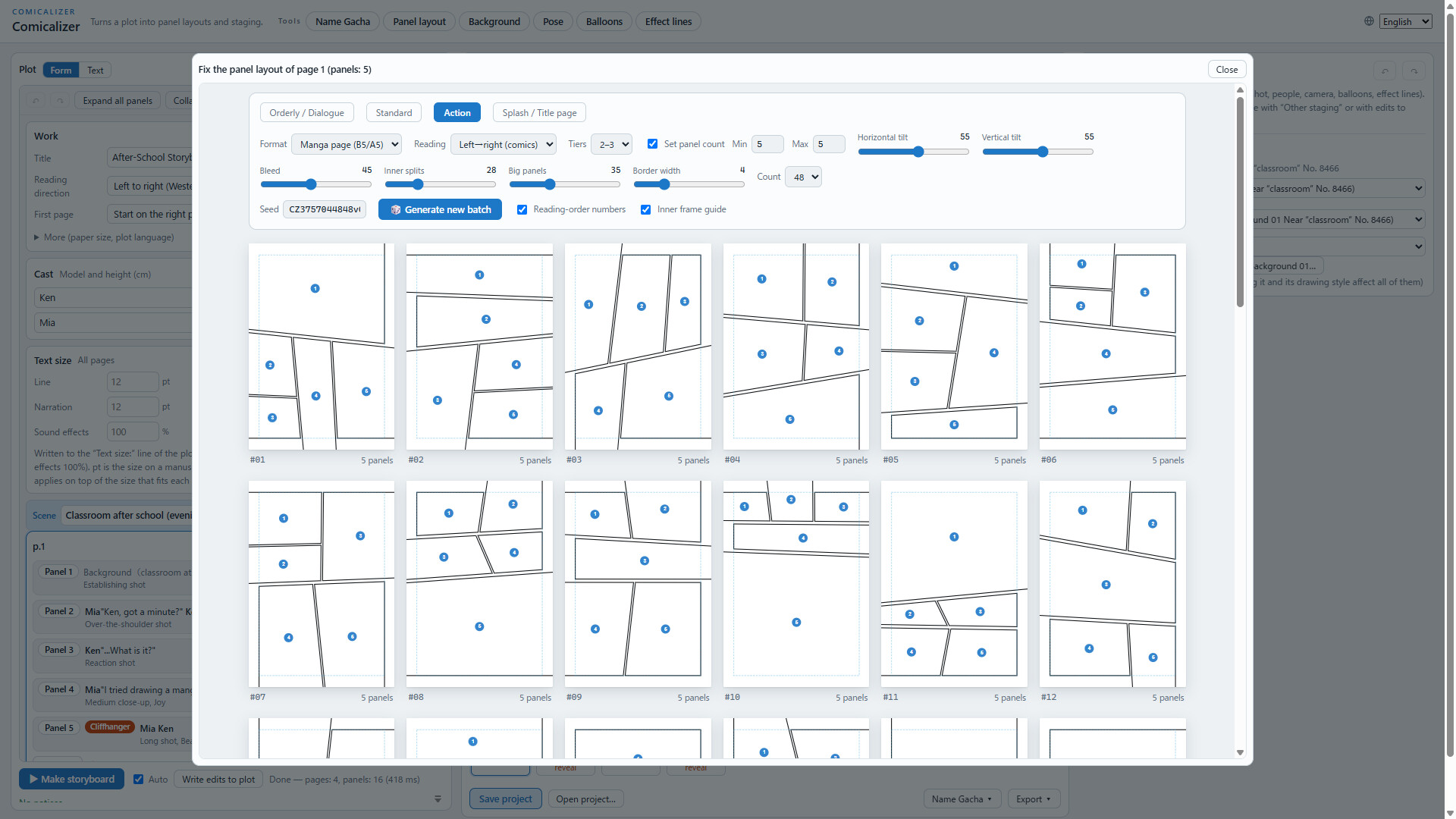
  • Adjust panel layouts by hand with the built-in panel layout generator
  • Add sound effect lettering

Export

Export PNG images, layered PSD files, or a ZIP of line-art SVG files split by layer, for the current page or all pages.
Save your work as a project file, and open it later to get exactly the same storyboard.

Works offline

Comicalizer runs entirely on your PC without an internet connection. Your plots and work are never sent anywhere.

Using what you make

You are free to use the storyboards and images you make, including for commercial work. Crediting Comicalizer is optional (for example: "Storyboards: Comicalizer").

AI Generated Content Disclosure

The developers describe how their game uses AI Generated Content like this:

Claude Code was used in the development of Comicalizer for the purposes listed below. No generative AI other than Claude Code was used.

■ Text
The translations of the interface text into each language, the sample plots, and parts of the help text and store page text are based on drafts written by Claude Code. The Japanese text and all final content were decided by the developer.

■ Program code
Claude Code was used as a coding assistant during implementation, bug fixing and testing.

■ Made without AI
The bundled 3D characters are models the developer created in VRoid Studio. The balloon lettering is based on the "GenEi Antique" font (SIL Open Font License 1.1).
The character on the store capsules and library images is an illustration hand-drawn by the developer (the manuscript page in the illustration was drawn by this software). The screenshots and the trailer are made from screens actually drawn by this software, combined with fonts and simple shapes. No AI that generates images or music was used.

■ How it works
Panel layouts, camera angles, poses and so on are assembled using random numbers, predefined rules and score calculations. The software never uses generative AI to create images or text while it runs, and it does not connect to the internet.

■ Developer responsibility
The developer takes responsibility for all included content and checks it for anything inappropriate or anything that may infringe on the rights of others.

System Requirements

    Minimum:
    • Requires a 64-bit processor and operating system
    • OS: Windows 10 (64-bit)
    • Processor: Dual-core 2.0 GHz or faster
    • Memory: 4 GB RAM
    • Graphics: GPU with WebGL 2.0 support (DirectX 11 class)
    • DirectX: Version 11
    • Storage: 600 MB available space
    • Additional Notes: No internet connection required.
    Recommended:
    • Requires a 64-bit processor and operating system
    • OS: Windows 11 (64-bit)
    • Processor: Quad-core or faster
    • Memory: 8 GB RAM
    • Graphics: Dedicated GPU or recent integrated graphics
    • DirectX: Version 11
    • Storage: 600 MB available space
Review Filters