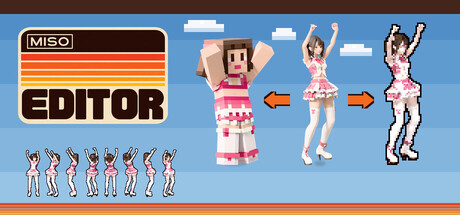
Create 2D sprite sheets for games from 3D models, in 1 to 64 directions. Auto Build handles rigging, animation, and export, so it is accessible without specialist 3D skills. You can also give characters a blocky look. Supports RPG Maker MZ output and 29 UI languages. Runs locally on your PC.

Sign in to add this item to your wishlist, follow it, or mark it as ignored

Early Access Software

Get involved with this software as it develops.

Note: This Early Access software is not complete and may or may not change further. If you are not excited to use this software in its current state, then you should wait to see if it progresses further in development. Learn more

What the developers have to say:

Why Early Access?

“Miso Editor already works from start to finish: you start from your own 3D model or the included sample character, and it goes through rigging, motion, weapons, and rendering to a finished sprite sheet with 1 to 64 directions. The developer uses it to make the enemies in their own game, Fire Field.”

Approximately how long will this software be in Early Access?

“About 6 months. This may change depending on how the animal support and the hair and cloth movement turn out.”

How is the full version planned to differ from the Early Access version?

“The full version is planned to add:
- Support for non-humanoid characters such as four-legged animals
- Hair and cloth (capes, skirts, and so on) that sway naturally with the motion
- Outfits and armor you can swap per body part (head, body, arms, legs, and so on)
- Better rigging accuracy and better handling of characters and models that tend to break
- More export formats and camera angles, based on feedback from users”

What is the current state of the Early Access version?

“The whole workflow works from start to finish: from your own 3D model (GLB / FBX / OBJ / ZIP) or the included sample character to rigging, motion, weapons, and sprite sheets with 1 to 64 directions. Auto Build takes you to a finished sheet with one button. RPG Maker MZ export is also supported. This version does not make character pictures and does not turn a picture into a 3D model.”

Will this software be priced differently during and after Early Access?

“Yes. During Early Access, Miso Editor will be sold at a lower price than the full version. The price will go up a little at a time as features are added, and we will announce each price change before it happens. If you buy during Early Access, you can keep using it through the full version with no extra payment.”

How are you planning on involving the Community in your development process?

“We take feedback and bug reports on the Miso Editor Discord and the Steam discussion boards. Tell us which characters or models didn't work well, which features you want, and which export formats you need, and we will reflect them in upcoming updates. We will announce each update in Steam news.”
Read more
This game is not yet available on Steam

Planned Release Date: Nov 23, 2026

This application will unlock in approximately 2 days

Interested?
Add to your wishlist and get notified when it becomes available.
 

Report bugs and leave feedback for this software on the discussion boards

See all discussions

About This Software

From one 3D model to an animated sprite sheet

Rigging, animating, and rendering multiple directions by hand can take days for a single character. Miso Editor is a desktop tool for taking 3D characters through rigging, motion setup, and 1 to 64-direction sprite sheet export in one interface. It also supports weapon setup and offers a user interface in 29 languages. The Steam version does not include image generation or 3D model generation; you start by rigging your own 3D model or a sample character.

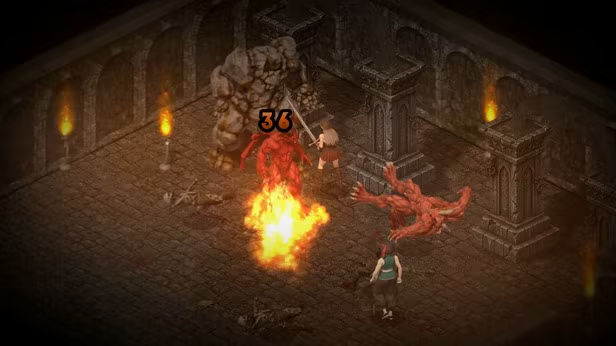
The developer is making Fire Field, a 90s-style isometric ARPG on Steam, and the enemies in that game were made with this tool.

Rigging to export runs on your own PC

Rigging, motion setup, weapon setup, baking, and export run locally on your PC and can be used offline. Miso Editor itself has no monthly subscription fee. However, BLOCKIFY (blocky character conversion) requires an internet connection and your own Claude Code or Codex setup. The respective service's usage terms and charges may apply.

  • Import your own 3D model (GLB / FBX / OBJ / ZIP) and go straight to rigging

  • A sample character and sample weapons (sword, axe, bow) are included, so you can try the whole workflow right away

What it does

  • Auto Build: select your own 3D model or the sample character to run rigging, motion setup, and export automatically in sequence. Designed to be accessible without specialist 3D knowledge, though some models may need manual rigging adjustments (initial setup requires downloading free motions from Mixamo)

  • Import your own 3D model (GLB / FBX / OBJ / ZIP). Rigged humanoid models whose bone names differ from Mixamo can be imported too (bone roles are matched from the shape, and you can pick them again by hand)

  • Auto-rigging: adds a humanoid skeleton automatically, right on your own PC. About 1-6 minutes on an NVIDIA GPU, or it runs on the CPU if you have no GPU. If the auto result is off, you can place 8 markers by hand (chin, elbows, wrists, knees, crotch) and rig again

  • Motion: drag in free motion FBX files from Mixamo to apply them to the rig and preview them instantly

  • Weapons: give your character a one-handed weapon, a two-handed greatsword, or a shield. The weapons and their slash trails are baked into the sprites. A sample sword, axe, and bow are included, and you can import your own weapon models

  • BLOCKIFY: converts a character into a blocky 3D model and saves it as a new character, leaving the original unchanged. The blocky character can then be animated and exported as sprite sheets. This feature requires an internet connection and Claude Code or Codex installed and signed in on the same PC. Usage is subject to the terms and limits of your Claude Code or Codex plan.

  • Sprite baking: renders 1, 2, 4, 8, 16, 32, or 64-direction sprite sheets

  • RPG Maker MZ export: bake with the RPG Maker MZ camera and it also writes a ready-to-use 4-direction walking character sheet ($name.png, 3x4 frames)

  • Camera presets: 2:1 isometric, true isometric, top-down, overhead, side view, first-person, and custom (save your own by name)

  • Per-motion and per-character settings: frame count, duration, looping, frame size, sheet width, character height, and facing direction

Output

  • PNG sprite sheets plus a text file describing each frame (anim.txt)

  • Aseprite-format JSON frame data for each sheet (.aseprite.json)

  • A separate grid sheet for each animation (PNG + JSON)

  • Everything for a character in one ZIP download

  • RPG Maker MZ character sheets

  • Rigged 3D models (FBX / GLB), with or without applied motions

What you need

  • A 3D character model (GLB / FBX / OBJ / ZIP). You can also try the sample character

  • Free motion FBX files from Mixamo: download them with a free Mixamo account. No Miso Editor account is needed

  • No other software to install: everything needed for 3D processing and rendering is included

  • For auto-rigging, either an NVIDIA GPU with 4 GB+ VRAM, or 16 GB+ of PC memory: with no NVIDIA GPU, rigging runs on the CPU instead (about 1-8 minutes). Manual rigging: if your PC has neither, you can rig by hand. Place 8 markers (chin, elbows, wrists, knees, crotch) on the character

Supported OS

Windows 10 / 11 (64-bit)

Screen languages

The screen is available in 29 languages (English, 日本語, 简体中文, 繁體中文, 한국어, Русский, Español, Português (Brasil), Português (Portugal), Deutsch, Français, Polski, Türkçe, ไทย, Українська, Italiano, Čeština, Magyar, Svenska, Nederlands, Dansk, Tiếng Việt, Bahasa Indonesia, Suomi, Română, Norsk, Ελληνικά, Български, العربية).

Who this is for

  • Developers who need many multi-direction character sprites for any kind of 2D-sprite game, such as RPGs, action RPGs, roguelikes, strategy games, and shooters. Any view works: isometric, top-down, overhead, side-view, or first-person (classic sprite enemies), or any angle you set with a custom camera

  • RPG Maker MZ users who want walking characters made from their own 3D models

  • People who have 3D models but would rather not spend time on rigging and render setup

  • Anyone who wants smooth 16, 32, or 64-direction facing, not just 8

  • Anyone who wants to keep a rigged 3D model alongside the sprites

Please note

  • Auto-rigging is designed for humanoid characters (two legs, two arms). Quadrupeds or heavily stylized shapes may not rig well

  • Works best with: a front-facing character with legs slightly apart. A normal T-pose without spread fingers is recommended (A-pose also works)

  • Tends to break: long capes, robes, or long skirts; baggy pants with the legs together; weapons or items held in the hands (add weapons later with the weapon feature instead); arms hanging down at the sides

  • Wings, tails, and long hair stay attached to the body and do not sway naturally

AI Generated Content Disclosure

The developers describe how their game uses AI Generated Content like this:

[AI use during development]
AI coding assistants were used in writing this software's code. The bundled sample character and sample sword 3D models were made with an AI 3D generation service.

[AI use inside the software]
- Auto-rigging: an AI model running locally on the user's PC (nothing is sent externally).
- Background removal: an AI model running locally on the user's PC (nothing is sent externally).
- Manual rigging, motion application, and sprite rendering: standard 3D processing. No AI is used.
The software does not send data to any external AI service. Only when the user turns on MCP (control from an AI app) are results passed to the user's own AI app (off by default).

System Requirements

    Minimum:
    • OS: Windows 10 64-bit
    • Processor: 64-bit CPU, 4 cores
    • Memory: 16384 MB RAM
    • Graphics: NVIDIA GPU with 4 GB+ VRAM (rigging takes about 1-6 min). Without one, rigging runs on the CPU with 16 GB+ PC memory (about 1-8 min)
    • Network: Broadband Internet connection
    • Storage: 15360 MB available space
    • Additional Notes: Network: Broadband internet connection (for downloading motions from Mixamo)
    Recommended:
    • OS: Windows 11 64-bit
    • Processor: 64-bit CPU, 4 cores or more
    • Memory: 16384 MB RAM
    • Graphics: NVIDIA GPU with 8 GB+ VRAM, CUDA-capable
    • Network: Broadband Internet connection
    • Storage: 15360 MB available space