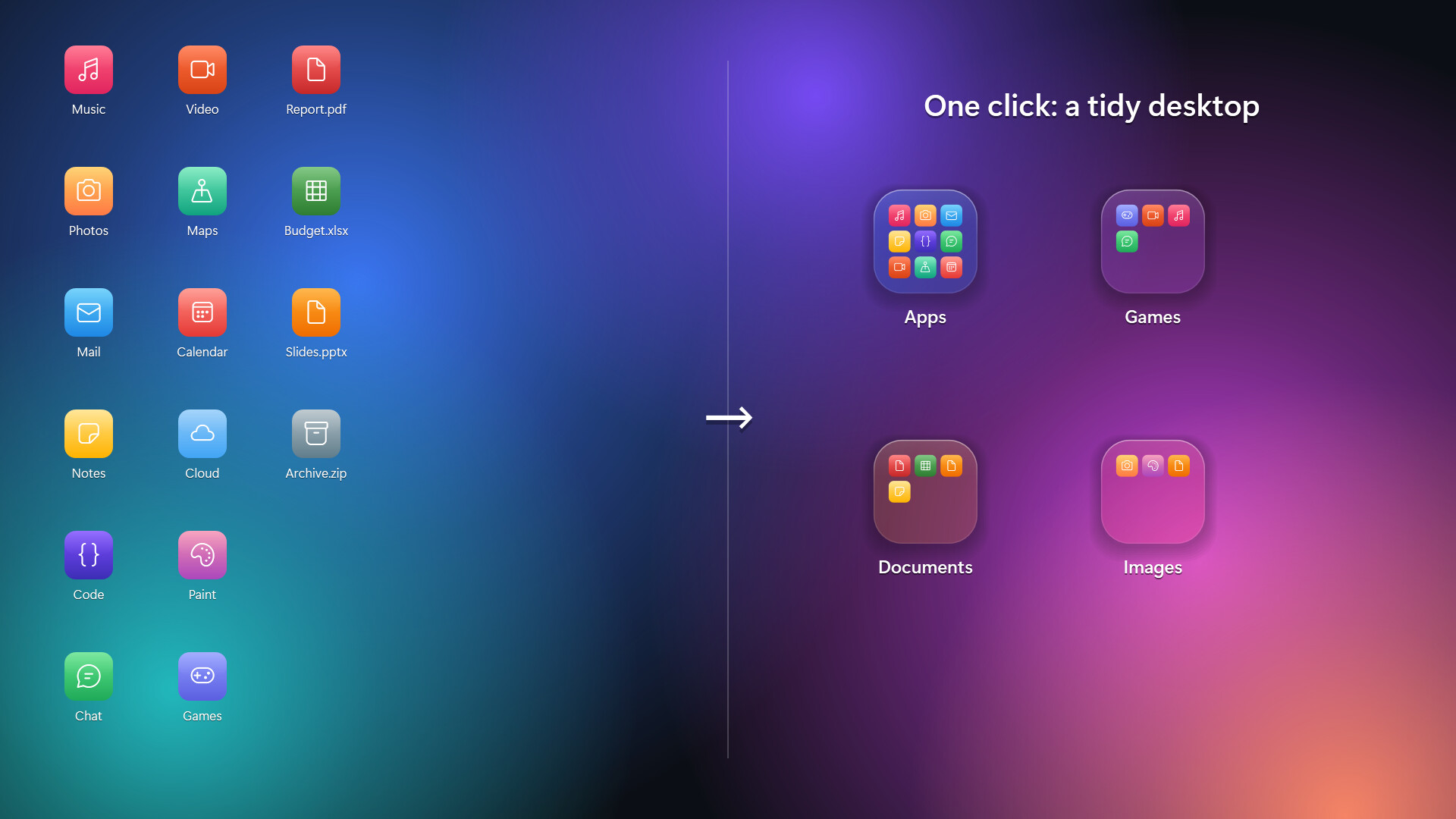
Group your desktop icons into folders, just like on your phone. Click a folder and the screen softly blurs as it springs open. Crystal and frosted glass styles, animated wallpaper see-through, auto-organize, and a clean uninstall that puts every file back.
Release Date:
Coming soon
Developer:
Publisher:
Tags

Sign in to add this item to your wishlist, follow it, or mark it as ignored

This game is not yet available on Steam

Coming soon

Interested?
Add to your wishlist and get notified when it becomes available.
 

About This Software

[h2]A tidy desktop, the way your phone does it[/h2]

DeskFolders turns a cluttered Windows desktop into a few neat folders. Drop files onto a folder, click it, and it springs open over a softly blurred screen. Click outside or press Esc to close.

[h2]Features[/h2]

[list]

[*][b]Phone-style folders[/b]: drag files and folders onto a folder tile to add them. Click an icon inside to open it.

[*][b]Auto-organize[/b]: sort your whole desktop into Apps, Games, Documents, Images and more in one click. Undo it any time.

[*][b]Two glass styles[/b]: Crystal (clear, with light bending at the edges) or Frosted (soft, milky glass).

[*][b]Animated wallpaper see-through[/b]: with Wallpaper Engine or Lively Wallpaper running, your moving background shows through the folders.

[*][b]Glass desktop icons[/b]: optionally show every desktop item as a matching glass icon.

[*][b]Quick search[/b]: type inside a folder and press Enter to launch.

[*][b]Recycle Bin tile[/b]: drop files on it, click to restore or empty.

[*][b]Grid snapping[/b], multi-select with Ctrl+click, and double-click the empty desktop to hide or show all folders.

[*][b]Multi-monitor & high-DPI[/b] aware.

[*]English and Korean.

[/list]

[h2]Your files stay yours[/h2]

Files you move into a folder are kept in a plain folder in your user profile (%USERPROFILE%\DeskFolders), one subfolder per desktop folder. Open it in Explorer and move things around; the desktop updates instantly.

Uninstalling from Steam (or Settings › Prepare to uninstall) puts every file back on your desktop and restores Windows' own settings.

[h2]Notes[/h2]

[list]

[*]Windows 10 (version 2004 or later) or Windows 11, 64-bit.

[*]While animated wallpaper see-through is on, folder tiles don't appear in screenshots or recordings. You can turn this off in Settings.

[/list]

System Requirements

    Minimum:
    • Requires a 64-bit processor and operating system
    • OS: Windows 10 64-bit (version 2004) / Windows 11
    • Processor: Any 64-bit CPU
    • Memory: 2 GB RAM
    • DirectX: Version 9.0
    • Storage: 50 MB available space
    • Additional Notes: .NET Framework 4.8 (included with Windows 10/11)
    Recommended:
    • Requires a 64-bit processor and operating system
    • OS: Windows 10 64-bit (version 2004) / Windows 11
    • Processor: Any 64-bit CPU
    • Memory: 2 GB RAM
    • DirectX: Version 9.0
    • Storage: 50 MB available space
    • Additional Notes: .NET Framework 4.8 (included with Windows 10/11)
Review Filters