Draw, paint, animate and work with 3D - all in one creative app built by an independent developer. Buy once, no subscription.

Sign in to add this item to your wishlist, follow it, or mark it as ignored

Free Demo

Play Elqori Demo

Check out the full game


About This Demo

CREATE WITHOUT RENTING YOUR TOOLS

I started building Elqori because I wanted a creative tool that I could buy once, keep, and actually enjoy working in.

I'm an artist and a solo developer, and Elqori started as my attempt to build the kind of drawing application I wanted for myself. Since then it has grown into something much bigger.

The idea is simple:

Draw. Paint. Pose. Animate.

All in one application, without a subscription.

MADE FOR DRAWING FIRST

At the heart of Elqori is the 2D workspace.

I've spent a lot of time working on the part that matters most to me: how drawing actually feels.

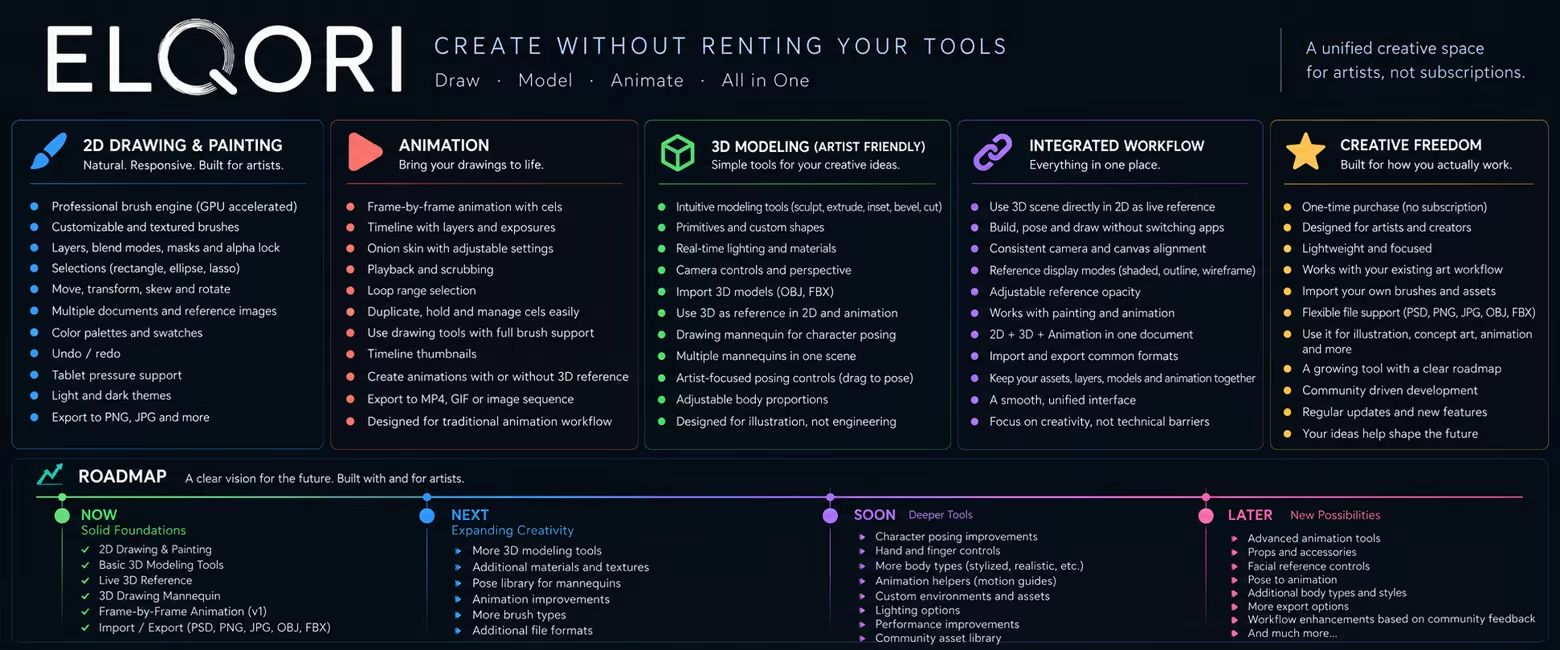
There are pressure-sensitive brushes for sketching, inking and painting, including pencils, ink brushes, charcoal, gouache, watercolor, airbrushes and more.

You can customize brushes, create your own, work with layers and blend modes, use masks and alpha lock, make selections, move and transform parts of your drawing, and work across multiple documents.

I'm continuing to improve the brush engine because I want Elqori to feel good when you put the pen down — not just have a long feature list.

ANIMATION WITHOUT LEAVING YOUR DRAWING WORKFLOW

I didn't want animation to feel like opening a completely different program.

Switch to ANIM and the drawing tools are still there, but now you have a timeline, cels, exposures, onion skinning, playback, looping and frame-by-frame controls.

You can sketch a pose, create the next cel, draw again and hit play.

My goal is to keep traditional frame-by-frame animation fast and approachable instead of surrounding it with tools you don't need.

3D — BUILT FOR ARTISTS, NOT ENGINEERS

This is where I'm taking Elqori in a slightly different direction.

I'm not trying to build another huge general-purpose 3D package.

I want 3D to solve problems I actually have while drawing.

Create simple objects, arrange a scene, choose your camera and use that scene directly as reference for your artwork.

The goal is to make perspective, composition, poses and difficult camera angles easier without constantly exporting images and jumping between different applications.

3D + 2D, IN THE SAME WORKFLOW

This is a big part of where I want Elqori to go.

Build something in 3D, switch back to 2D and use it as a reference while you draw.

Change the scene or camera and continue working.

The 3D isn't there just because having “3D” on a feature list sounds impressive. It's there to support the drawing.

I'm also working on artist-friendly posing tools, including a 3D drawing mannequin that can be positioned using simple handles rather than exposing a complicated rigging system.

Eventually I want this same idea to extend into animation as well.

WHY 2D + ANIM + 3D?

I get asked why someone would use Elqori when specialized painting, animation and 3D applications already exist.

I'm not trying to replace every one of them.

What I want to remove is this:

Draw in one program → build a reference somewhere else → export it → import it → change it → export it again → animate somewhere else...

Elqori is my attempt to make those workflows live together.

The three workspaces:

2D · ANIM · 3D

aren't supposed to be three separate applications stuffed into one window.

They're different ways of working on the same piece of art.

BUILT BY ONE ARTIST

Elqori isn't being designed by a big software company.

It's me.

I use it, I break it, I draw with it, and when something annoys me I try to make it better.

Early Access lets me develop Elqori together with the people actually using it. Some ideas will change. Some features will grow considerably. And I'm sure users will come up with workflows I haven't thought of yet.

That's part of why I'm releasing it this way.

ONE PURCHASE. NO SUBSCRIPTION.

This part isn't complicated.

Buy Elqori once and keep using it.

I don't want your drawing application to stop working because you stopped making a monthly payment.

There may be bigger versions of Elqori years down the road, but the software you purchase is yours to keep using.

WHERE ELQORI IS GOING

The current version is the foundation.

I want to keep improving the brushes and painting workflow, expand frame-by-frame animation, make the 3D tools much more useful for illustrators, improve posing and reference tools, and connect all three workspaces more deeply.

Some ideas will take time.

I'd rather build them properly than pretend they're finished.

But the direction is clear:

Draw. Paint. Pose. Animate.

One creative space. No subscription.

-Vlad
Creator of Elqori

System Requirements

    Minimum:
    • Requires a 64-bit processor and operating system
    • OS: Windows 10 64-bit
    • Memory: 8 GB RAM
    • Graphics: DirectX 11 compatible GPU
    • DirectX: Version 11
    • Storage: 2 GB available space
    • Additional Notes: Pressure-sensitive drawing tablet recommended for the best drawing experience.
    Recommended:
    • Requires a 64-bit processor and operating system
    • OS: Windows 11 64-bit
    • Processor: Intel Core i7 or AMD Ryzen 7
    • Memory: 16 GB RAM
    • Graphics: Dedicated GPU with 4 GB VRAM or more
    • DirectX: Version 11
    • Storage: 4 GB available space
    • Additional Notes: Pressure-sensitive drawing tablet recommended. 16 GB RAM or more is recommended for large canvases and animation projects.
Review Filters