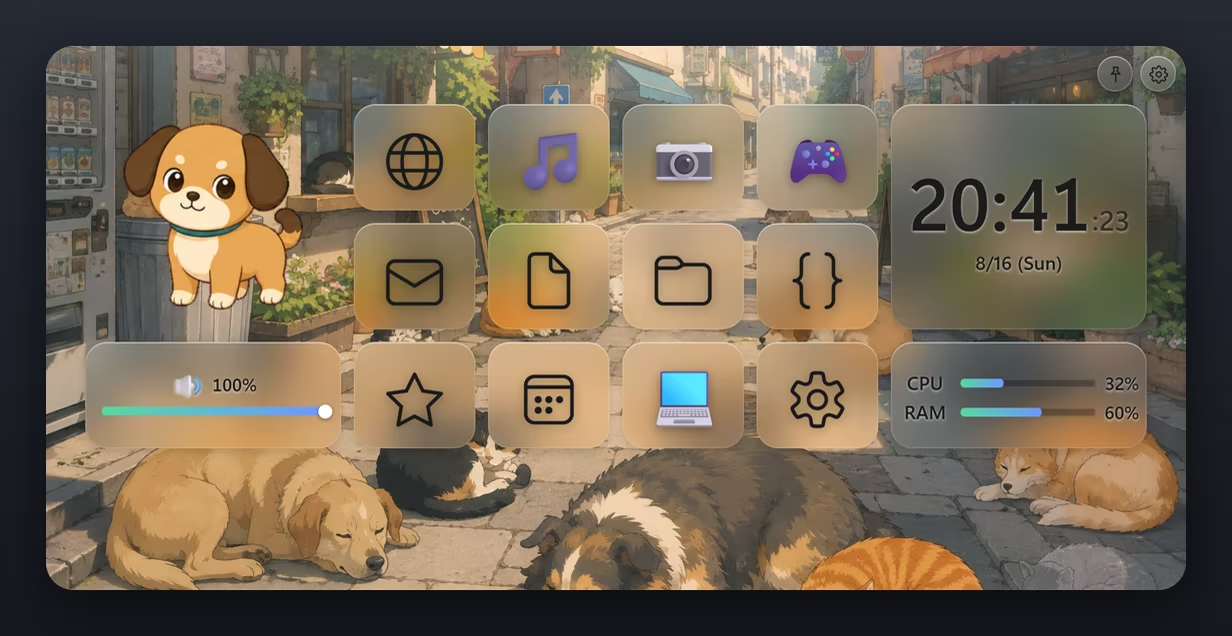
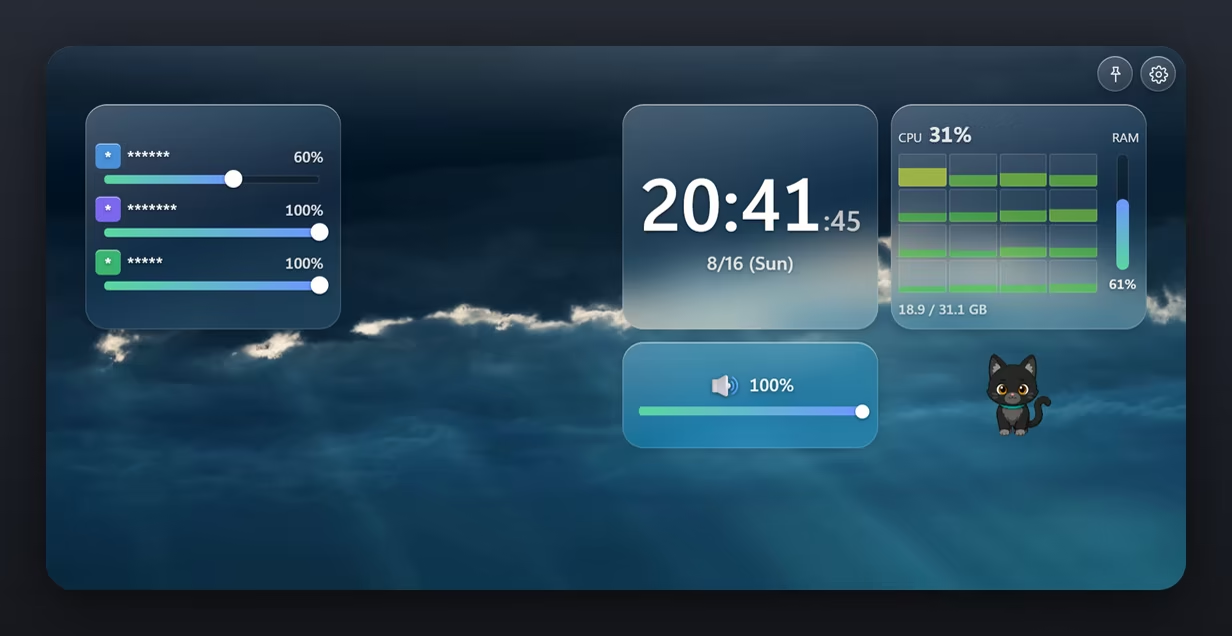
A frosted glass launcher widget that sits on top of your desktop, with video for a background. Line up the apps and games you use most, and keep a clock, a volume mixer and what's now playing right beside them — a small window holding just the controls and information you need.
Дата выхода:
Скоро выйдет
Разработчик:
Издатель:

Войдите, чтобы добавить этот продукт в список желаемого или скрыть его

Не поддерживается русский язык

Этот продукт не поддерживает ваш язык. Пожалуйста, перед покупкой ознакомьтесь со списком поддерживаемых языков.

Эта игра ещё не доступна в Steam

Скоро выйдет

Заинтересовала игра?
Добавьте её в список желаемого и получите уведомление, когда она выйдет
 

Об этой программе

MistWindow is a small launcher widget that lives on your desktop.
Lay a video or image behind it, and arrange frosted glass tiles on top.
The apps, games, folders and sites you reach for most — everything you want to open, one click away.

Video as your background

Loops mp4, webm and mov. Still images work too.
Each widget can have its own background, and you can adjust which part shows and how far it zooms.
Video moves behind rounded glass, and one corner of your desktop quietly comes alive.

Lay out your tiles

  • Launch apps and games
  • Open folders and files
  • Open websites (icons are fetched automatically)
  • Drag and drop to add anything right away
Choose from over 240 icons and emoji.

There when you need it

Three ways to show it:
  • Always visible — there whenever you look
  • Hover fade — drifts in like mist as your cursor approaches, and fades away when it leaves
  • Hotkey — bring it up and dismiss it with a key of your choosing
While hidden, video playback stops — so leaving it on your desktop costs almost nothing.

Information and control

More than a launcher. The tiles themselves do the work.
  • Volume mixer — set the volume and mute of each app, right there
  • Volume — system volume on a slider
  • Now playing — title, artist and cover art
  • Clock — time and date
  • System monitor — CPU and memory usage

A pet moves in

Animated pet sprites live and move inside a tile.
When you step away, when something starts playing — its behavior changes to match what your PC is doing.

Switch with scenes

Save your whole widget layout and switch between them in a single click.
Keep separate desktops for work, streaming and gaming.

Call it up by name

One hotkey opens the command palette, where you can search apps, games and scenes by name and launch them instantly.
Star the ones you use most to keep them close.

Steam Workshop

Share wallpapers and pet sprites through the Workshop.
Subscribe to what you like and it appears in your library — and you can publish your own creations from inside the app.

Информация об ИИ-контенте

Вот как разработчики описывают контент в игре, сгенерированный ИИ:

MistWindow includes static visual assets — the application icon, task-tray icon, and the sprite sheets for the bundled pet characters — that were created with AI tools during development, and portions of its source code were written with the help of AI coding assistants. All of this content is pre-generated and ships as fixed files: MistWindow does not generate any content with AI while it is running, and it does not send user data to AI services.

Системные требования

    Минимальные:
    • ОС: Windows 10, Windows 11
    • Процессор: 1.6 GHz Intel Core i3 or equivalent
    • Оперативная память: 2048 MB ОЗУ
    • Видеокарта: HD Graphics 4000 or above
    • DirectX: версии 11
    • Сеть: Широкополосное подключение к интернету
    • Место на диске: 512 MB
    Рекомендованные:
    • ОС: Windows 10, Windows 11
    • Процессор: 2.0 GHz Intel Core i5 or equivalent
    • Оперативная память: 4096 MB ОЗУ
    • Видеокарта: NVIDIA GeForce GTX 660, AMD HD 7870, 2 GB VRAM or above
    • DirectX: версии 11
    • Сеть: Широкополосное подключение к интернету
    • Место на диске: 1024 MB
Фильтры обзоров