This content requires the base application ECHO on Steam in order to run.

Sign in to add this item to your wishlist, follow it, or mark it as ignored

Downloadable Content

This content requires the base application ECHO on Steam in order to run.

Buy ECHO Pro

Buy ECHO Pro Edition

Includes 2 items: ECHO, ECHO Pro

0% off. $53.98 normally, discounted to $53.98
 

About This Content

ECHO Pro: finer control for your Hi-Fi setup

ECHO Pro is optional paid DLC for the ECHO base application. It unlocks advanced audio processing, sample-rate conversion and PCM-to-SDM controls, Connect device workflows, ECHO Pet and Rainbow Mode in the same installation. No separate application or content download is required.

Pro is for users who want to tune headphones, speakers, audio interfaces or DACs, explore filters and output modes, or send music to compatible local-network devices. For local songs, playlists and lyrics, the Steam base app or Community Edition already provides these features. Everyday listening does not require Pro.

Advanced processing and saved listening setups

Combine compression, FIR, stereo and channel processing into a named listening setup. Save, update, apply and bind it to the current output device, keeping separate settings for headphones and desktop speakers. DSP Rack lets you reorder supported modules. Whole-chain bypass and loudness matching help compare processing without mistaking a louder result for a better one.

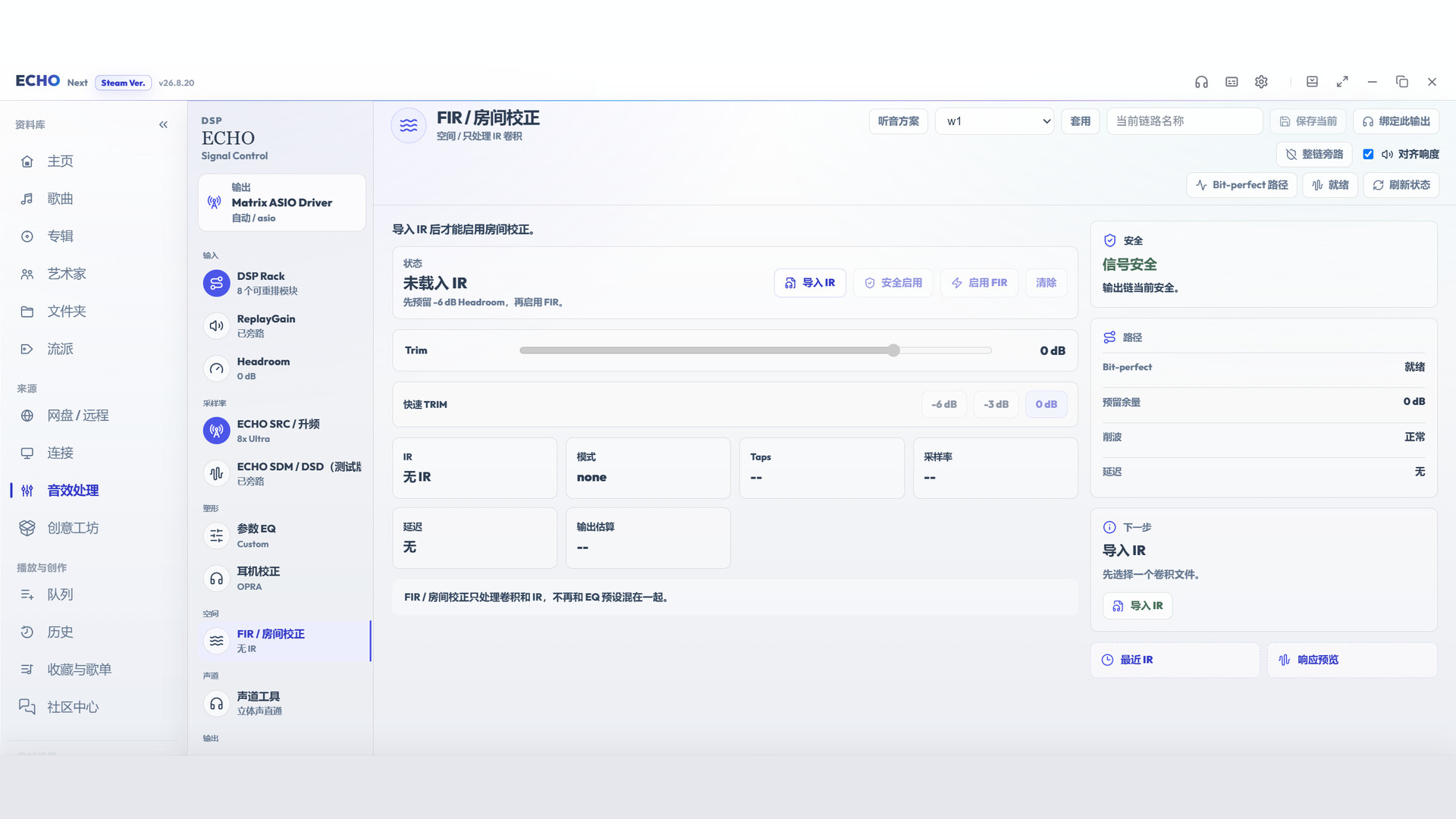
FIR and room correction using your IR data

Import an impulse response appropriate for your equipment or room and apply it through FIR convolution. The workbench displays load state, channel mode, sample rate, tap count and latency, with trim and bypass controls for checking compatibility and gain. This is for users with reliable measurement or correction files. ECHO Pro does not automatically measure a room or include a measurement microphone or calibration service.

Compressor: manage dynamics and transients

Adjust threshold, ratio, attack, release, knee, makeup gain and dry/wet mix. Choose Peak or RMS detection, stereo linking, maximum compression range, sidechain high-pass filtering and automatic release. Input/output levels and gain-reduction displays show when compression engages. Useful for controlling sudden loud passages or narrowing dynamic range; heavy compression changes the recording's original dynamics.

Crossfeed, stereo field and channel tools

  • Crossfeed: Adjust feed amount and low-pass cutoff to soften excessive left/right separation in headphone listening while retaining high-frequency localization.
  • Stereo Field: Adjust width and independent Mid/Side gain to narrow or expand stereo presentation.
  • Channel adjustment: Set balance, independent left/right gain and delay, low/mid/high-band channel gains, channel swap, mono and polarity inversion for wiring checks or image-position adjustments.
  • Channel matrix: Set the mix of each input into each output for remapping and mixing experiments. Added gain can clip; monitor headroom.

PCM dither for bit-depth conversion

Choose TPDF, high-pass TPDF or supported noise-shaping modes on applicable PCM output paths to manage quantization error during bit-depth conversion. This does not add detail absent from the recording. Check the active path and status to confirm whether the option is in use.

ECHO SRC: rates, filters and compute backends

ECHO SRC converts PCM sample rates in the playback path so you can choose an output rate and reconstruction filters for a compatible audio interface or DAC. Upsampled PCM remains PCM: it is separate from DSD conversion and does not change playback speed or pitch. It is for comparing filter settings and managing output rates and processing load.

  • 2× / 4× / 8× upsampling: A 44.1 kHz source gives nominal targets of 88.2 / 176.4 / 352.8 kHz; a 48 kHz source gives 96 / 192 / 384 kHz. These are multiplier examples. Available targets still depend on the path, device and driver; selecting 8× does not establish device support.
  • 48 kHz compatibility: Converts to 48 kHz for paths that need that rate. This is not 48-times upsampling and may downsample sources above 48 kHz.
  • Quality and latency: Transparent, Balanced and Low Latency options offer different processing and responsiveness priorities. Heavier settings can require more compute and are not automatically the best fit for every device.
  • Filter 1x and Filter Nx: Advanced settings let you choose filters for the first and later upsampling stages separately. 1x covers the stage entering from the source rate; Nx covers subsequent multiplier stages. Check the active filter plan for the actual stages, configurations and tap counts.
  • Filter directions: Compare Steep, Gauss, Minring, Apod and Sinc designs, linear/minimum phase, length and roll-off. These choices affect frequency and time response, latency and processing cost. Names and lengths are not sound-quality rankings, and audible differences are not guaranteed for every recording.
  • CPU / CUDA: Choose CPU or CUDA on compatible NVIDIA hardware. Activation depends on hardware, runtime conditions, path and configuration. A CUDA request does not guarantee activation: inspect the actual backend and fallback reason. Confirm PCM SRC and SDM backends separately.
  • Actual output: The workbench reports source and target rates, engine, filter plan and runtime state. A shared output path can still pass through system audio processing, so a software target rate does not establish the DAC's final internal clock or processing.
  • Comparison and limits: Use A/B bypass to compare enabled and disabled paths, paying attention to level differences. Upsampling cannot recover information absent from the recording or turn a lossy file into a native high-resolution recording. SRC processes the digital signal; the resulting path is not unchanged bit-perfect output.

PCM-to-SDM: target rates, sound profiles and advanced processing

PCM-to-SDM uses upsampling, filtering and modulation to generate a high-rate 1-bit stream for supported DSD output paths. It differs from PCM upsampling by changing the signal representation and output method. It does not turn the source into a native DSD recording or guarantee better sound.

  • DSD64 / 128 / 256 / 512: Select a target stream tier. Higher tiers increase processing and transport demands. Activation depends on the DAC, manufacturer driver, operating system, output path and real-time performance. A visible option is not proof of device support or actual output.
  • Quality versus sound profiles: Quality profiles control modulation, noise shaping and stability priorities. Linear, Transient and Smooth sound profiles mainly organize FIR filter choices. They are separate dimensions that can be combined, not new recording formats or promises of a particular listening result.
  • First and later filters: Choose Filter 1x / Nx and adjust FIR processing tiers in supported configurations. Longer filters and heavier chains can increase latency, CPU/GPU work and resource use. Refer to the current signal plan and actual runtime result.
  • Extra / Horizon options: Explore more complex modulation and compute choices when your equipment and processing budget allow. These add processing cost and remain subject to capability and real-time checks. Higher settings do not automatically mean better sound.
  • Level and headroom: SDM modulation requires digital headroom, and enabling it may change output level. Check signal-path, level and protection indicators rather than repeatedly increasing preamp to compensate. Headroom helps manage processing stability; it does not replace sensible device volume.
  • CPU / CUDA and real-time status: Confirm the SDM backend independently; selecting CUDA for SRC does not prove CUDA SDM is active. High target rates combined with heavy filters may exceed real-time capability. Configurations that fail admission are rejected with a reason; adjust the settings before retrying.
  • Native DSD and DoP: Available transport depends on platform, DAC and driver. DoP packages DSD data into PCM frames: the DoP carrier sample rate is not the 1-bit stream rate. Use actual SDM/DSD status to identify the conversion tier rather than the PCM kHz figure alone.
  • Local output and Connect: Local playback and network DSF casting have their own format, rate and device limits. The receiver must explicitly support DSF for that route. Some high-quality paths require preprocessing and a wait before casting; working locally does not establish receiver support.

DSD file playback, DoP and supported ASIO Native DSD passthrough are already base-app capabilities. Pro adds PCM-to-SDM processing and controls. Choose settings according to the path actually active and your equipment's supported range.

Connect: music on compatible local-network devices

Unlock device discovery, connection, casting and playback-control workflows. Supported DLNA players can use the applicable lossless FLAC/WAV and ECHO SRC upsampling paths; devices explicitly supporting DSF can use supported SDM casting. Casting has independent format and rate limits and does not automatically copy the entire local DSP chain to a receiver. Some higher-quality SRC/SDM paths require preparation before playback. Formats, rates, controls and compatibility depend on the receiving device.

ECHO Pet and Rainbow Mode

ECHO Pet offers size, position, startup restore, shortcut and tray controls to fit your desktop layout. Rainbow Mode adds animated colors with Aurora, Ribbon, Wheel, Nebula, Prism, Tide, Breathe and Accents styles, plus speed and intensity controls. These are desktop and appearance features; they do not change recording quality.

See what your adjustments actually do

Signal-path and output-safety views help confirm active processing, rates, backends, headroom and fallback state. EQ, loudness adjustment, FIR, channel processing, SRC and SDM change the digital signal; a processed path should not be described as unchanged bit-perfect output. Use bypass or disable individual processors to compare the original, and rely on the state actually in use.

Base ECHO and Community Edition

Parametric EQ (including Simple controls and presets), ReplayGain, headroom, headphone correction and output safety protection are included in the Steam base app and do not require ECHO Pro.

The Steam base app includes the local library, metadata, playlists, lyrics, history, normal playback and output-device selection, plus DSD file playback, DoP and supported ASIO Native DSD passthrough. Acrylic window customization is included on supported Windows systems.

ECHO Community Edition is permanently free and open source under AGPL v3. It does not require purchasing ECHO on Steam or ECHO Pro, and its available DSP effects are free too. Community and Steam are separate release lines; features and updates depend on the edition and version.

Before you buy

This DLC requires ECHO on Steam and is associated with the Steam account that owns it. Refunds, revocation, loss of ownership or an inability to verify Steam ownership may relock Pro without deleting base-edition library data or settings. Pro does not guarantee better sound or improve the recording quality of a music file. Results depend on hardware, drivers, settings and listening preferences. Choose modes according to the signal path actually in use and your device's capabilities.

AI Generated Content Disclosure

The developers describe how their game uses AI Generated Content like this:

我们使用AI进行本地化和一些文本补充

System Requirements

Windows
macOS
SteamOS + Linux
    Minimum:
    • Requires a 64-bit processor and operating system
    • OS: Windows 11 (64-bit)
    • Processor: Intel Core i3-8100 / AMD Ryzen 3 2300X or equivalent 64-bit processor
    • Memory: 8 GB RAM
    • Storage: 2 GB available space
    • Sound Card: Windows-compatible audio output device (WASAPI); ASIO requires a compatible audio interface and manufacturer driver.
    Recommended:
    • Requires a 64-bit processor and operating system
    Minimum:
    • Requires an Apple processor
    • Processor: Apple M1
    • Memory: 3 GB RAM
    Recommended:
    • Requires an Apple processor
    Minimum:
    • OS: Ubuntu 24.04 LTS (64-bit)
    • Processor: x86_64 processor
    • Memory: 8 GB RAM
    • Storage: 2 GB available space
    • Sound Card: ALSA or PipeWire-compatible audio output device
    • Additional Notes: Early Linux beta. Built on Ubuntu 24.04 x64; SteamOS, other distributions, and audio hardware compatibility are still being verified. Requires the Steam client. If you do not already own ECHO, we do not recommend buying it solely for Linux support yet.
    Recommended:
    Review Filters