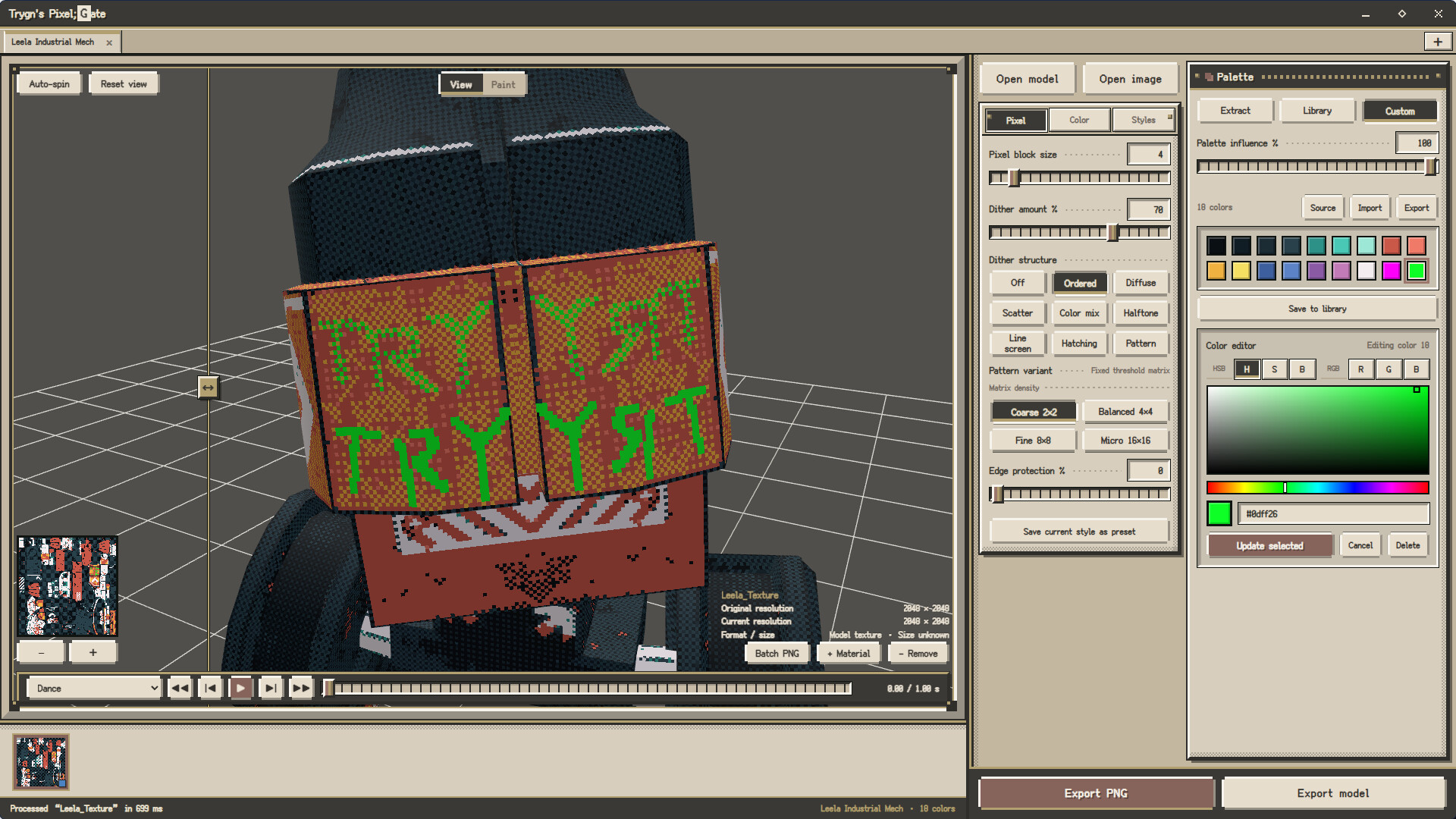
3D models? Pixel art? Spritesheets? Yes! Trygn's Pixel;Gate connects them in one creative pipeline: use dithering and pixel clustering to shape your style, arrange multi-direction views and animation frames, then export game-ready sprites.

Sign in to add this item to your wishlist, follow it, or mark it as ignored

Download Trygn's Pixel;Gate Demo

Buy Trygn's Pixel;Gate

INTRODUCTORY OFFER! Offer ends September 8

-10%
$9.99
$8.99
 

About This Software

From 3D Models to a Pixel World!


Ready to bring your model into the pixel world?


Pixel art isn't simply about shrinking an image. It's about rethinking color, silhouettes, lighting, and motion. Trygn's Pixel;Gate brings this creative process into a single workspace, taking you from an existing 3D model or image to pixel-art assets that are truly your own.

Start with Style


Use dithering to shape color transitions and tonal depth, then use pixel clustering to organize neighboring color blocks into clearer, more deliberate pixel structures.

Switch between Basic Pixel Clustering and Smart Pixel Clustering, or combine palettes, color adjustments, and the style library to quickly establish a consistent visual style.

From nuanced color transitions to bold shapes and crisp outlines, every adjustment is yours to make.

Give 3D Models a Complete Pixel View


Use the 9-grid to arrange model views quickly. Create 8-direction characters, standard six-view sets, or directional assets in 4, 8, or 16 directions.


Perspective and orthographic cameras are supported. Adjust view height, camera range, model scale, and pixel rendering resolution.

Turn Motion into Sprite Frames


Use the model's existing animation tracks to control actions on the timeline with FPS and the actual frame count.

Each action has its own independent sprite-frame markers. Mark keyframes manually, or let the software sample frames evenly based on the action length to quickly generate animated spritesheets for game development.

Export Game-Ready Assets


When exporting PNGs, choose a standard image or a spritesheet and adjust:

  • Current view, 4-way, 8-way, 16-way, and six-direction views
  • Per-cell width, height, and aspect ratio
  • Model scale, view height, and background color
  • Animation markers, action range, and spritesheet layout

Preview the result in the window before exporting, then zoom and pan to inspect the spritesheet details.

A Workspace for Creators


Whether you're an indie game developer, a pixel artist, or an artist who prefers to start from 3D models, Pixel;Gate lets you complete the full workflow—from model and style to views, animation, and spritesheets.

You define the character of your work; Trygn's Pixel;Gate connects the creative pipeline.

System Requirements

    Minimum:
    • Requires a 64-bit processor and operating system
    • OS: Windows 10 (64-bit)
    • Processor: Intel i5-8400 / AMD Ryzen 5 1400
    • Memory: 8 GB RAM
    • Graphics: GTX 1050 Ti / RX 560
    • Storage: 1 GB available space
    Recommended:
    • Requires a 64-bit processor and operating system
    • OS: Windows 10 or Windows 11 (64-bit)
    • Processor: Intel i5-10400 / AMD Ryzen 5 2600
    • Memory: 16 GB RAM
    • Graphics: GTX 1060 / RX 580
    • Storage: 2 GB available space
Review Filters