Stay on top of everything with an elegant Windows hub featuring music controls, live lyrics, weather, calendar, and real-time system and game widgets.

Sign in to add this item to your wishlist, follow it, or mark it as ignored

Early Access Software

Get involved with this software as it develops.

Note: This Early Access software is not complete and may or may not change further. If you are not excited to use this software in its current state, then you should wait to see if it progresses further in development. Learn more

What the developers have to say:

Why Early Access?

“Notched is already a full daily-use app, but it runs on top of a huge variety of Windows setups: different monitors and scaling, games in exclusive fullscreen, media players, browsers, Discord, VS Code and home servers. Early Access lets us release it now and tune it with real users on real machines instead of guessing. Your feedback on which integrations, widgets and themes matter most will directly shape what we build next.”

Approximately how long will this software be in Early Access?

“We expect Notched to be in Early Access for about 6 months. We plan to leave Early Access once the integrations, the layout editor and the Workshop tools are stable across the setups players report, and the main roadmap items are in.”

How is the full version planned to differ from the Early Access version?

“We plan to keep growing Notched with: more integrations, and deeper ones, for the apps people already use (Discord, VS Code, Notion, Home Assistant, OctoPrint, Trading 212, stream chat); more games added to the supported game integrations, joining CS2, VALORANT and Assetto Corsa EVO with their own live notch, overlays and stats, on top of the custom games list; more polish for the Desktop Tools (window tiling on native Windows virtual desktops, the desktop switcher and custom cursors); more built-in themes, notch layouts and widgets, and better Steam Workshop tools for creators; performance and stability work for multi-monitor setups and fullscreen games; and localization beyond English.”

What is the current state of the Early Access version?

“Notched is feature-rich and used daily. Today it includes a live notch at the top of the screen with now playing, synced lyrics, battery, calls, file progress and game stats; an expandable panel with about 30 widgets (weather, calendar, to-dos, music, performance, audio mixer, notifications and more); integrations with Discord, Steam friends, VS Code, Notion, Home Assistant, OctoPrint, Trading 212, Phone Link, Picture-in-Picture and Notched Cloud; game overlays for CS2, VALORANT and Assetto Corsa EVO, a crosshair editor and per-game display settings; Desktop Tools (a Start menu replacement, a virtual desktop switcher, window tiling and custom cursors); and a layout editor, themes and Steam Workshop support for community themes and elements. Some integrations and Desktop Tools are newer and may have rough edges on less common setups.”

Will this software be priced differently during and after Early Access?

“We're not planning on changing the price when Notched leaves Early Access. Everyone who buys during Early Access gets the full version and all future updates at no extra cost.”

How are you planning on involving the Community in your development process?

“We plan to involve players through the Steam Community hub and discussions for bug reports and feature requests, patch notes posted as Steam events with every update, and a built-in bug report and diagnostics tool in the app so reports include what we need to fix them. Players already share themes and notch elements on the Steam Workshop, and the most popular ideas feed back into Notched. We also plan to share a public roadmap of what is coming next.”
Read more

Coming soon

This item is not yet available

Interested?
Add to your wishlist and get notified when it becomes available.
 

Report bugs and leave feedback for this software on the discussion boards

See all discussions

About This Software

Notched is a desktop utility. It runs in the background alongside everything else you do.

  • Clock and date, now playing, the current lyric line

  • Next calendar event, weather and a focus timer

  • Battery, network and performance modes

  • Volume and brightness HUDs that replace the default Windows ones

  • Artwork, seek bar and playback controls

  • Synced lyrics that follow the song line by line

  • Works with any media player that reports to Windows

  • Current conditions with today's high and low

  • Hourly forecast with chance of rain, and a 7-day forecast

  • Feels-like, wind and humidity

  • Weekly and monthly calendar with your events

  • To-do list with due dates and quick add

  • Pomodoro timer that also shows in the collapsed notch

  • Control Center: Wi-Fi, Bluetooth, focus mode, pin the notch, and more

  • Audio mixer with a volume slider for each app

  • FPS, CPU, RAM, GPU, disk, network and uptime

  • Battery for your PC and wireless devices

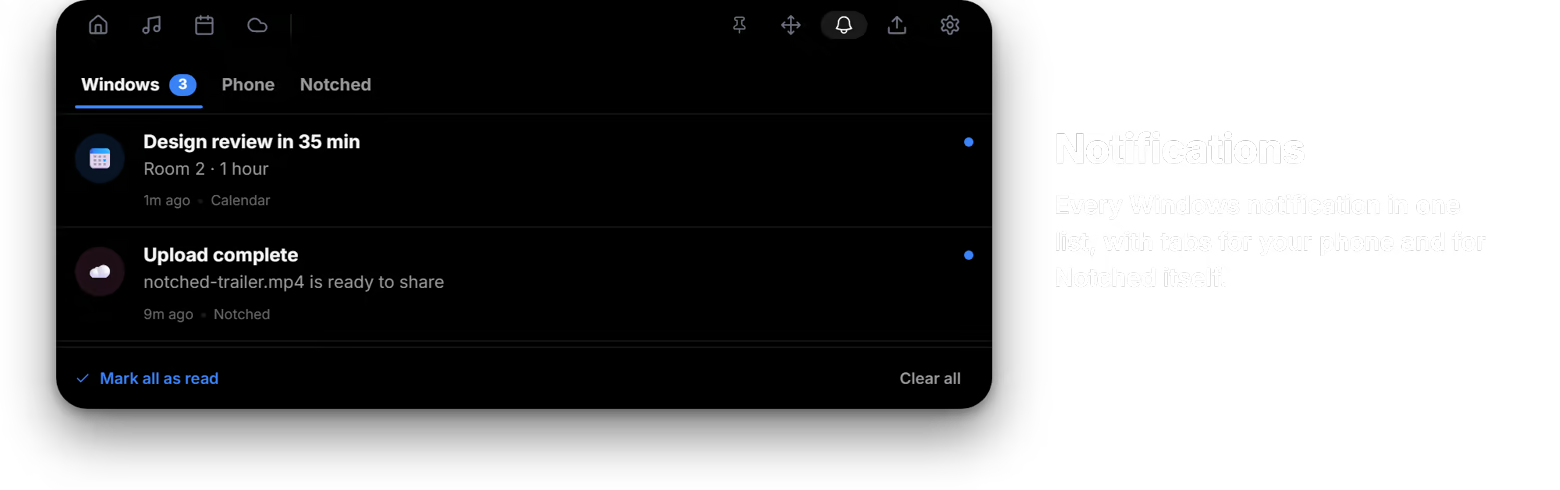
All your Windows notifications in one list, plus notifications from your phone.

  • Drag-and-drop layout editor with about 30 widgets to add, remove, resize and reorder

  • Default Dark, Liquid Glass and Windows Acrylic themes built in, or create your own

  • Animations: Smooth, Scale, Flip, Wave, Glitch or none

  • Move it anywhere on the top edge, with multi-monitor support

  • Steam Workshop: download and share community themes and notch elements

  • Drop a file on the notch to share it with a link that expires when you choose

  • Convert images to JPG, WebP, ICO, PDF and more

  • Copy and download progress right in the notch

  • Notched Cloud for keeping files a click away

  • See and switch between your virtual desktops from the notch, or add a new one.

For gamers

  • In-game overlays with live match stats for supported games

  • Custom crosshair and in-game menu

  • Stream mode and a fullscreen hider so the notch stays out of recordings

Integrations

Optional connections to popular chat, code editor, 3D printing, smart home and investing tools, set up with a guided wizard.

AI Generated Content Disclosure

The developers describe how their game uses AI Generated Content like this:

Notched uses AI-assisted tools during development to support minor fixes and improvements to manually written code. The application also offers optional AI integrations, allowing users to connect services and other AI providers to enhance their experience.

System Requirements

    Minimum:
    • OS: Windows 10/11
    • Processor: 2.0 GHz dual-core
    • Memory: 300 MB RAM
    • Graphics: DirectX 11 compatible (integrated GPU is fine)
    • DirectX: Version 11
    • Storage: 250 MB available space
    • Sound Card: Any Windows-compatible sound device