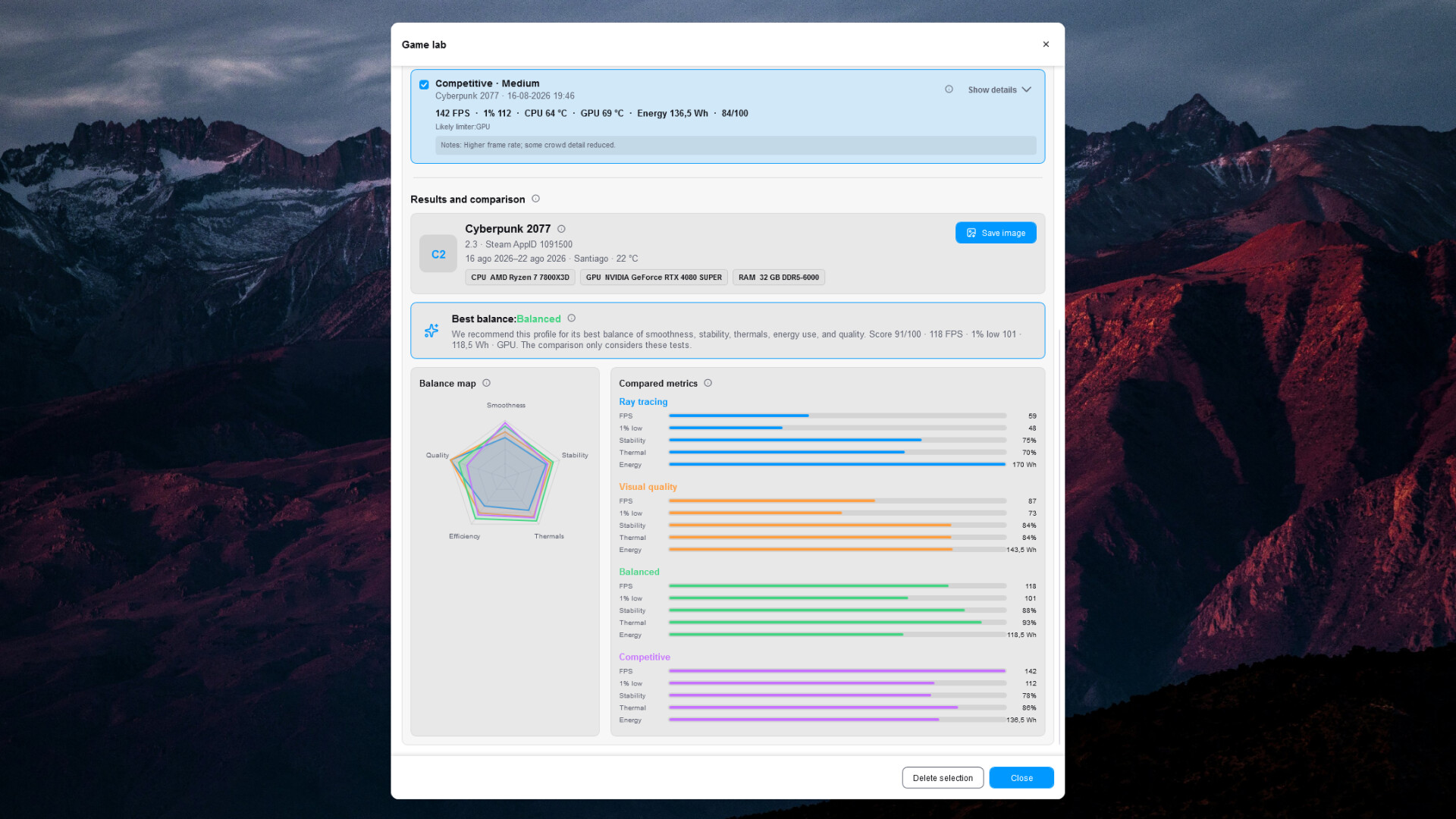
Build a fully customizable PC dashboard for a second screen—no code required. Monitor hardware, FPS, media and more, keep essentials visible with Dashoverlay, and explore local PC Health trends and Game Lab session comparisons.

Sign in to add this item to your wishlist, follow it, or mark it as ignored

Early Access Software

Get involved with this software as it develops.

Note: This Early Access software is not complete and may or may not change further. If you are not excited to use this software in its current state, then you should wait to see if it progresses further in development. Learn more

What the developers have to say:

Why Early Access?

“Dashdoce already provides functional Dashdoce and Dashoverlay editors, local monitoring, PC Health and Game Lab. It is developed by one independent creator, and real-world feedback from different hardware, displays and workflows is essential for improving compatibility, stability and usability before version 1.0.”

Approximately how long will this software be in Early Access?

“I currently expect Early Access to last approximately 6 to 12 months. This is an estimate rather than a fixed release date and may change according to testing results, community feedback and development progress.”

How is the full version planned to differ from the Early Access version?

“The goal for version 1.0 is to consolidate stability, broaden hardware and game compatibility, refine both editors and improve the clarity of PC Health and Game Lab analyses. Additional widgets and data sources may be added according to testing and community priorities. These are development goals, not guarantees of specific future features.”

What is the current state of the Early Access version?

“The current beta lets users build and save complete Dashdoce and Dashoverlay themes with cards, groups, widgets, free or grid positioning, snapping, guides, layers, templates, style copying, undo and redo. It includes local hardware, FPS and media monitoring, optional PC Health history and Game Lab session comparisons. Some readings can be N/A when hardware, drivers or Windows do not expose them. Bugs and hardware-specific limitations can still occur.”

Will this software be priced differently during and after Early Access?

“Dashdoce will have a lower base price throughout Early Access—approximately 40% below the planned version 1.0 base price—to thank and reward the people who support its development early. The base price is planned to increase when Dashdoce leaves Early Access. Any change will be communicated in advance.”

How are you planning on involving the Community in your development process?

“Feedback will be collected through the Steam Community Hub, the official website and the Dashdoce community on Reddit. Users can report bugs, incompatible configurations and feature requests. Patch notes and development updates will explain what changed and which areas are being tested.”
Read more
This game is not yet available on Steam

Coming soon

Interested?
Add to your wishlist and get notified when it becomes available.
 
See all discussions

Report bugs and leave feedback for this software on the discussion boards

About This Software

BUILD YOUR PC COMMAND CENTER

Turn a second screen into a dashboard made for your setup—or keep essential information on your main display with Dashoverlay. Dashdoce gives you a visual editor for building live hardware and performance layouts without writing code.

DESIGN IT YOUR WAY

  • Add, move, resize, copy and customize widgets visually.
  • Combine widgets inside cards and groups.
  • Work on a grid or position elements freely by pixel.
  • Use multi-selection, automatic snapping, guides, spacing measurements and layer controls.
  • Copy and paste styles, and undo or redo editor changes.
  • Save independent Dashdoce and Dashoverlay themes, reusable templates and theme screenshots.

MONITOR WHAT MATTERS

Create layouts for CPU cores and threads, GPU and VRAM, RAM and virtual memory, storage, network activity, latency, FPS, frametime, clocks, calendars, media, Steam and game information.

Present the data using values, text, dynamic text, legends, separators, bars, rings, semicircles, history charts, images, GIFs and gradients.

Available readings depend on the sensors exposed by your hardware, Windows and drivers. When a value cannot be read, Dashdoce marks it as N/A and explains the cause, relevant permissions and compatible optional solutions when available.

DASHOVERLAY

Dashoverlay is a compact, independent surface for the main display, with its own themes, dimensions, editor and configurable shortcuts. Dashdoce and Dashoverlay can be shown or hidden separately, even while a game is running.

Dashoverlay is intended for the desktop and windowed or borderless applications. Visibility over exclusive fullscreen software, anti-cheat systems or other overlays can vary.

PC HEALTH

Build separate local baselines for games, demanding applications, everyday use and idle periods. Dashdoce keeps incompatible simultaneous workloads out of a session and lets you choose which applications and games are measured. PC Health provides context and trends—not a diagnosis or a guarantee against hardware failure.

GAME LAB

Compare compatible sessions from your own PC using FPS, 1% lows, frametime, temperatures, stability, power and overall balance when those readings are available. Game Lab compares this PC with itself under similar conditions; it is not an absolute cross-PC benchmark.

SENSORS AND COMPATIBILITY

Compatible FPS capture support is included through PresentMon. Some optional readings may require permissions, support from the hardware or driver, or external tools such as MSI Afterburner or RivaTuner Statistics Server. Those third-party tools are optional, are not bundled with Dashdoce and are not affiliated with Dashdoce.

LOCAL-FIRST PRIVACY

Hardware readings, FPS analysis, audio-reactive visualization, themes and optional PC Health history are processed locally. Dashdoce does not record audio, include advertising or send automatic telemetry or crash reports. Internet access is used only by features the user chooses that require an online source, such as Steam information, online font or hardware catalogs, support links and manually submitted reports.

BUILT FOR REAL SETUPS

Use an ultrawide auxiliary display, an old monitor, a small screen inside a PC case or almost any display recognized by Windows. A second screen is recommended, not required.

EARLY ACCESS

Dashdoce is developed independently by one creator. The current beta is functional and already includes both editors, local monitoring, PC Health and Game Lab, but bugs, hardware-specific limitations and changes to features or saved-theme formats may occur before version 1.0. Community reports directly help improve compatibility, stability and usability.

A NOTE FROM THE CREATOR

Every feature, workflow and design decision in Dashdoce was conceived and directed by me. AI-assisted programming tools helped me implement, test and refine parts of that vision, but they did not define the product, its ideas or its purpose. I have reviewed the application carefully and worked through its smallest interactions so that nothing is included without intention. Dashdoce is the result of a personal vision made real through technology, continuous iteration and close attention to detail.

AI Generated Content Disclosure

The developers describe how their game uses AI Generated Content like this:

Dashdoce was created and directed by a single independent developer. AI-assisted tools were used to help implement, debug and test the software and to draft or polish portions of interface text, localization and store copy. All concepts, feature ideas, visual and interaction design decisions, behavior specifications and final approvals were conceived, directed and carefully curated by the developer. AI served as an implementation tool, not as the source of the product's ideas. Dashdoce does not generate content with AI while running.

System Requirements

    Minimum:
    • OS: Windows 10 64-bit (version 1903 or later)
    • Processor: Any 64-bit x64 processor
    • Memory: 4096 MB RAM
    • Graphics: Any GPU with a current Windows driver
    • Storage: 300 MB available space
    Recommended:
    • OS: Windows 11 64-bit
    • Processor: Any modern 64-bit x64 processor
    • Memory: 8192 MB RAM
    • Graphics: NVIDIA, AMD or Intel GPU with an up-to-date driver
    • Storage: 300 MB available space
Review Filters