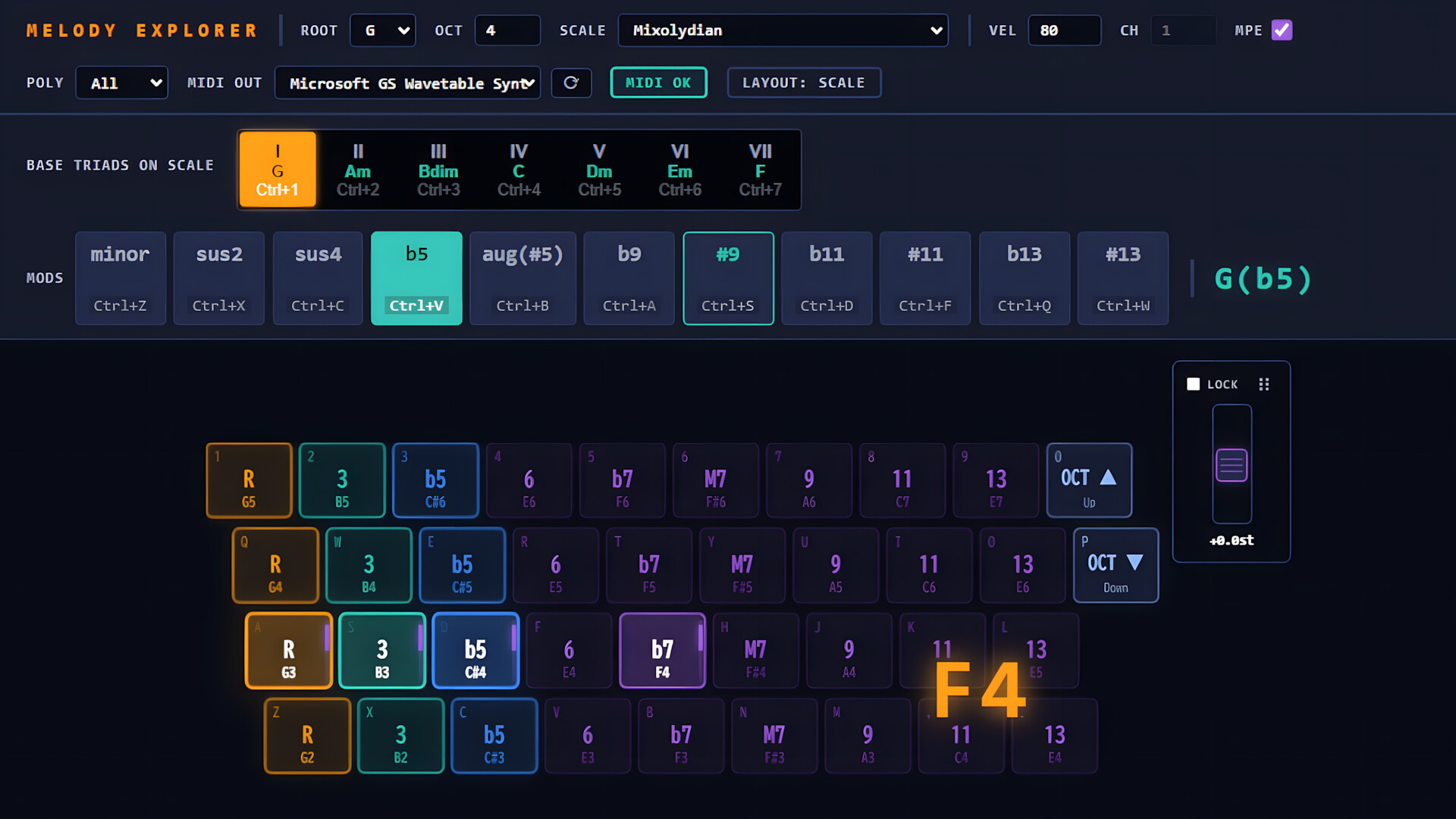
Set the Scale. Follow your dopamine. Melody Explorer turns your QWERTY keyboard into an intuitive, harmoniously safe music production tool. Explore beautiful scales and chords instantly without formal training—zero wrong notes, endless creative inspiration.

Daftar masuk untuk menambah item ini ke senarai hajat anda, ikuti atau tandakannya sebagai diabaikan

Bahasa Bahasa Melayu tidak disokong

Produk ini tidak menyokong bahasa tempatan anda. Sila semak senarai bahasa yang disokong di bawah sebelum membuat pembelian

Demo Percuma

Main Melody Explorer Demo

Lihat permainan penuh


Tentang Demo Ini

Set the Scale. Follow your dopamine.


Melody Explorer Demo is an intuitive, standalone music creation and performance tool designed specifically for QWERTY keyboards, making desktop music production accessible to everyone without requiring any external hardware.

Traditional music creation often requires expensive MIDI controllers, physical space for hardware, extensive muscle memory for piano fingering, and a steep learning curve for music theory. Melody Explorer solves this by using music theory under the hood to map and simplify the PC keyboard layout dynamically based on your selected scale.

Once you set a scale, the software automatically rearranges your keys into an intuitive, harmoniously safe layout. You do not need any formal piano training or theoretical knowledge; simply explore keys following your musical instinct and immediate auditory feedback, confident that you will never play a wrong note.

Key Features available in Demo

  • Smart Scale & Triad Mapping: Select a scale root and mode to instantly generate a list of matching basic triads. Choosing a triad maps your keyboard slots automatically. From left to right, keys are cleanly assigned to the 1st (Root), 3rd, and 5th degrees, followed by essential tension chord intervals.
  • Dynamic Modifiers (MODS): Alter chord structures on the fly using the "MODS" function (e.g., triggering minor shifts, sevenths, or extensions). The UI automatically analyzes the notes and displays the current chord name in real time.
  • Alternative Layouts (Chromatic & Piano): Switch instantly to alternative modes for advanced chord progressions. Hold Shift to trigger a flat Chromatic Layout (ordered in a continuous +9 semitone step per row for seamless diagonal fingering), or press Alt to toggle a standard Piano Layout mapped across 4 rows (white keys on the z/q rows, black keys on the a/1 rows).
  • High-Performance Architecture: Developed as a lightweight Tauri (Rust + TypeScript) desktop application. It runs completely standalone and sends robust MIDI outputs directly to any DAW (Digital Audio Workstation) or software synthesizer setup.
*SteamOS and macOS versions are currently in preparation. The release date is TBD.

Demo Version Limitations

Please note that this Demo version is designed to let you experience the core workflow and responsiveness of Melody Explorer, and features the following functional limitations compared to the full version:
  • Root Note Restriction: The Root note is fixed to C only.
  • Mode Restriction: Selectable modes are limited to Major and Minor only. (The full version features a vast library of 46 different scales, including Diatonic Modes, Bebop, Pentatonic/Blues, and Exotic scales like Hirajoshi).

Target Audience

  • Casual Hobbyists & Music Beginners: Experience the joy of music-making and improvisation without being blocked by technical barriers or theory.
  • Indie Game Developers & Software Engineers: Compose unique, high-quality soundtracks for your own projects while drastically reducing the cognitive load of arrangement.
  • AI-Generated Music Arrangers: Quickly add a human touch, custom chord layers, or counter-melodies over AI-generated tracks.
  • Experienced Composers: A perfect rapid prototyping tool to test complex chord changes right from your laptop keyboard while traveling.

Keperluan Sistem

    Minimum:
    • Memerlukan pemproses 64-bit dan sistem pengendalian
    • OS: Windows 10
    • Pemproses: Intel Core i3 / AMD Ryzen 3
    • Memori: 4 GB RAM
    • Grafik: DX10, DX11, DX12 capable
    • DirectX: Versi 10
    • Storan: 100 MB ruang tersedia
    Dicadangkan:
    • Memerlukan pemproses 64-bit dan sistem pengendalian
    • OS: Windows 10 / 11
    • Pemproses: Intel Core i5 / AMD Ryzen 5
    • Memori: 8 GB RAM
    • Grafik: DX10, DX11, DX12 capable
    • Storan: 100 MB ruang tersedia
Tiada ulasan untuk produk ini

Anda boleh menulis ulasan anda untuk produk ini untuk berkongsi pengalaman anda dengan komuniti. Untuk menulis ulasan anda, gunakan kawasan di atas butang pembelian pada halaman ini.

Penapis Ulasan