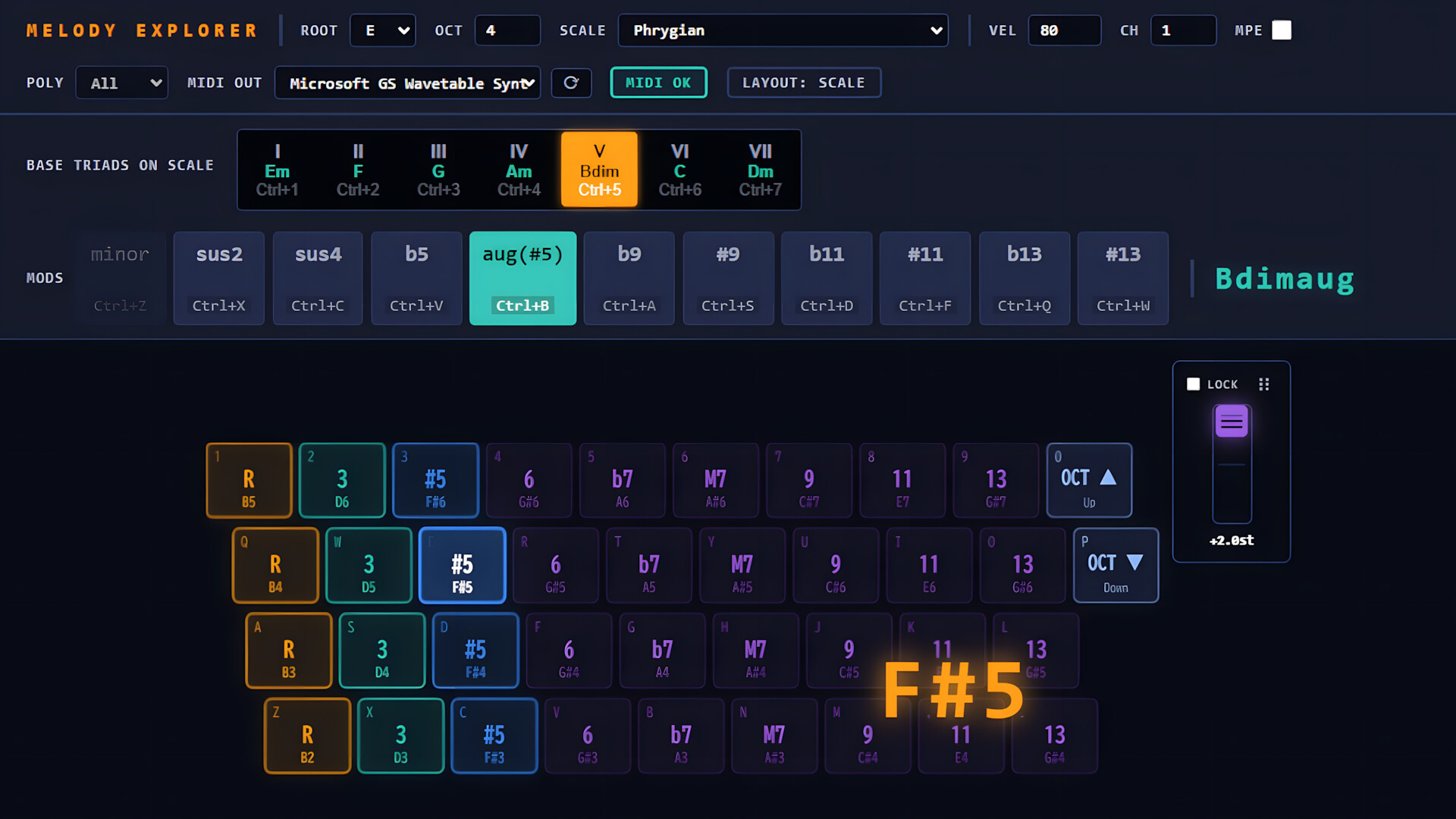
Set the Scale. Follow your dopamine. Melody Explorer turns your QWERTY keyboard into an intuitive, harmoniously safe music production tool. Explore beautiful scales and chords instantly without formal training—zero wrong notes, endless creative inspiration.

Sign in to add this item to your wishlist, follow it, or mark it as ignored

Early Access Software

Get involved with this software as it develops.

Note: This Early Access software is not complete and may or may not change further. If you are not excited to use this software in its current state, then you should wait to see if it progresses further in development. Learn more

What the developers have to say:

Why Early Access?

“Melody Explorer introduces a unique way to create music using a QWERTY keyboard. We are launching in Early Access to gather crucial feedback from indie developers, casual creators, and experienced composers. This will help us refine the user experience, expand the scale library, and ensure robust MIDI compatibility across a wide variety of DAWs and operating systems.”

Approximately how long will this software be in Early Access?

“We plan to keep the software in Early Access for approximately 6 to 12 months. However, this timeline may be adjusted depending on the volume of community feedback and the complexity of implementing requested features.”

How is the full version planned to differ from the Early Access version?

“For the full version, we are planning to enhance the MPE (MIDI Polyphonic Expression) capabilities, allowing for deeper real-time expressive controls. We also plan to optimize the UI/UX based on community feedback, add more advanced workflow customization options, and expand the built-in reference documentation to make music production even more seamless.”

What is the current state of the Early Access version?

“The core functionality is already fully stable and playable. The software currently features 46 distinct scales across various musical genres, smart triad mapping, dynamic chord modifiers (MODS), alternative Chromatic and Piano layouts, and a standalone MIDI output system built with Tauri (Rust + TypeScript).”

Will this software be priced differently during and after Early Access?

“We plan to keep the price the same during Early Access and after the full release, ensuring that early adopters and future users can access the tool under the same affordable pricing structure.”

How are you planning on involving the Community in your development process?

“We highly value community input. Users can share their feedback, report bugs, and request new scales or layout features through our Steam Discussion boards and our community channels. We plan to actively review this feedback to shape our regular updates and guide the development toward the full release.”
Read more
This game is not yet available on Steam

Coming soon

Interested?
Add to your wishlist and get notified when it becomes available.
 
See all discussions

Report bugs and leave feedback for this software on the discussion boards

About This Software

Set the Scale. Follow your dopamine.


Melody Explorer is an intuitive, standalone music creation and performance tool designed specifically for QWERTY keyboards, making desktop music production accessible to everyone without requiring any external hardware.

Traditional music creation often requires expensive MIDI controllers, physical space for hardware, extensive muscle memory for piano fingering, and a steep learning curve for music theory. Melody Explorer solves this by using music theory under the hood to map and simplify the PC keyboard layout dynamically based on the user's selected scale.

Once you set a scale, the software automatically rearranges your keys into an intuitive, harmoniously safe layout. You do not need any formal piano training or theoretical knowledge; simply explore keys following your musical instinct and immediate auditory feedback, confident that you will never play a wrong note.

Key Features

  • Smart Scale & Triad Mapping: Select a scale root and mode to instantly generate a list of matching basic triads. Choosing a triad maps your keyboard slots automatically. From left to right, keys are cleanly assigned to the 1st (Root), 3rd, and 5th degrees, followed by essential tension chord intervals.
  • Dynamic Modifiers (MODS): Alter chord structures on the fly using the "MODS" function (e.g., triggering minor shifts, sevenths, or extensions). The UI automatically analyzes the notes and displays the current chord name in real time.
  • Alternative Layouts (Chromatic & Piano): Switch instantly to alternative modes for advanced chord progressions. Hold Shift to trigger a flat Chromatic Layout (ordered in a continuous +9 semitone step per row for seamless diagonal fingering), or press Alt to toggle a standard Piano Layout mapped across 4 rows (white keys on the z/q rows, black keys on the a/1 rows).
  • Vast Scale Library: Features 46 different scales neatly organized by categories, including Diatonic Modes, Harmonic/Melodic Minor modes, Bebop, Pentatonic/Blues, Symmetric, and Exotic/World scales like Hirajoshi.
  • High-Performance Architecture: Developed as a lightweight Tauri (Rust + TypeScript) desktop application. It runs completely standalone and sends robust MIDI outputs directly to any DAW (Digital Audio Workstation) or software synthesizer setup.
*SteamOS and macOS versions are currently in preparation. The release date is TBD.

Target Audience

  • Casual Hobbyists & Music Beginners: Experience the joy of music-making and improvisation without being blocked by technical barriers or theory.
  • Indie Game Developers & Software Engineers: Compose unique, high-quality soundtracks for your own projects while drastically reducing the cognitive load of arrangement.
  • AI-Generated Music Arrangers: Quickly add a human touch, custom chord layers, or counter-melodies over AI-generated tracks.
  • Experienced Composers: A perfect rapid prototyping tool to test complex chord changes right from your laptop keyboard while traveling.

System Requirements

    Minimum:
    • Requires a 64-bit processor and operating system
    • OS: Windows 10
    • Processor: Intel Core i3 / AMD Ryzen 3
    • Memory: 4 GB RAM
    • Graphics: DX10, DX11, DX12 capable
    • DirectX: Version 10
    • Storage: 100 MB available space
    Recommended:
    • Requires a 64-bit processor and operating system
    • OS: Windows 10 / 11
    • Processor: Intel Core i5 / AMD Ryzen 5
    • Memory: 8 GB RAM
    • Graphics: DX10, DX11, DX12 capable
    • DirectX: Version 10
    • Storage: 100 MB available space
There are no reviews for this product

You can write your own review for this product to share your experience with the community. Use the area above the purchase buttons on this page to write your review.

Review Filters