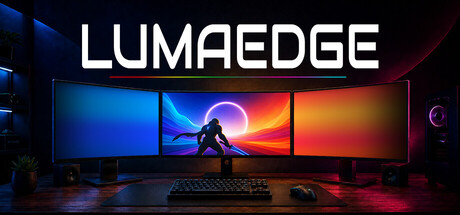
Reactive ambience - no hardware required. Transform your desktop into dynamic ambient lighting that reacts to games, movies, streams, and more. No LED strips. No hubs. Just your existing displays.

Sign in to add this item to your wishlist, follow it, or mark it as ignored

This game is not yet available on Steam

Planned Release Date: October 2026

Interested?
Add to your wishlist and get notified when it becomes available.
 

About This Software

MAKE EVERY SCREEN A PART OF THE EXPERIENCE

Games. Movies. Music. LumaEdge turns the displays you already own into reactive ambient lighting.

Extend color across extra monitors. Fill the black bars on an ultrawide or TV or transform your PC’s audio into a customizable full-screen visualizer.

No LED strips. No lighting hub. Just the screens you already own.

A DIFFERENT APPROACH

Instead of stretching a game or video across every display, LumaEdge keeps it exactly where you choose and samples its edges in real time.

Dense forests seem to extend beyond your screen, neon city lights wash across your entire setup, and bright explosions fill your desk with light. The colour flows naturally into the space around your content, creating a bigger, more immersive experience with virtually no performance impact and none of the usual setup time that comes with traditional multi-monitor gaming or ultrawide fixes. 

TURN UP THE SCREEN

Music, games, microphones, or anything playing through your PC can drive a fully customizable visualizer across an entire display or even on the sides of your ultrawide.
Choose a style, shape the reaction, and let your audio take over the room.

HARDWARE YOU ALREADY OWN

No LED strips. No capture cards. No hubs, controllers, adapters, or anything else to buy.

LumaEdge is software. It runs quietly in the background and turns the screens you already own into reactive ambience. 
An ultrawide?  A television? A multi-monitor setup? HDR? All at the same time? Luma works around your setup, then gets out of the way.  Choose where you want the effect, and where you don't. Then let Luma take it from there. 

WORKS WITH PRETTY MUCH EVERYTHING

LumaEdge doesn't need plugins, game integration, title-specific support, or a new setup every time you switch apps.

Games. Movies. Streams. Browsers. Desktop apps. Whatever you're watching or playing, Luma is ready!

READS YOUR SCREEN, NOT YOUR GAME

LumaEdge uses the same screen capture method as taking a screenshot. It never reads or touches game memory, never stores whats on your screen, and never injects into game processes. It simply reacts to what's already on your display.

MAKE IT YOURS

A subtle glow? Your whole setup bathed in colour? Something completely unhinged? LumaEdge gives you deep control over how it looks, moves and reacts.  
Customize each display individually, save profiles for games, movies, music and moods, then switch between them in seconds.  

AI Generated Content Disclosure

The developers describe how their game uses AI Generated Content like this:

LumaEdge does not contain generative AI features or generate AI content during use.

AI-assisted tools were used to create portions of the multi-monitor environments shown in LumaEdge’s trailers and Steam store artwork. The reactive gradients shown in those materials were captured directly from LumaEdge and composited into the scenes. None of the gradients were AI-generated.

No AI-generated content is included with the LumaEdge software.

System Requirements

    Minimum:
    • Requires a 64-bit processor and operating system
    • OS: Windows 10/11 64-bit
    • Processor: Dual-Core CPU, 2.0GHz or better
    • Memory: 4 GB RAM
    • Graphics: GPU with desktop composition support
    • Storage: 200 MB available space
    • Sound Card: Any
    Recommended:
    • Requires a 64-bit processor and operating system
    • OS: Windows 10/11 64-bit
    • Processor: Quad-Core CPU, 3.0GHz or better
    • Memory: 8 GB RAM
    • Graphics: Dedicated GPU or modern integrated GPU
    • Storage: 500 MB available space
    • Sound Card: Any
Review Filters