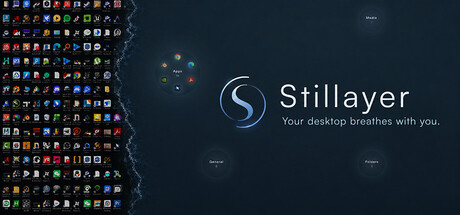
Turn your cluttered desktop into a clean, breathing space — icons settle into glowing pools of light, there when you need them, gone when you don't. A live wallpaper that moves with your cursor. No notifications, nothing to chase.

Sign in to add this item to your wishlist, follow it, or mark it as ignored

Buy Stillayer


About This Software

A wallpaper that breathes

Behind your icons, a soft field of light rises and falls like breath. Move the cursor and it answers; hold still and it settles on its own. Four scenes, each a different kind of quiet:

  • Breathe · Presence — a glow that swells and fades with the breath.

  • Ripple · Stillness — move sharply and the water churns; slow down and it calms itself.

  • Bloom · Being — light blooms wherever you come to rest.

  • Aware · The Watcher — thoughts drift up and dissolve as you watch.

Pick a breathing rhythm — Natural, 4-7-8, Box, or Sigh — and let the light keep the pace.

Start where you are

Stillayer doesn't ask you to change how you use your PC. On day one it's just the wallpaper: your icons stay exactly where they've always been, and the light breathes behind them. Everything beyond that is yours to turn on, one step at a time.

Light Pools, for a work PC

When you're ready, open the Light Pools. Your icons gather into a few glowing pools by kind — apps, media, documents, folders — and the six apps you use most sit right in the Apps pool, arranged like a clock: the one you open most at twelve, the rest clockwise from there. One click launches it. Hover a pool and it blooms open to everything else; right-click any item to reveal the real file.

Nothing gets slower. The things you reach for all day are one click closer than they were on a cluttered grid. The order learns from how you use it, on your machine only — nothing is sent anywhere.

Light Pools, for a home PC

On the machine you come to at the end of the day, turn the icons off. The pools go quiet — a few soft circles of light with a name and a count, nothing else. Everything is still one hover away, but nothing is asking for you. This is the desktop with the least in it that still does everything: the breathing light, and the pools resting on top of it.

Stillayer never moves, renames, or deletes a single file. It only draws a calmer view over what's already there.

Sound that settles

An optional ambient bed — an oceanic drift, softly tuned to 432 Hz — with gentle tones that answer your touch. Turn it on and the room changes. Turn it off and the quiet is just as intended.

Made to disappear

Stillayer is feather-light. Windows are created only when you need them and released when you don't, so while you're working it stays nearly invisible — no churn, no fans spinning up over a wallpaper.

Yours, in ten languages

English · 简体中文 · 日本語 · 한국어 · Русский · Українська · Español · Português · Français · Deutsch

No check-ins. No notifications. No progress bars. Just stillness, made into a place you can keep.

AI Generated Content Disclosure

The developers describe how their game uses AI Generated Content like this:

Stillayer uses AI-assisted tools during development for some pre-generated content: the ambient sound bed (the background audio pad) was created with AI audio generation and then hand-edited by the developer; the interface text and store descriptions were written and localized into multiple languages with AI assistance and reviewed by the developer. All visuals — the desktop scenes, light pools and animations — are hand-coded procedural graphics with no AI-generated artwork. Stillayer does not generate any content at runtime, contains no live AI features, and works fully offline.

System Requirements

    Minimum:
    • Requires a 64-bit processor and operating system
    • OS: Windows 10 (64-bit)
    • Processor: Dual-core 2.0 GHz
    • Memory: 4 GB RAM
    • Graphics: Integrated graphics with hardware acceleration
    • DirectX: Version 11
    • Storage: 300 MB available space
    • Sound Card: Any audio output device
    • Additional Notes: Requires Microsoft Edge WebView2 Runtime. Works offline after installation.
    Recommended:
    • Requires a 64-bit processor and operating system
    • OS: Windows 11 (64-bit)
    • Processor: Quad-core 2.5 GHz or better
    • Memory: 8 GB RAM
    • Graphics: Dedicated or modern integrated GPU with hardware acceleration
    • DirectX: Version 11
    • Storage: 500 MB available space
    • Sound Card: Headphones or speakers recommended
    • Additional Notes: For the best experience, use wallpaper mode on a hardware-accelerated desktop environment.
Review Filters