Infinite Scroll gives you precision control over how your scrolling feels. It unlocks butter-smooth scrolling in sync with your actual mouse feel. You get a responsive and fluid scrolling experience across the modern desktop apps you already use.
Release Date:
Coming soon
Developer:
Publisher:
Tags

Sign in to add this item to your wishlist, follow it, or mark it as ignored

This game is not yet available on Steam

Coming soon

Interested?
Add to your wishlist and get notified when it becomes available.
 

About This Software

Infinite Scroll gives you precision control over how your scrolling feels. It unlocks butter-smooth scrolling in sync with your actual mouse feel. You get a responsive and fluid scrolling experience across the modern desktop apps you already use.

Make Your Mouse Feel Expensive

Infinite Scroll helps ordinary mouse-wheel scrolling feel smoother, cleaner, and more premium. Keep the mouse you already use. See how you like the feel of Long Glide. If it’s not the feel you’re after, use the sliders to tune scrolling until your wheel stops feeling like the cheapest part of your setup.

Sliders autosave as soon as you adjust each one. This enables fast precision tuning. Dial in that exact feel you wish scrolling had that first time you used a mouse, before reality crushed your dreams and conditioned you to settle for mediocre scrolling.

Dual Scroll Engine Architecture

Manual Transmission Engine

When Smooth is unchecked, this engine kicks in. It simulates pure hardware. An engine that feels like physics without bells and whistles. Designed to feel like your actual mouse wheel is spinning, decelerating as you glide down a page.

Smooth Engine

Built on the physics foundation of the Manual Transmission Engine, Smooth Engine is the low-gravity experience that feels good. The higher your monitor's refresh rate, the more you fall in love with it. 120 Hz? Gorgeous. 144 Hz? Phenomenal. More? Life changing.

Built-in Profiles

Long Glide
A luxurious scrolling experience. You get buttery smooth scrolling without sacrificing speed.

Velocity Flick
Feels like standard scrolling but smoother per notch, until you flick that wheel hard or start rapid flicking and stuff on your screen goes by so fast.

Manual Transmission
If you enjoy standard scrolling but want to make your mouse feel like it got a high-end scroll wheel upgrade, this is the one for you. While you scroll slow, it's like Infinite Scroll isn't even there. Once you speed up the engine kicks in.

Infinite Glide
Great for skimming content hands-free. This one may give a dopamine rush.

"After I started using Infinite Glide on my social media feed, my life fell apart. I lost my wife, house and dogs. No regrets, 10/10" - LousyNPC

Infinite Immersion
Best for webcomics and pleasure reading. Cinematic slowness for maximum experience absorption.

Pick Your Scroll Flavor

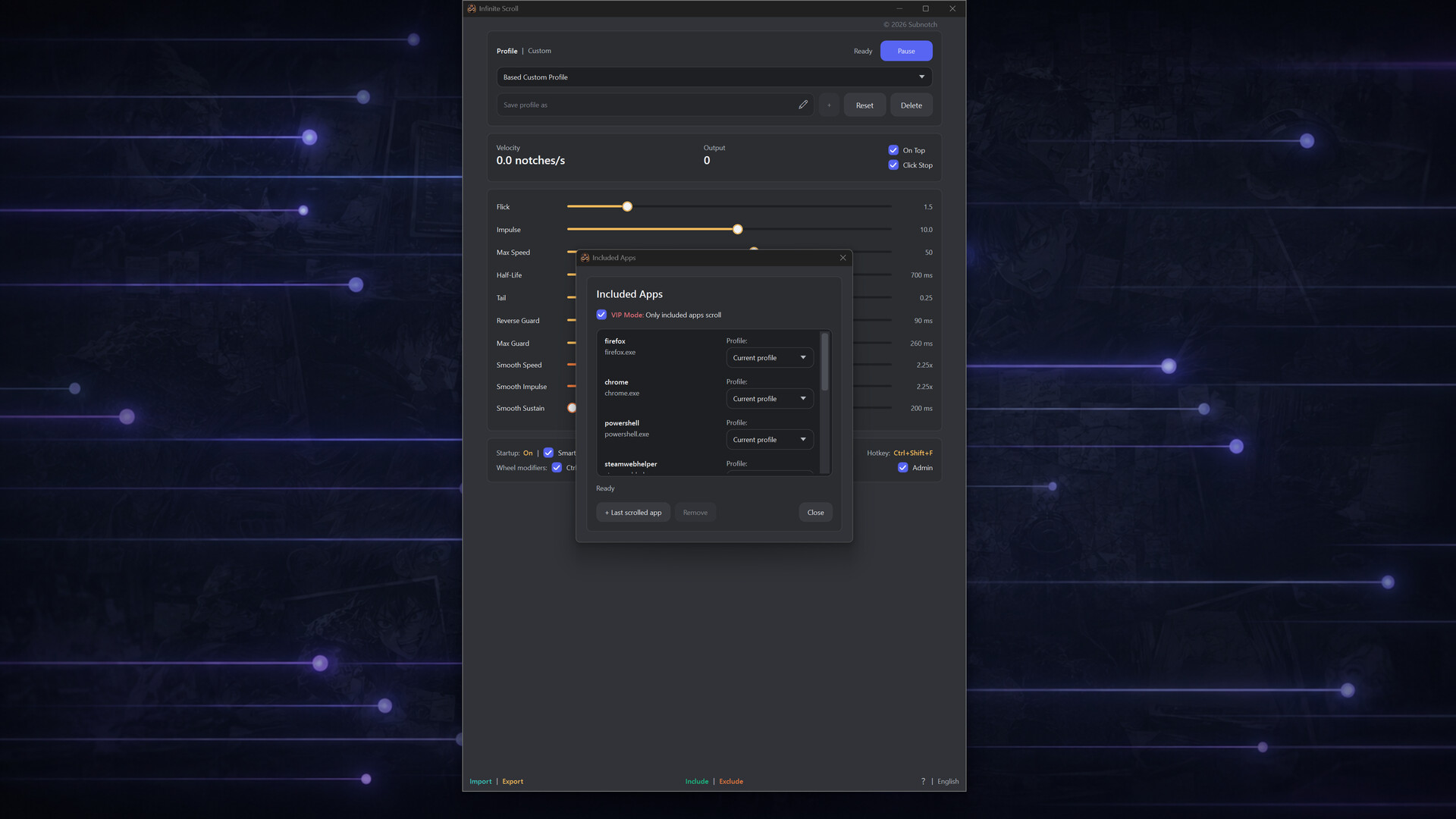
Not every app wants the same scroll feel. Go smooth, fast, mechanical, momentum-heavy, or slow and cinematic depending on what you're doing. When you add an app to the Included list, you can select exactly which scrolling profile that app will use. Or stay flexible. Right-click the tray icon to switch profiles as you go.

Works Where You Actually Scroll

Whether it's a webcomic in a web browser, a news article, blog post, fanfic, chat window, you name it. If it can be scrolled, Infinite Scroll will make it feel so good that going back... NANI!? What's that?

It works across modern desktop software, improving productivity and immersion by keeping you in a state of flow while you scroll.

Smooth, Not Floaty

Bad smooth scrolling feels fake and unresponsive. Infinite Scroll is tuned to stay connected to your actual wheel movement. Scrolling gets smoother without turning into uncontrollable mush.

Features

  • Two scrolling engines.

  • One-time purchase

  • Expensive mouse not required for luxury scrolling.

  • Human-tuned built-in profiles.

  • Quickly finetune the feel of Infinite Scroll to match your taste.

  • Once you love it, export your finetune as a custom profile to keep it safe and share with others.

  • Included Apps list that uses currently selected profile, or a per-app profile, where you add your last scrolled app by scrolling in it instead of having to type the .exe name.

  • Same for Exclude. Scroll the app you want to exclude and Infinite Scroll will ignore it.

  • Starts to tray with your PC for a seamless integrated experience.

  • Justifies high refresh rate monitor.

  • Multi-monitor environments are supported.

AI Generated Content Disclosure

The developers describe how their game uses AI Generated Content like this:

Some store page artwork and app icons were AI-assisted, then edited in Photoshop with AI-powered tools.

System Requirements

    Minimum:
    • Requires a 64-bit processor and operating system
    • OS: Windows 10 22H2, 64-bit
    • Processor: Any dual-core x64 processor
    • Memory: 2 GB RAM
    • Graphics: Any Windows-compatible graphics
    • DirectX: Version 11
    • Storage: 250 MB available space
    • Additional Notes: Mouse with mostly functional scroll wheel required.
    Recommended:
    • Requires a 64-bit processor and operating system
    • OS: Windows 11, 64-bit
    • Processor: Modern dual-core x64 processor or better
    • Memory: 4 GB RAM
    • Graphics: Any Windows 11-compatible graphics
    • DirectX: Version 12
    • Storage: 250 MB available space
    • Additional Notes: Any mouse. Luxury behavior.
There are no reviews for this product

You can write your own review for this product to share your experience with the community. Use the area above the purchase buttons on this page to write your review.

Review Filters