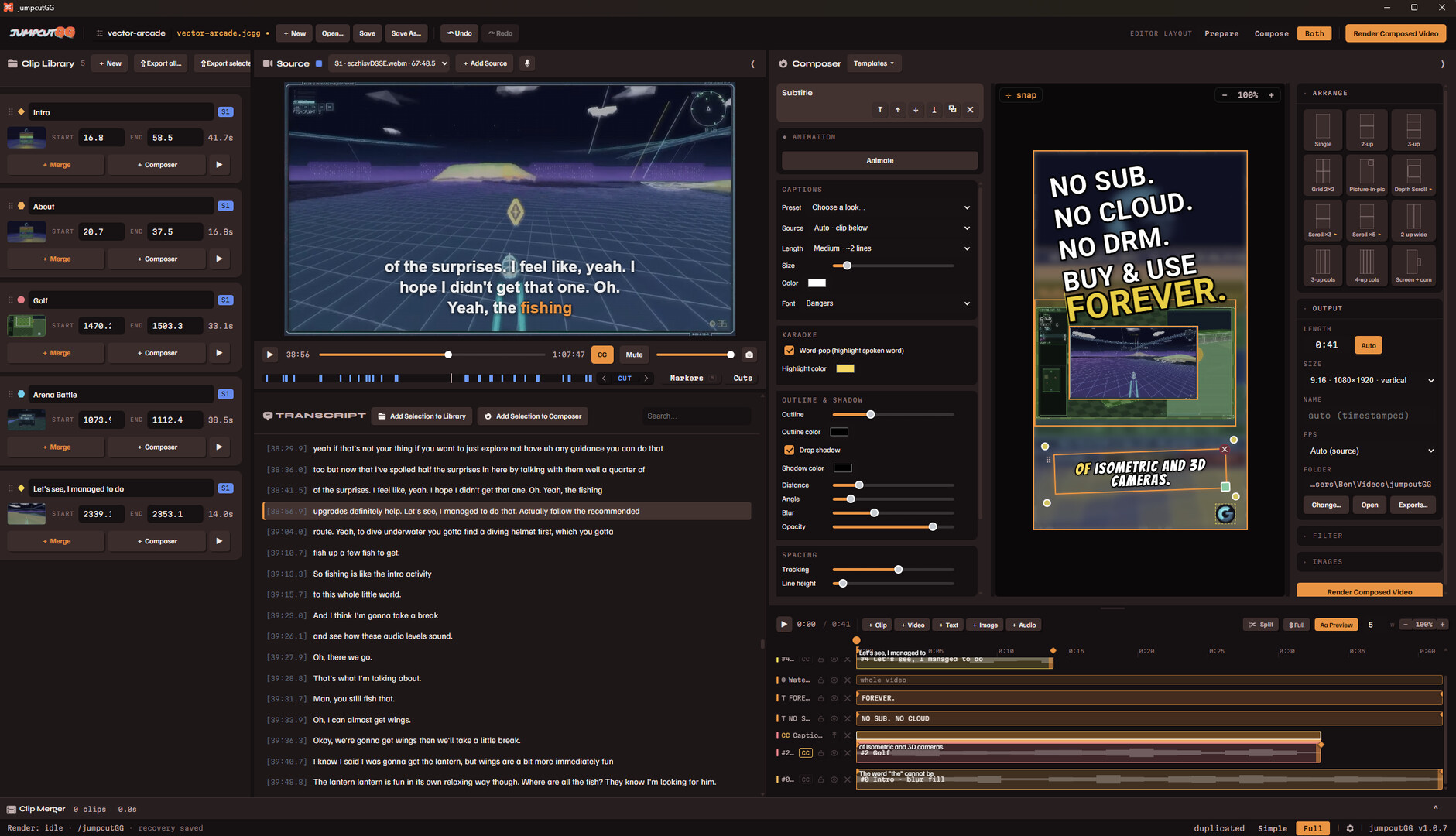
A video editor minus the subscription. Auto-transcribe and clip from the words, build your cut on the timeline, customize the layout, layer captions+graphics, add keyframe anims, then export to any aspect ratio. Runs on your PC - GG NO SUB - Demo is full version with small watermark

Sign in to add this item to your wishlist, follow it, or mark it as ignored

Buy jumpcutGG


About This Software

Ditch your expensive cloud editor subscription for good, own your tools!

Stop Scrubbing and Start Clipping

JumpcutGG is a full video editor that helps you turn long gameplay VODs into share-ready clips and videos, with everything you need: auto-transcription, text-to-clip, easy captions, keyframe animations, full layout composer, templates, plugins, and more all running locally on your machine.

Missing a feature you need? Head over to the Feature Request Steam forum, JumpcutGG is still seeing regular free updates!

Buy It Once, Use It Forever

No subscription. No monthly fee. No account required to edit. No features hidden behind paywalls. No data collection/tracking/training.

Pay once and it's yours to use as much as you want for as long as you want, this software comes from a developer tired of constant data harvesting and subscriptions for everything. 

Clip Straight From the Words

Your video gets transcribed automatically on import, just highlight a line and make a clip. No more scrubbing, listening, scrubbing listening, etc; the clip you're looking for is just a ctrl+f away!

You can either one-click export these clips or use them with the sequence/layout composer for more control.

Cut the Dead Air

Tighten Silence cuts the pauses and filler out of any clip using the word timings from the transcript.

One click on a clip card and the ums, dead air between sentences, and delays reading chat are gone.

Timeline and Full Layout Composer

Cut together your clips and then frame them however you like. Layer them with captions, titles, and overlays. Style your text with fonts, outlines, shadows, and more then position everything just how you need it or use the built in preset layouts to try out looks quickly.

Custom One-Click Templates

Use the layout composer to create custom templates for use with one click clips!  Get your signature look consistent across all of your videos, all from one click.

Any Aspect Ratio

Export vertical shorts or keep it landscape for a standard upload. Or go all out with it, who doesn't have a need for 8192 x 200 resolution videos every now and then?

Just GIF It

Easily convert exported clips into animated gifs! Or is it animated gifs? (That joke doesn't work in text...)

Extend It With Plugins

Use Javascript to add new custom tools and features to jumpcutGG.  Includes two demo plugins focused on looking up TCG cards, their art, and info.

Note: Only add plugins from authors you trust!

Runs On Your Machine

Transcription and rendering happen on your own computer. No cloud involved, nothing gets uploaded to a server, your footage stays on your machine.

Windows at launch, Mac and Linux builds to follow soon after.

AI Generated Content Disclosure

The developers describe how their game uses AI Generated Content like this:

Whisper running locally on your machine is used for the speech-to-text dictation and transcribing of your own footage alone and nothing else.
No connecting to any servers, no uploading or training, and no creative decisions are handed over.

For additional languages, the UI was auto translated to bring jumpcutGG to as many people as possible. If you have any corrections, improvements, or would be interested in translating it into an additional language please contact jumpcutGG@gmail.com, thank you!

System Requirements

    Minimum:
    • Requires a 64-bit processor and operating system
    • OS: Windows 11 64-bit
    • Processor: 8-core x64
    • Memory: 8 GB RAM
    • Graphics: NVIDIA, AMD, or Intel GPU with hardware H.264 encoding (NVENC/AMF/QSV) - speeds up clip rendering
    • DirectX: Version 11
    • Storage: 750 MB available space
    Recommended:
    • Requires a 64-bit processor and operating system
    • OS: Windows 11 64-bit
    • Processor: 8-core x64
    • Memory: 8 GB RAM
    • Graphics: NVIDIA, AMD, or Intel GPU with hardware H.264 encoding (NVENC/AMF/QSV) - speeds up clip rendering
Review Filters