Stop Scrubbing. Start Clipping. Auto-transcribe your gameplay and clip straight from the words, no dragging a playhead for hours. Build the cuts on the timeline, customize the layout, layer captions and overlays then export to any aspect ratio. Runs local on your PC. Buy it once, no subscription.

Melden Sie sich an, um dieses Produkt zu Ihrer Wunschliste hinzuzufügen, zu abonnieren oder als „Ignoriert“ zu markieren.

Dieses Spiel ist noch nicht auf Steam verfügbar

Geplantes Veröffentlichungsdatum: Juli 2026

Interesse? Fügen Sie das Spiel Ihrer Wunschliste hinzu und erhalten Sie eine Benachrichtigung, wenn es verfügbar ist.
 

Über diese Software

Stop Scrubbing. Start Clipping.

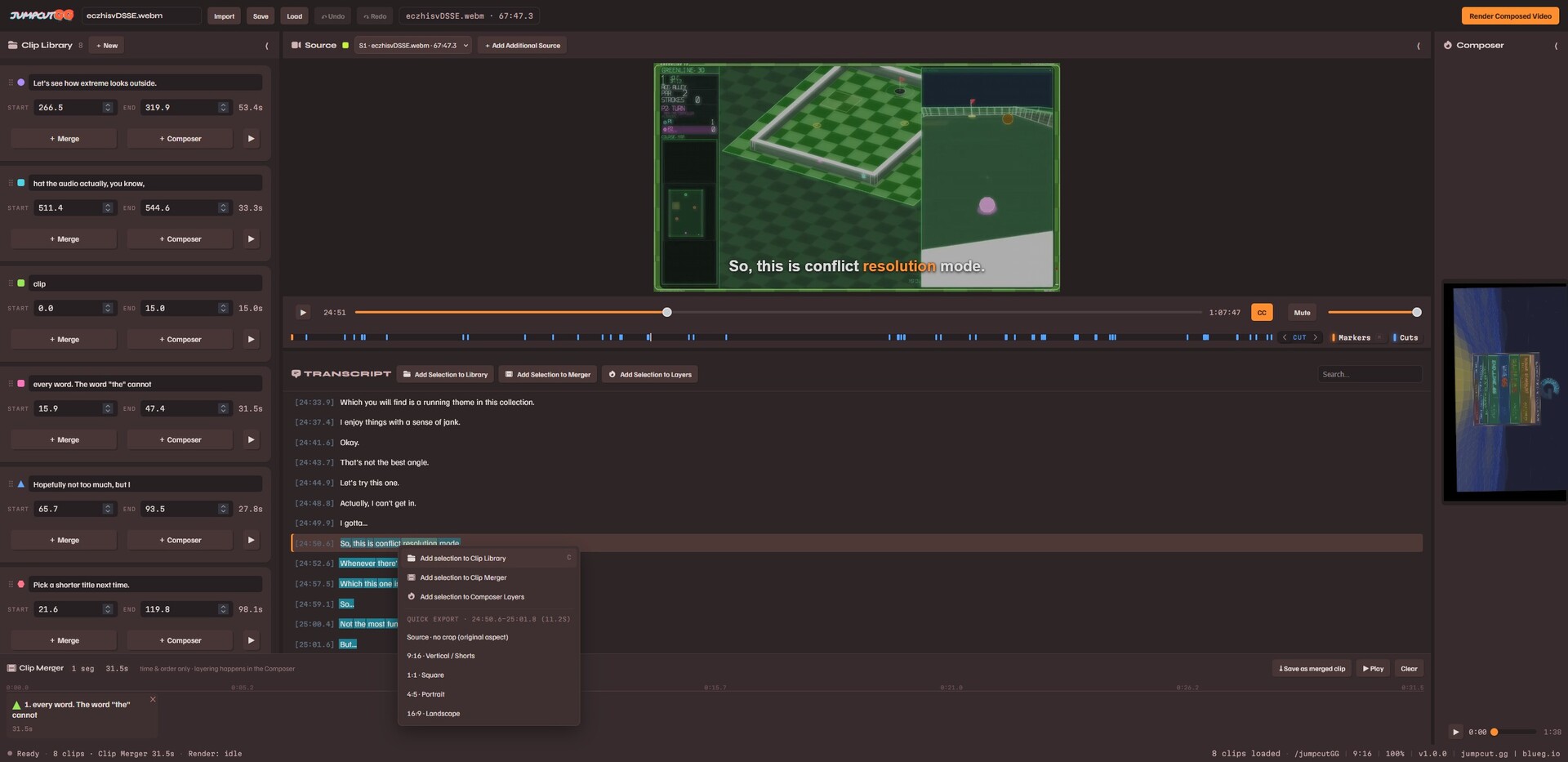
JumpcutGG helps you turn long gameplay VODs into share-ready clips and videos, fast. It transcribes your footage on your own machine, then lets you cut by highlighting the transcript instead of dragging a playhead around for hours.

Put it all together with the built in layout editor and export at any aspect ratio you need.

Buy It Once, Use It Forever

No subscription. No monthly fee. No account required to edit. No features hidden behind paywalls. 

Pay once and it's yours to use as much as you want for as long as you want.

And no data collection or anything along those lines to 'explain' the the low price-tag, this software comes from a developer being sick to death of data harvesting and subscriptions for everything.

Clip Straight From the Words

Your VOD gets transcribed automatically. Highlight a line, make a clip. What used to take an afternoon of scrubbing takes minutes.

Build Your Sequence

Drop clips onto the timeline to set their order and timing. Trim, reorder, and build the exact sequence you want. 

Full Layout Composer

Frame your cut however you like. Layer gameplay, captions, titles, and overlays. Style your text with fonts, outlines, shadows, and spacing. Position everything exactly where you want it.

Any Aspect Ratio

Export vertical shorts or keep it landscape for a standard upload.

Runs On Your Machine

Transcription and rendering happen on your own computer. No cloud involved, nothing gets uploaded to a server, your footage stays on your machine (until you upload your sweet export, that is!)

Windows at launch, Mac and Linux builds to follow soon after.

Systemanforderungen

    Mindestanforderungen:
    • Setzt 64-Bit-Prozessor und -Betriebssystem voraus
    • Betriebssystem: Windows 11 64-bit
    • Prozessor: 8-core x64
    • Arbeitsspeicher: 8 GB RAM
    • Grafik: NVIDIA, AMD, or Intel GPU with hardware H.264 encoding (NVENC/AMF/QSV) — speeds up clip rendering
    • DirectX: Version 11
    • Speicherplatz: 750 MB verfügbarer Speicherplatz
    Empfohlen:
    • Setzt 64-Bit-Prozessor und -Betriebssystem voraus
    • Betriebssystem: Windows 11 64-bit
    • Prozessor: 8-core x64
    • Arbeitsspeicher: 8 GB RAM
    • Grafik: NVIDIA, AMD, or Intel GPU with hardware H.264 encoding (NVENC/AMF/QSV) — speeds up clip rendering
Für dieses Produkt gibt es keine Rezensionen

Sie können Ihre eigene Rezension für dieses Produkt verfassen, um Ihre Erfahrungen mit der Community zu teilen. Nutzen Sie den Bereich über den Schaltflächen zum Kaufen, um Ihre Rezension zu verfassen.

Filter überprüfen