A simple desktop soundboard that lets you play audio clips directly through your microphone in any game or voice chat. Instantly expand your collection of audio clips with full Steam Workshop and Linux support. Perfect for streamers or trolling your friends!

Sign in to add this item to your wishlist, follow it, or mark it as ignored

Buy SoundRelay


About This Software

Take Control of Your Voice Chat

Elevate your gaming lobbies, live streams, and Discord calls. SoundRelay is a modern, high-performance desktop soundboard built specifically to inject custom audio directly into your microphone feed. Whether you want to drop the perfect sound effect in a clutch moment, troll your friends in proximity chat, or enhance your tabletop RPG streams, you can trigger your favorite audio clips with zero hardware stutter.

Unlike legacy soundboards that rely on outdated frameworks, SoundRelay leverages hardware-accelerated audio processing to deliver native-level performance without suffocating your CPU while you game.

Key Features

  • Endless Audio via Steam Workshop: Never run out of sounds. Browse, download, and share thousands of community-created audio clips, memes, and sound effects right from the app. With instant subscription syncing, automatic dead-file cleanup, and an intuitive tag filtering system, your library grows as fast as the community does.

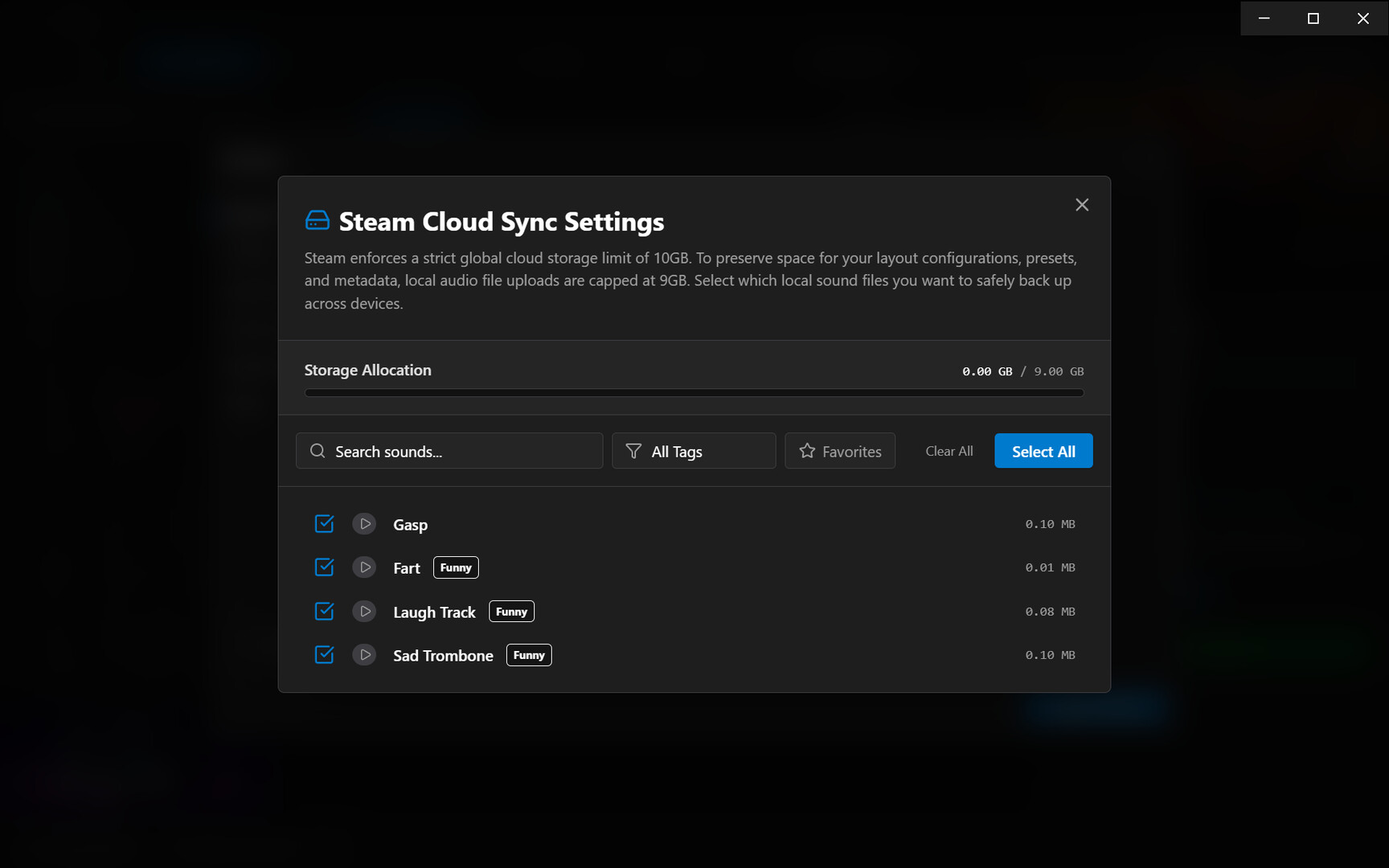
  • Intelligent Steam Cloud Sync: We built a custom data-reconciliation engine to protect your library. Because Steam imposes a strict 10GB cloud limit, SoundRelay smartly reserves 1GB exclusively for your lightweight layouts, hotkeys, and metadata. You maintain complete control over the remaining 9GB, allowing you to selectively opt-in your heaviest audio files for cross-device syncing without ever breaking your save data.

  • Seamless Mic Injection: Play audio clips directly through your microphone. Your friends, teammates, and stream viewers will hear the audio crystal clear, perfectly mixed with your actual voice.

  • Zero Latency Performance: Offloaded audio math and OS-level routing mean your audio plays the exact millisecond you press the global hotkey, with virtually zero impact on your game's framerate.

  • Modern, Customizable UI: A sleek, industrial interface designed for speed. Organize your sounds with custom tags, visual icons, and personalized preset banks.

System Requirements & Technical Notes

Windows Users: Microphone Routing Setup SoundRelay functions flawlessly out of the box as a local desktop soundboard. However, to bypass strict Windows operating system limitations and broadcast sound directly into your microphone feed for games (like Counter-Strike 2, Lethal Company) or Discord, a free, third-party virtual audio driver is required.

  • We highly recommend using a free virtual audio cable (such as VB-Cable).

  • You don't need to be an audio engineer to configure it! SoundRelay includes an in-app "OS Mic Setup" guide that will walk you step-by-step through downloading the driver and configuring your Windows settings for perfect, echo-free routing.

Linux & Steam Deck Support SoundRelay features first-class support for the Linux desktop ecosystem. It bypasses complex sandboxes to communicate directly with both PipeWire and PulseAudio, automatically generating native virtual audio sinks on the fly.

  • Steam Deck: Runs flawlessly for all your handheld proximity-chat needs.

  • Display Server Dependencies (X11 vs. Wayland): Please note that SoundRelay's global hotkey engine requires an X11 environment (or XWayland). Due to Wayland's strict security protocols against global key-logging, background keystrokes cannot be intercepted by default on native Wayland sessions. Wayland users will need to utilize alternative desktop environment shortcuts or switch to X11 to trigger sounds while focused on other gaming windows.

AI Generated Content Disclosure

The developers describe how their game uses AI Generated Content like this:

AI was used throughout the development of this Application. Many aspects of the UI and audio optimization were created by AI tools.

System Requirements

Windows
SteamOS + Linux
    Minimum:
    • OS: Windows 10, 11
    • Processor: 2.0 GHz Dual-Core
    • Memory: 4 GB RAM
    • Graphics: DirectX 11 compatible graphics card
    • Storage: 500 MB available space
    Recommended:
    • OS: Windows 10, 11
    • Processor: 2.5 GHz Quad-Core Processor or better
    • Memory: 8 GB RAM
    • Graphics: DirectX 11 compatible graphics card
    • Storage: 2 GB available space
    Minimum:
    • OS: SteamOS 3.0+ (64-bit)/similarly packaged distros
    • Processor: 2.0 GHz Dual-Core
    • Memory: 4 GB RAM
    • Graphics: OpenGL 3.2+ / Vulkan compatible graphics card
    • Network: Broadband Internet connection
    • Storage: 500 MB available space
    Recommended:
    • OS: SteamOS 3.0+ (64-bit)/similarly packaged distros
    • Processor: 2.5 GHz Quad-Core Processor or better
    • Memory: 8 GB RAM
    • Graphics: OpenGL 3.2+ / Vulkan compatible graphics card
    • Network: Broadband Internet connection
    • Storage: 2 GB available space

Customer reviews for SoundRelay About user reviews Your preferences

Overall Reviews:
No user reviews


To view reviews within a date range, please click and drag a selection on a graph above or click on a specific bar.


Filter reviews by the user's playtime when the review was written:


No minimum to No maximum

Show reviews in selected display order


Learn More
Filters
Excluding Off-topic Review Activity
Playtime:
Played Mostly on Steam Deck
Operating System:
CPU:
GPU:
Device Type:
Review Filters