PawPaint is a modern 3D model painting software that has been crafted with you in mind, focused on being the best 3D painting software for VRChat avatar creators, 3d modelers and hobbyists. Featuring non-destructive layers, masks, modifiers, a bundled asset library, and game-ready export up to 4K.

Sign in to add this item to your wishlist, follow it, or mark it as ignored

Early Access Software

Get involved with this software as it develops.

Note: This Early Access software is not complete and may or may not change further. If you are not excited to use this software in its current state, then you should wait to see if it progresses further in development. Learn more

What the developers have to say:

Why Early Access?

“PawPaint is in early access so that we can get real user feedback to implement the features that the community wants and iron out bugs along the way. We're making out best efforts to shape this program around the communities that will use it the most.”

Approximately how long will this software be in Early Access?

“We plan on making continued improvements to PawPaint over the next year while we implement the most popularly requested features. Once we feel that we have the program in a sable and community-satisfied state then we will fully release it.”

How is the full version planned to differ from the Early Access version?

“We plan on adding mesh-derived procedural bakes (AO/curvature/position/thickness), as well as mask-generators that reference each bake. We also plan on implementing a way to add and edit values linked directly to assets from the library, for example the "softness" or "midway point" of a gradient mask. We hope to also eliminate as many user-found bugs as possible along the way.”

What is the current state of the Early Access version?

“We have currently implemented every feature listed and shown in the "About This Game" section - please refer to that for a list of what features the program currently comes with. We have tested and expect everything to work as intended, and will be fixing any user-reported bugs along the way.”

Will this software be priced differently during and after Early Access?

“PawPaint will increase in price when it fully releases.”

How are you planning on involving the Community in your development process?

“PawPaint users can contact us through the "Bugs / Features" tab at the top of the program to submit a bug report or a feature request. We will be reading every email as we want the community to feel as heard as possible.”
Read more

Buy PawPaint

 
See all discussions

Report bugs and leave feedback for this software on the discussion boards

About This Software

PawPaint is the latest 3D model painting software that has been built with you in mind. Featuring 5 painting channels (color, roughness, metallic, normal and height) that can be painted individually, together or mixed and matched, PawPaint is perfect for getting your desired look in the texturing phase. Want to find out more? Take a quick scroll to see some of our awesome features.

Buy it once? It's yours!

We believe that creative tools should be something that you own, so PawPaint has no subscription and never will. No locked features, no pro tier, no monthly costs. You buy it, you own it. Every future update will be included with your purchase, and we greatly appreciate your support by purchasing PawPaint.

Layer Stacks

Materials are built as layer stacks, similar to any 2D image editor/drawing software. The layer panel can host paint layers, fill layers, folders, masks, blend modes, and modifiers you can stack and reorder. Nothing here is destructive. You can save layers, masks and folders as presets and easily use them into your next project.

Model Painting

The paint engine runs efficiently on the GPU meaning strokes stay smooth even on 4K textures. There's customizable 3 axis symmetry, an eyedropper tool, an RGB color wheel, and a UV view that you can paint on whenever you like.

Import and Export

You can import FBX, OBJ, glTF and most other common formats into PawPaint. Models import with their shape keys, so you can preview them while you paint. When you're done, export PNG, TGA or EXR texture sets, or pack the whole thing into a glTF/GLB file.

Asset Library

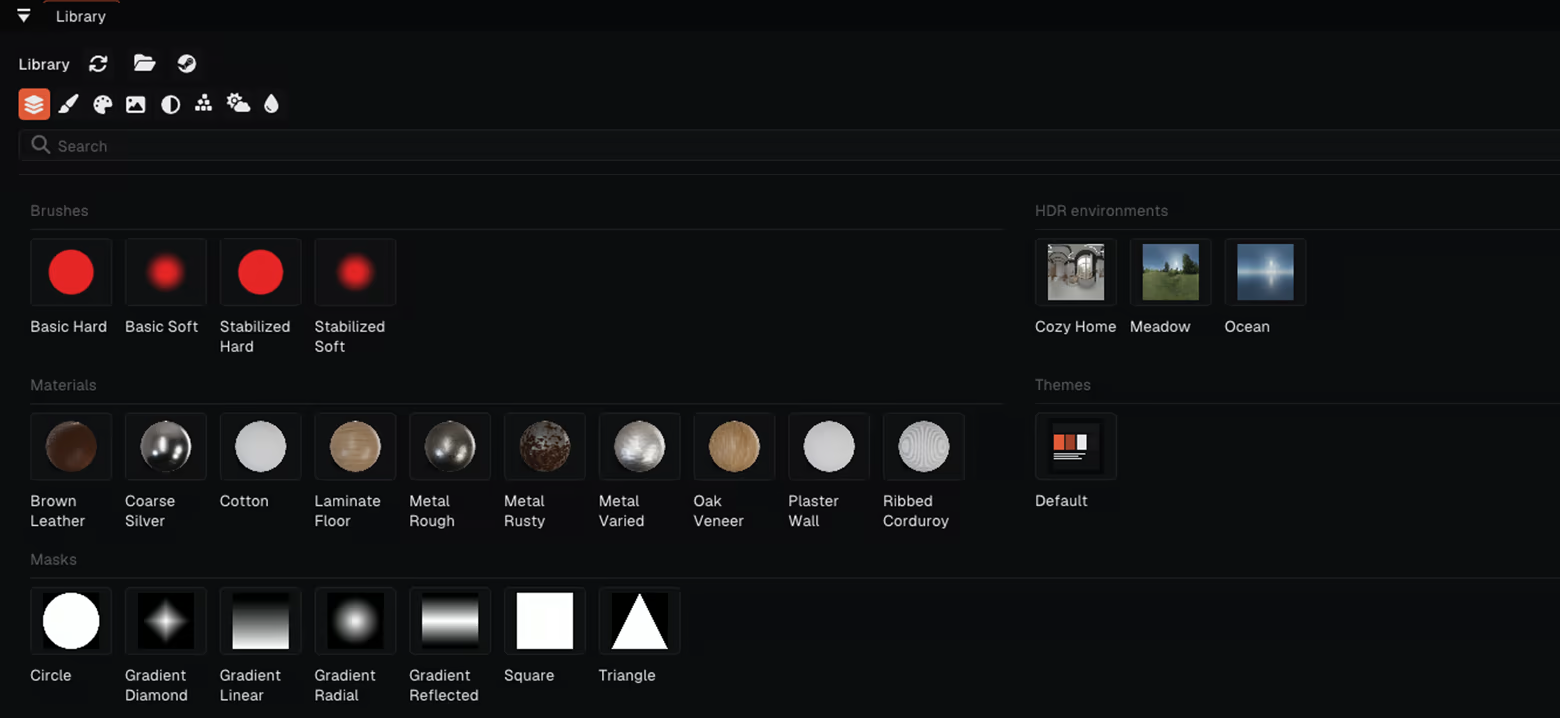
PawPaint comes with a library for brushes, materials, stamps, masks and HDRI environments, which can be easily used in any project. We also have an integrated Steam Workshop page that links directly to the library, where you can browse, use and create community made assets.

Plugins, Themes, and Shortcuts

Every keyboard shortcut can be rebound to whatever key or combination suits you best! The UI theme is customizable, and themes are just files meaning that you can share them with your friends. There's also a sandboxed Lua plugin API if you want to script tools of your own.

Feature List:

  • PBR channel painting: albedo (color), roughness, metallic, normal, height

  • Real-time rendered viewport lit by HDR environments

  • Paint layers, fill layers, folders, masks, blend modes, modifiers

  • Optimized painting system

  • Brush symmetry, color wheel, eyedropper tool

  • 2D painting in the UV view

  • Per-material stacks and resolution, up to 4096²

  • Library for brushes, materials, stamps, masks and HDRIs

  • Shape-key / blendshape previews

  • Imports FBX, OBJ, glTF and more; exports PNG, TGA, EXR, glTF/GLB

  • Full undo history, rebindable keyboard shortcuts, sharable themes, Lua plugins

  • One price. No subscription, no paywalled features, all updates included.

System Requirements

    Minimum:
    • Requires a 64-bit processor and operating system
    • OS: Windows 10 64-bit
    • Processor: Quad-core CPU (Intel Core i5-4460 / AMD FX-8350)
    • Memory: 8 GB RAM
    • Graphics: OpenGL 4.5 GPU, 2 GB VRAM (GeForce GTX 750 Ti / Radeon R7 260X / Intel HD 530)
    • Storage: 1 GB available space
    • Additional Notes: Requires OpenGL 4.5 (compute shaders). Integrated graphics works for 1K-2K textures; a dedicated GPU is recommended.
    Recommended:
    • Requires a 64-bit processor and operating system
    • OS: Windows 10 / 11 64-bit
    • Processor: Intel Core i5-8400 / AMD Ryzen 5 2600
    • Memory: 16 GB RAM
    • Graphics: Dedicated GPU, 6-8 GB VRAM (GeForce GTX 1060 6 GB / Radeon RX 580 8 GB)
    • Storage: 2 GB available space
    • Additional Notes: 8 GB VRAM recommended for 4K multi-material projects.
There are no reviews for this product

You can write your own review for this product to share your experience with the community. Use the area above the purchase buttons on this page to write your review.

Review Filters