A powerful Windows automation tool with multi-point auto clicking, visual sequence flows, macro recording, image and pixel detection, scheduling, profiles, safety controls, and quick/advanced modes.

เข้าสู่ระบบ เพื่อเพิ่มผลิตภัณฑ์นี้ลงในสิ่งที่อยากได้ของคุณ ติดตาม หรือทำเครื่องหมายเป็นถูกละเว้น

ไม่รองรับภาษาไทย

ผลิตภัณฑ์นี้ไม่รองรับภาษาท้องถิ่นของคุณ โปรดตรวจสอบรายชื่อภาษาที่รองรับก่อนทำการสั่งซื้อ

ซื้อ Multi Auto Clicker

ข้อเสนอช่วงแนะนำ! ข้อเสนอจะสิ้นสุดในวันที่ 21 กรกฎาคม

ซื้อ Infinite Clicker Bundle ชุดรวม (?)

มี 5 ผลิตภัณฑ์: Multi Auto Clicker, Apprentice's Cache, Archmage's Treasury, Forbidden Vault, The Distant Lands

-35%
-13%
$5.82
$5.07
 

เกี่ยวกับซอฟต์แวร์นี้

Multi Auto Clicker is a flexible desktop automation tool for Windows, built for users who need precise, repeatable, and easy-to-control mouse and keyboard automation.

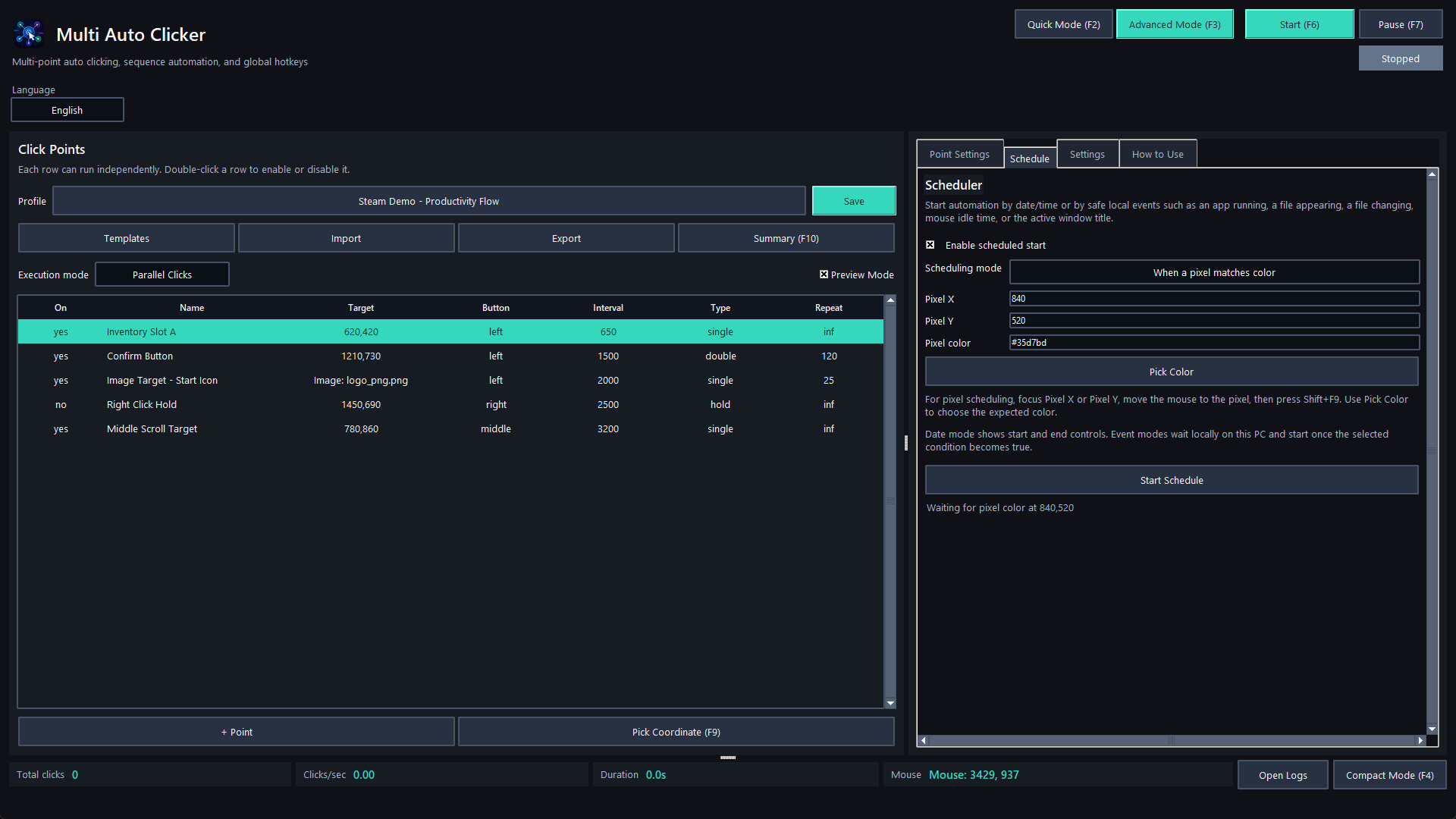
Start simple with Quick Mode: add one or more click points, choose the mouse button, set the interval, and run. When you need more control, switch to Advanced Mode to build full automation profiles with parallel click points, step-based sequences, macro recording, random areas, visual flow editing, scheduling, image targets, pixel checks, and safety controls.

Create independent click points with their own coordinates, mouse button, click type, interval, delay, repeat rules, random offsets, random timing, hotkeys, sounds, image targets, and human-like movement options. Run them together, organize them into structured sequences, or use random area clicking for broader automation scenarios.

For advanced workflows, Multi Auto Clicker includes a visual Flow Editor, a Macro Recorder, conditional logic, scheduler triggers, and reusable profiles. You can combine clicks, waits, key presses, text input, clipboard actions, mouse movement, drag actions, sound alerts, window focus steps, image detection, pixel color checks, and conditional branches into reusable automation setups.

Key Features

  • Quick Mode for simple click automation

  • Advanced Mode for detailed automation workflows

  • Multi-point parallel clicking

  • Step-based sequence automation

  • Visual Flow Editor with conditional branches

  • Macro Recorder with editable recorded actions

  • Image target clicking

  • Pixel color detection

  • Random area clicking with editable polygon points

  • Human-like mouse movement

  • Randomized intervals, offsets, and click chance

  • Global hotkeys

  • Coordinate capture hotkeys

  • Scheduler with time, app, file, clipboard, window, idle, and pixel triggers

  • Profiles with save, import, export, duplicate, templates, and health checks

  • Run summary reports with TXT and CSV export

  • Preview Mode / Dry Run for safe testing

  • Compact Mode for minimal control while working

  • Dark and light themes

  • Accessibility options

  • Safety controls including emergency stop and failsafe behavior

Multi Auto Clicker is designed for productivity tasks, testing workflows, repetitive desktop actions, QA routines, UI automation, and controlled personal automation where clarity, stability, and safety matter.

Important Notice

Before using Multi Auto Clicker with any game, online service, platform, or third-party software, review that product's Terms of Service, rules, and automation policy. Some games or services may prohibit automation tools, macros, auto clickers, image detection, or input simulation. You are responsible for how you use this application.

ความต้องการระบบ

    ขั้นต่ำ:
    • ต้องการโปรเซสเซอร์และระบบปฏิบัติการแบบ 64 บิต
    • ระบบปฏิบัติการ: Windows 10 64-bit
    • โปรเซสเซอร์: Intel Core i3 or equivalent
    • หน่วยความจำ: แรม 4 GB
    • กราฟิกส์: Integrated graphics
    • พื้นที่จัดเก็บข้อมูล: พื้นที่ว่างที่พร้อมใช้งาน 200 MB
    แนะนำ:
    • ต้องการโปรเซสเซอร์และระบบปฏิบัติการแบบ 64 บิต
ไม่พบบทวิจารณ์สำหรับผลิตภัณฑ์นี้

คุณสามารถเขียนบทวิจารณ์ของคุณเองสำหรับผลิตภัณฑ์นี้เพื่อแบ่งปันประสบการณ์ของคุณให้กับชุมชน ใช้พื้นที่ด้านบนของปุ่มซื้อในหน้านี้เพื่อเขียนบทวิจารณ์ของคุณ

ตัวกรองบทวิจารณ์