A cottagecore typing companion. A transparent flower garden lives just above your taskbar and blooms as you write, code, and chat. Sell flowers for coins, attract bees and butterflies, build a garden out of the hours you already spend at the keyboard.

Melden Sie sich an, um dieses Produkt zu Ihrer Wunschliste hinzuzufügen, zu abonnieren oder als „Ignoriert“ zu markieren.

Dieses Spiel ist noch nicht auf Steam verfügbar

Bald verfügbar

Interesse? Fügen Sie das Spiel Ihrer Wunschliste hinzu und erhalten Sie eine Benachrichtigung, wenn es verfügbar ist.
 

Infos zum Spiel

Butterflies & Bloom is a quiet typing companion that lives above your taskbar. A row of flowers grows there, one seed per slot, blooming a little more with every keystroke. There is no full-screen world to enter, no level to start. The garden is simply there, alongside everything else you're doing — writing, coding, replying to emails, working on a thesis — turning the hours you'd spend typing anyway into something soft and cumulative.

How It Works

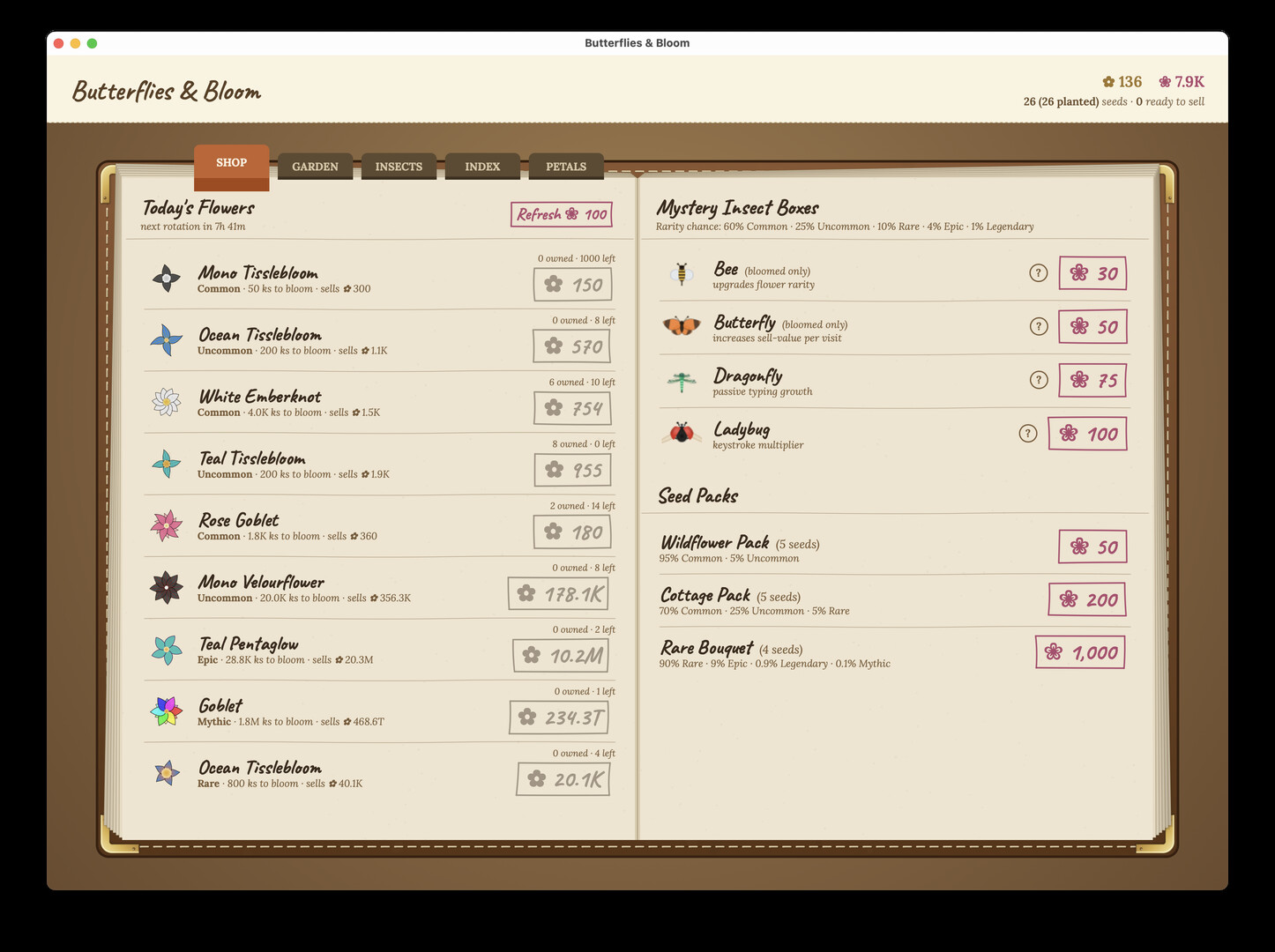
Open the Shop, buy a seed for a few coins, plant it. Every key you press nudges that flower's growth meter forward. When it fully blooms, sell it back for twice what the seed cost — and use the profit to buy rarer, prettier, more expensive seeds. Rinse and repeat at your own pace. Whether you're a hunt-and-peck typist or hammering out a hundred words a minute, the garden keeps up with you.

The Garden Loop

  • Buy seeds with coins

  • Plant your garden

  • Type — the more you type, the more they bloom

  • Sell bloomed flowers for a profit

  • Repeat

Bees, Butterflies, Dragonflies, Ladybugs

Four kinds of garden visitors drift through, each with a different gameplay effect: bees nudge growth forward without you typing, butterflies multiply your sell value, dragonflies make every keystroke worth more coins, and ladybugs slowly drip passive income. Each comes in five rarity tiers (Common through Legendary) with distinct color palettes — and every visitor is animated procedurally, so no two are exactly alike.

720+ Flowers to Discover

Twelve archetypes × six rarities × ten color palettes = 720 unique flowers. Rarer flowers take more keystrokes to bloom but sell for far more. The shop rotates every eight hours; the Mythic-tier flowers cost a small fortune and reward a small fortune. Patience is part of the loop.

Privacy is the Whole Point

The game needs system permission to count your keystrokes — and that's all it does. Every key you press advances the counter by one. Which key you pressed is never read, stored, logged, transmitted, or used in any way. We don't capture text. We don't read mouse content. The keystroke counter never leaves your machine.

Petals (Optional)

For those who want to skip ahead, "Petals" is an optional real-money currency that buys instant insects and seed packs. The entire core loop — every flower, every visitor, every tier — is reachable by typing alone. Petals are convenience, never required.

Designed to Disappear

The overlay is transparent and click-through. It never steals focus, never makes a sound, never pings you. When you bring your mouse near the flowers they politely fade out so you can use the dock or taskbar underneath. Open the Shop or Garden tabs when you want to play with the loop; ignore the whole thing on a deadline and your flowers will still be there when you're done.

Systemanforderungen

Windows
macOS
    Mindestanforderungen:
    • Setzt 64-Bit-Prozessor und -Betriebssystem voraus
    • Betriebssystem *: Windows 7, 8, 10, 11 x64
    • Prozessor: Intel Core i3
    • Grafik: OpenGL 2.1 compatible graphics card, integrated graphics
    Empfohlen:
    • Setzt 64-Bit-Prozessor und -Betriebssystem voraus
* Ab dem 1. Januar 2024 unterstützt der Steam-Client nur noch Windows 10 und neuere Versionen.
    Mindestanforderungen:
    • Betriebssystem: macOS 11 (Big Sur) or later
    • Prozessor: Any Intel or Apple processors
    • Grafik: 4 GB RAM
    Empfohlen:
    Für dieses Produkt gibt es keine Rezensionen

    Sie können Ihre eigene Rezension für dieses Produkt verfassen, um Ihre Erfahrungen mit der Community zu teilen. Nutzen Sie den Bereich über den Schaltflächen zum Kaufen, um Ihre Rezension zu verfassen.

    Filter überprüfen