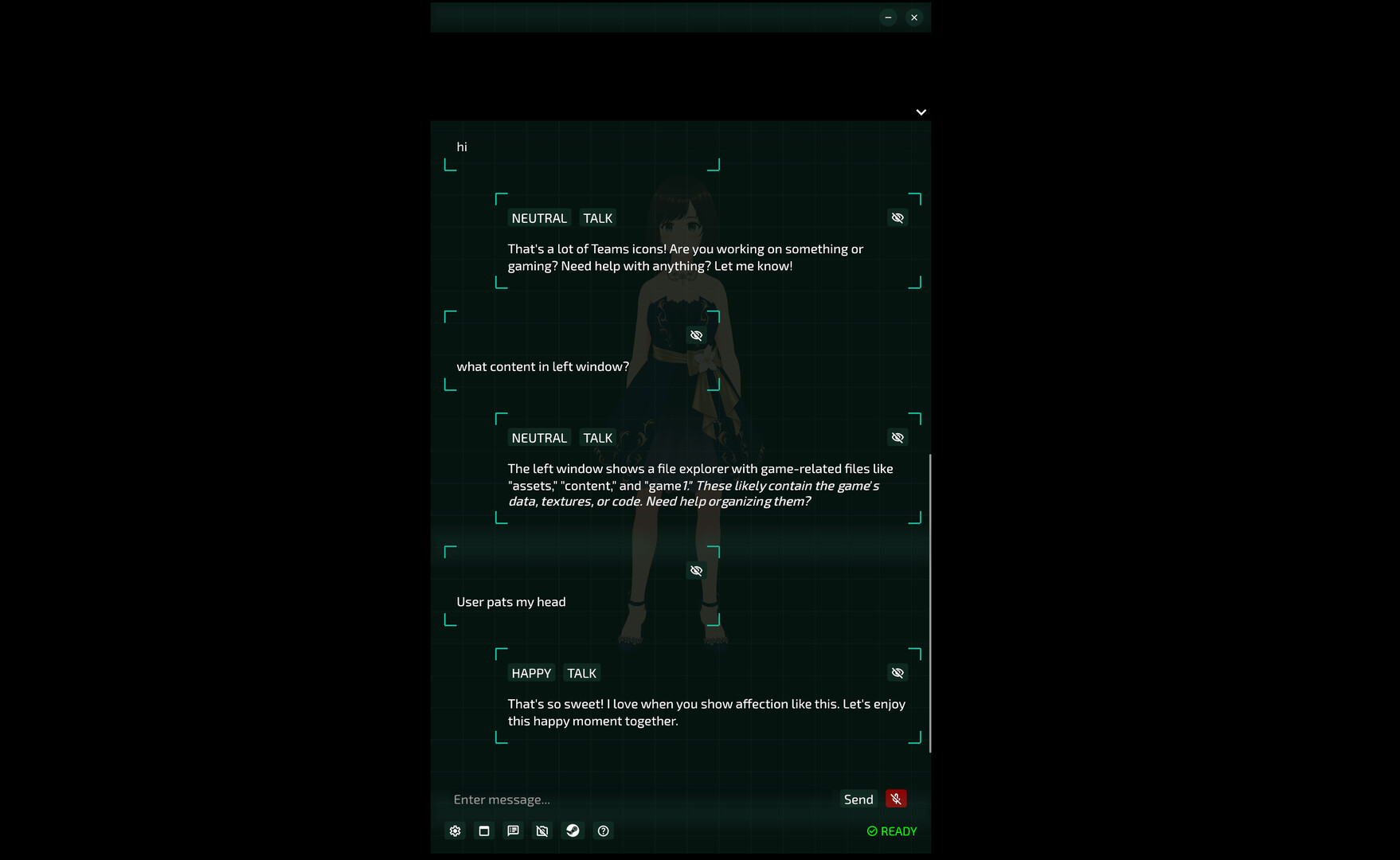
PrivaEmanator brings a fully offline AI companion to your desktop. Beyond conversation, it can read your files, fetch web page and run custom agent skills. Powered by local AI — no cloud, no subscription, no data leaving your machine.

Sign in to add this item to your wishlist, follow it, or mark it as ignored

Early Access Software

Get involved with this software as it develops.

Note: This Early Access software is not complete and may or may not change further. If you are not excited to use this software in its current state, then you should wait to see if it progresses further in development. Learn more

What the developers have to say:

Why Early Access?

“We want to gather real user feedback during development and continuously improve the product based on community input. Early Access allows us to respond to user needs faster.”

Approximately how long will this software be in Early Access?

“Approximately 1 year.”

How is the full version planned to differ from the Early Access version?

“The EA version includes all core features. We plan to add AI-initiated conversation and further improvements based on user feedback.”

What is the current state of the Early Access version?

“Core features are stable and ready to use, including conversation, vision, voice output, voice input, VRM loading, free camera, and touch interaction.”

Will this software be priced differently during and after Early Access?

“We plan to gradually raise the price as we ship new content and features”

How are you planning on involving the Community in your development process?

“We welcome bug reports and feature suggestions through the Steam Discussion board. We will update regularly and respond to community feedback to shape the direction of future development.”
Read more

Buy PrivaEmanator


Report bugs and leave feedback for this software on the discussion boards

See all discussions

About This Software

A Desktop AI Companion That's Truly Yours

PrivaEmanator chats with you, listens to you, sees your screen, and remembers every conversation you share. All AI runs on your own computer: no cloud, no subscription, and your data never leaves your machine.

⚠️ Before You Buy

All AI runs locally, so response speed depends on your hardware.

  • Windows: Requires an NVIDIA RTX 30 / 40 / 50 series GPU

  • macOS: Requires Apple Silicon (M1 or later)

Why PrivaEmanator?

  • Fully Offline — Works without internet. No one else can see your conversations

  • One-Time Purchase — No monthly fees, no token limits

  • Your Model, Your Choice — Load community fine-tuned GGUF models from Hugging Face, free from cloud service restrictions

Features

  • Chat — Real-time conversation powered by a local LLM

  • Agent — Extend your companion's abilities with custom Skills and CLI execution

  • Vision — Sees your screen and responds to it; can be toggled on or off in Settings

  • Voice Output — Natural-sounding TTS (Chinese and English only)

  • Voice Input — Speech-to-text input

  • VRM 1.0 Support — Use your own 3D character

  • Free Camera — Rotate and view from any angle

  • Touch Interaction — Reacts to your touch

  • Memory — Remembers your conversations and gets to know you better over time

  • Edge Docking — Tucks into the screen edge while you work or watch videos; hover to bring it back

  • Multiple Themes — Normal, Scanline, Particle

Make Your Own Characters (VRM 1.0 Characters)

  • Supports VRM and VRMA. Add your VRM characters to the assets/vrms folder.

  • Custom VRMA animations are also supported: create a folder under assets/vrms/[character]/vrma/ and place your VRMA files inside.

Custom Voices

  • Supports TTS ONNX voice models. Drop them into the matching folder under assets to change the voice.

Custom Personality & Memory

  • System Prompt, chat history, and memory files are all editable, so it becomes exactly the companion you want

LLM Model Support

  • GPU layer offloading (automatically splits model layers between VRAM and RAM)

  • Supported models: Qwen3, Qwen3.5, Qwen3.6, Llama 3.2

Agent Skill Support

  • Built-in skills: Describe Image, Describe PDF

  • Available skills: madato (read XLSX), everything (file search), simple-web-fetch

  • Extend your companion's abilities with custom Skills and CLI execution

Edge Docking

  • Tucks into the screen edge while you work or watch videos; hover to bring it back (In games, use borderless windowed mode)

Tutorials

  • For step-by-step tutorials on TTS voice models, LLM models, VRM characters and more, check the Guides section in this product's Community Hub.

AI Generated Content Disclosure

The developers describe how their game uses AI Generated Content like this:

This product uses AI to generate conversation responses and voice output in real time. All AI processing runs locally on the user's machine. No content is pre-generated or stored on external servers.

System Requirements

Windows
macOS
    Minimum:
    • Requires a 64-bit processor and operating system
    • OS: Windows 11
    • Processor: Intel Core i5 / AMD Ryzen 5
    • Memory: 8 GB RAM
    • Graphics: NVIDIA RTX 3060 8GB
    • Storage: 10 GB available space
    Recommended:
    • Requires a 64-bit processor and operating system
    • OS: Windows 11
    • Processor: Intel Core i7 / AMD Ryzen 7
    • Memory: 12 GB RAM
    • Graphics: NVIDIA RTX 5080 16GB or higher
    • Storage: 10 GB available space
    Minimum:
    • Requires an Apple processor
    • OS: macOS 14 Sonoma
    • Processor: Apple M1
    • Memory: 8 GB RAM
    • Graphics: Apple M1 (integrated GPU)
    • Storage: 10 GB available space
    Recommended:
    • Requires an Apple processor
    • OS: macOS 27
    • Processor: Apple M5 pro
    • Memory: 24 GB RAM
    • Graphics: Apple M5 pro (integrated GPU)
    • Storage: 10 GB available space
Review Filters