Playto is a game translation overlay and a language-learning tool at once. Local OCR reads any PC game's on-screen text and AI shows the meaning in place — dialogue, menus, anywhere you point. It's immersion learning, as you actually play. 12 languages · Offline · No subscription.

Sign in to add this item to your wishlist, follow it, or mark it as ignored

Early Access Software

Get involved with this software as it develops.

Note: This Early Access software is not complete and may or may not change further. If you are not excited to use this software in its current state, then you should wait to see if it progresses further in development. Learn more

What the developers have to say:

Why Early Access?

“Playto combines real-time game translation with language learning — a category that doesn't really exist yet. The translation engine works, but the learning system around it is still being built. Which games to prioritize, which languages to expand next, what study tools actually help retention — these decisions should be driven by real users playing real games. Early Access is the right place to build this together.”

Approximately how long will this software be in Early Access?

“Approximately 6–12 months. The timeline depends on how quickly we can ship the planned features (see below) and validate them with community feedback. We'll leave Early Access when the learning tools, language coverage, and community features reach a level where we're confident in the full experience.”

How is the full version planned to differ from the Early Access version?

“The full version will add significant features beyond the current Early Access build:

- **Expanded language pair support** — The EA version works best with English ↔ Japanese. Full version targets reliable quality across CJK languages (Chinese, Korean) and major European languages, with per-language tuning.
- **Community game glossaries** — A shared glossary system where players contribute and refine translation dictionaries for specific games. Each game has unique terminology that generic translation misses.
- **Learning analytics and progress tracking** — Vocabulary growth visualization, difficulty-adapted word suggestions, and data-driven study recommendations based on your play history.
- **Mobile companion app** — Review your saved vocabulary and practice quizzes on your phone, synced with your PC dictionary. Study on the go without your gaming PC.
- **Improved quiz and practice modes** — More exercise types beyond the current spaced repetition flashcards, including context-based recall and game-scene association.
- **Per-game translation profiles** — Optimized settings and prompts for popular games, developed with community feedback to handle game-specific fonts, UI layouts, and terminology.
- **Content engine** — A public database ranking games by language difficulty (CEFR level), helping learners pick games that match their skill level.

Some of these features depend directly on Early Access user feedback to shape their design.

What is the current state of the Early Access version?

“The translation foundation is functional: real-time OCR screen capture, cursor-point translation, text-to-speech, a personal dictionary, and basic spaced repetition quizzes. It works with any PC game. All translation processing runs locally on your machine using open-source AI models — no internet connection required during gameplay.

What's still early-stage: translation quality varies significantly by game (font style, art direction, and text density all affect accuracy). Language support beyond English ↔ Japanese is functional but not yet well-tuned. The learning tools (quizzes, progress tracking, vocabulary review) are basic — they work, but they don't yet adapt to your level or give you meaningful feedback on your progress. There are no community features yet (glossary sharing, game profiles). These are the areas where Early Access development is focused.”

Will this software be priced differently during and after Early Access?

“We plan to increase the price when Playto leaves Early Access, as the feature set will be substantially larger. Getting Playto during Early Access is the best deal.”

How are you planning on involving the Community in your development process?

“Community input directly shapes what we build next:

- **Game requests** — Tell us which games you want better support for. We prioritize per-game translation tuning based on what the community is actually playing.
- **Language pair priorities** — Which language combinations matter most to you? Community demand determines our expansion order.
- **Bug reports and accuracy feedback** — Reports on specific games help us improve the OCR and translation pipeline where it matters.
- **Glossary contributions** — We're building a community glossary system where players can share and refine game-specific terminology. Your corrections make Playto better for everyone playing the same game.
- **Feature feedback** — Steam discussions and our Discord server are where we hear what's working, what's not, and what's missing. Development priorities shift based on this feedback.”
Read more

Download Playto Demo

Buy Playto

 
See all discussions

Report bugs and leave feedback for this software on the discussion boards

About This Software

Learn languages through the games you love. Playto reads the on-screen text of any PC game with local AI and shows the meaning right there as an overlay.


There's no fiddly setup that gets between you and the game. Pick how it reads to fit how you play: keep a fixed region in view, follow your mouse, read the whole screen, or show a translation only when you ask. Save the words and sentences you care about to your Word Book, and the ones you register quickly become study material — flashcards and more — that deepen your grasp of the game. This is immersion learning: play with Playto, and the words you run into again and again start to make sense without stopping to look them up.

Translate any spot you point at — dialogue or UI


Cursor-follow mode reads the text wherever you point your mouse — dialogue, menus, item descriptions. Fixed-region mode watches a set area such as subtitles or a status bar. Window mode (beta) translates the whole screen in the background and shows the overlay only when you want it. Whatever the game, you read any spot you like — not just subtitles. Captured text appears as an overlay with the original and its meaning, without pausing the game.

After playing, grow your Word Book


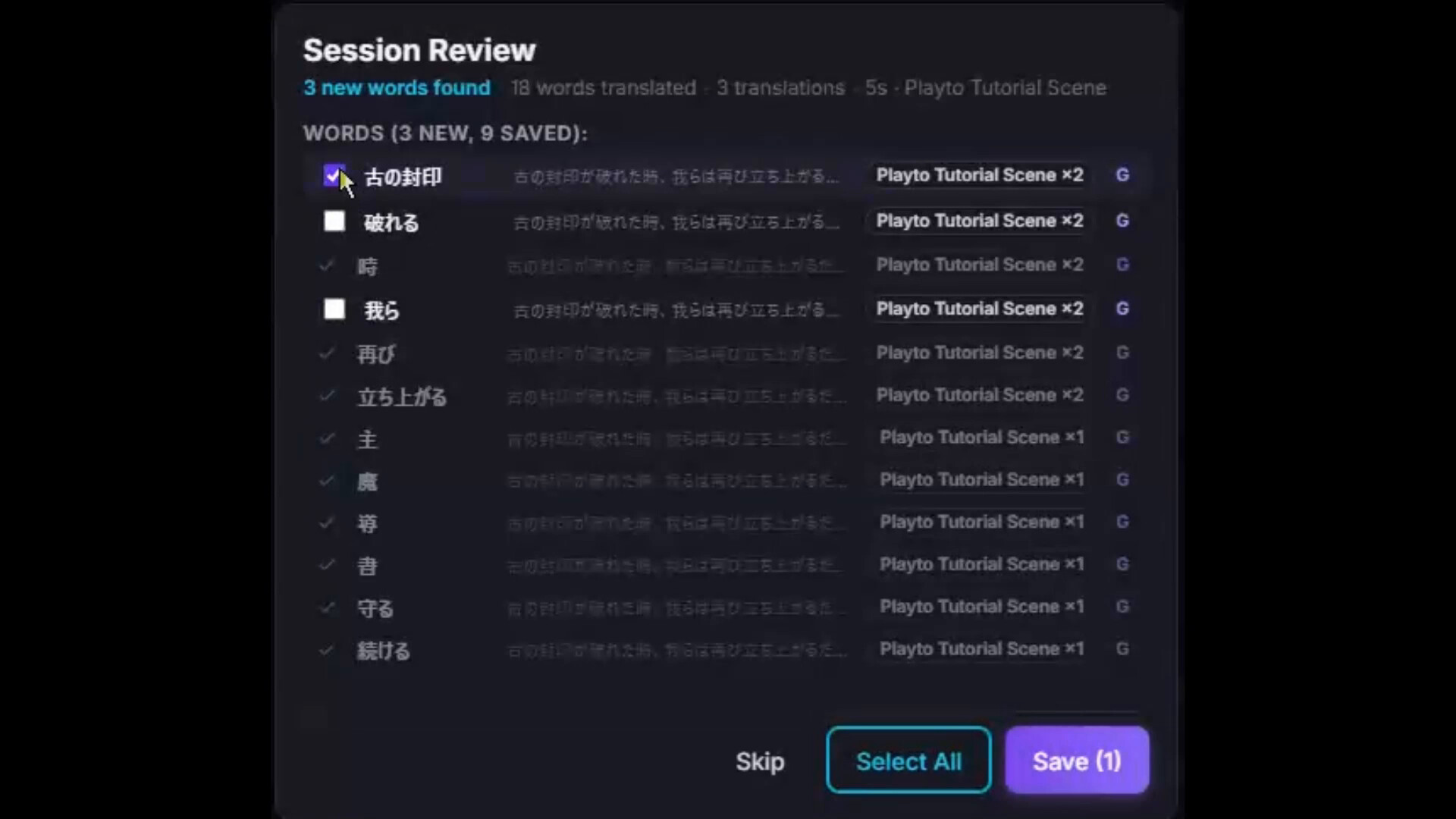
When you stop playing, a session summary lets you look back over the text you met today. Nothing is saved automatically — only the words and sentences you choose to keep enter your Word Book. So your Word Book becomes a learning record you selected yourself.

Make it stick with review and quizzes


Saved items go into SRS (spaced repetition) timed to the forgetting curve, and 8 quiz modes turn them into lasting memory. The more you play, the more your own dictionary grows — as wide as the games you've played.

From reading the screen to logging every line

Playto's work goes well beyond the translation itself. First, OCR that reads the on-screen characters accurately; stylized fonts and Japanese vertical text that ordinary OCR struggles with are handled by a vision-model mode that reads the image directly. Next, it sorts that text into dialogue, menus, and item descriptions and breaks it into units a language model can translate cleanly. The meanings themselves are produced by a local LLM running on your own PC. Their quality depends on the model you run, and local models keep getting better, so Playto is built to get the most out of them. And every translation that appears on screen is kept in a log you can read back after you play. A per-game glossary pins character names and terms the way you want them.

Key features

  • Real-time translation overlay — Reads on-screen text and shows the original together with its meaning, without pausing the game.

  • Capture modes — Cursor-follow reads wherever you point your mouse; fixed-region watches a set area; window mode (beta) translates the whole screen in the background. Dialogue, menus, UI — read any spot you like.

  • Automatic log — Everything you encounter is recorded. Look back anytime during play to check meanings or pronunciation.

  • Word Book + SRS + 8 quiz modes — Save the words and sentences you want to remember, and make them stick with spaced repetition and quizzes (Flashcard, Multiple Choice, Fill Blank, Dictation, and more).

  • Album — Save captured scenes as full images with their translation, to look back on memorable moments anytime.

  • Anki export — Take your study out of Playto: export your Word Book as a TSV file, or package Album scenes with their images as an Anki deck (.apkg) for spaced-repetition review anywhere. A natural fit for sentence mining.

  • Vision Mode — Stylized fonts, Japanese vertical writing, and other text that ordinary OCR struggles with are read by AI interpreting the image directly.

  • Per-game glossary — Register character names and custom terms, and they're reflected in that game's translations.

  • Fully local — Translation runs on your own PC, works offline while you play, and the text on your screen is never sent anywhere. 12 languages for the UI and in-game meanings.

Before you buy

  • Try the free demo — Local AI needs GPU VRAM in addition to your game (typically 2–4 GB extra). Please confirm compatibility with the free Playto Demo before purchasing.

  • Speech support varies — Text-to-speech is fully supported for English; quality varies for other languages, and 5 (KO, DE, RU, PL, VI) currently lack TTS. Check the free demo for your languages before buying.

  • How translation works — Meanings are produced by a local LLM: words and short phrases are fairly stable, while longer sentences come through as a meaning hint alongside the original, and quality depends on the model you run. It's there to support your reading of the real text, not to replace it with a dub.

AI Generated Content Disclosure

The developers describe how their game uses AI Generated Content like this:

Playto uses AI models (LLMs) to generate real-time translations of on-screen game text. All AI processing runs entirely on your machine using local models — no data is sent to external servers. The AI is also used for OCR (optical character recognition) to read text from game screens. No pre-generated AI content is included; all translations are generated live during use.

System Requirements

    Minimum:
    • Requires a 64-bit processor and operating system
    • OS: Windows 10 64-bit
    • Processor: Intel Core i5 / AMD Ryzen 5 (with AVX2 support)
    • Memory: 8 GB RAM
    • Graphics: DirectX 11 compatible GPU. Local AI runs on the CPU by default; an NVIDIA (CUDA) or Vulkan-capable GPU enables faster acceleration
    • DirectX: Version 11
    • Network: Broadband Internet connection
    • Storage: 5 GB available space
    • Additional Notes: AI models (about 2–6 GB) download on first run. For GPU acceleration, keep your GPU driver up to date — 4 GB+ VRAM recommended. No dedicated GPU? CPU mode works (slower)
    Recommended:
    • Requires a 64-bit processor and operating system
    • OS: Windows 11 64-bit
    • Processor: Intel Core i7 / AMD Ryzen 7
    • Memory: 16 GB RAM
    • Graphics: NVIDIA GPU (CUDA) or Vulkan-capable GPU, 6 GB+ VRAM, with an up-to-date driver
    • DirectX: Version 11
    • Network: Broadband Internet connection
    • Storage: 10 GB available space
    • Additional Notes: Keep your GPU driver current (especially on the latest-generation GPUs). If CUDA isn't supported, Vulkan and CPU modes are available.

Customer reviews for Playto: Learn Languages Through Games About user reviews Your preferences

Overall Reviews:
6 user reviews (6 reviews)


To view reviews within a date range, please click and drag a selection on a graph above or click on a specific bar.


Filter reviews by the user's playtime when the review was written:


No minimum to No maximum

Show reviews in selected display order


Learn More
Filters
Excluding Off-topic Review Activity
Playtime:
Played Mostly on Steam Deck
Operating System:
CPU:
GPU:
Device Type:
Review Filters