Data config platform for game devs. Supports Excel imports, multi-format exports, validation & rich/JSON editing to boost efficiency!

เข้าสู่ระบบ เพื่อเพิ่มผลิตภัณฑ์นี้ลงในสิ่งที่อยากได้ของคุณ ติดตาม หรือทำเครื่องหมายเป็นถูกละเว้น

ซอฟต์แวร์ระหว่างการพัฒนา

มีส่วนร่วมกับซอฟต์แวร์นี้ในขณะที่กำลังพัฒนา

หมายเหตุ: ซอฟต์แวร์ระหว่างการพัฒนานี้ยังไม่เสร็จสมบูรณ์ ซึ่งอาจจะมีหรืออาจจะไม่มีการเปลี่ยนแปลงเพิ่มเติมก็ได้ หากคุณไม่ตื่นเต้นกับการใช้ซอฟต์แวร์นี้ในช่วงสถานะปัจจุบัน คุณควรจะรอเพื่อตัดสินใจในกรณีที่ซอฟต์แวร์มีความคืบหน้าในการพัฒนาเพิ่มเติมมากกว่านี้ เรียนรู้เพิ่มเติม

สิ่งที่ผู้พัฒนาต้องการจะบอก:

เหตุใดจึงเป็นช่วงระหว่างการพัฒนา?

“ConfigNexus's core vision is to build a community co-built, infinitely extensible game configuration workflow platform. While we already offer solid desktop configuration management, Excel-compatible editing, the CT column type system, and multi-format data export, the next phase of development is highly open-ended and customization-heavy.

Game developers' workflows vary enormously — RPG teams need quest/dialogue editors, CCG teams need gacha probability configs, SLG teams need complex numeric tables and cross-sheet reference validation. We can't decide development priorities behind closed doors.

Our core roadmap — the "Workshop Plugin Ecosystem" and the "Industry Template Pack System" — needs real user feedback to shape: which game engines deserve deep integration, which new CT column types are needed, which visual sub-editors developers want most urgently. Early Access isn't just about polishing existing features — it's about letting the community directly shape ConfigNexus's future feature map.”

ซอฟต์แวร์นี้จะอยู่ในช่วงระหว่างการพัฒนานานเท่าไรโดยประมาณ?

“We anticipate Early Access will last around 12 months. During this period we'll focus on completing the plugin SDK and Workshop ecosystem, expanding the native visual sub-editor suite, and tuning large-table performance based on real user project scales. The exact duration depends on the volume of community feedback we receive and how users prioritize new features.”

เวอร์ชันเต็มได้ถูกวางแผนไว้ให้แตกต่างจากเวอร์ชันระหว่างการพัฒนาอย่างไร?

“The current Early Access version is already a complete, production-ready configuration management toolkit — fully capable of handling daily config development on real game projects. It includes:

Core spreadsheet editing: Powered by the Luckysheet core, with multi-tab management and Excel-style shortcuts (formulas, filtering, freezing, conditional formatting).
CT column type system: Rich text, JSON, date, resource loader, multi-data structures, cross-sheet references — column types built specifically for game configuration.
Declarative data validation: DSL-based validation rules (required / unique / range / enum / ref / enum_ref / len / regex), composable with &&, errors highlighted in real time with jump-to-cell.
Flexible export system: Native export to JSON / YAML / CSV / Protobuf / C# data classes / MessagePack / binary formats.
Python script extensions: Built-in Python engine, allowing power users to customize workflows, cell-level functions, and persistent script libraries.
Version control integration: Built-in Git / SVN bridges — commit, revert, conflict resolution all within the tool.
Localization: Chinese / English / Japanese / Korean UI, with localization text deduplication and character whitelist extraction.
Developer toolbox: Character extraction, font subsetting, batch find-and-replace, table diff comparison, and other utility tools.
Workshop foundation: Plugin architecture is already in place — version control and other extension plugins already installable.”

สถานะปัจจุบันของเวอร์ชันระหว่างการพัฒนาเป็นอย่างไร?

“Here is the professional English translation, keeping the terminology consistent with the English store page copy you've already prepared:

The current Early Access version is already a fully functional configuration management toolset, perfectly capable of handling the daily configuration workflows of game projects. It includes:

Core Spreadsheet Editing: Powered by the Luckysheet core, supporting multi-tab management and familiar Excel-like operations (formulas, filtering, frozen panes, conditional formatting).

CT (Configuration Type) System: Custom column types designed specifically for game configuration, including Rich Text, JSON, Date, Resource Loader, Multi-Data Structures, and Cross-Sheet References.

Declarative Data Validation: DSL-based validation rules (required / unique / range / enum / ref / enum_ref / len / regex). Supports arbitrary combinations using &&, with real-time error highlighting and direct jumping to offending cells.

Versatile Export System: Native support for exporting to multiple formats, including JSON, YAML, CSV, Protobuf, auto-generated C# data classes, MessagePack, and custom Binary formats.

Python Script Extensions: A built-in Python engine allowing advanced users to customize workflows, write cell-level functions, and maintain persistent script libraries.

Workshop Foundation: The underlying plugin architecture is fully in place, currently supporting the subscription and installation of extension plugins (such as version control integrations).”

ซอฟต์แวร์นี้จะมีราคาเปลี่ยนแปลงไปหรือไม่ในระหว่างและหลังจากช่วงระหว่างการพัฒนา?

“Yes — we plan to moderately raise the price when we exit Early Access and release the full version. We want to thank our early supporters with a lower initial price; as the Workshop plugin ecosystem, visual sub-editor suite, and advanced features continue to mature, the software's value will grow accordingly.”

คุณกำลังวางแผนให้ชุมชนมีส่วนร่วมในขั้นตอนการพัฒนาของคุณอย่างไร?

“ConfigNexus is a tool built for developers, so our users are themselves the most expert advisors we could ask for. We'll maintain high-frequency interaction through the Steam Community Discussions and the official Discord channel:

Workflow pain point collection: Invite users to share their unique project structures and configuration scenarios as real input for the next phase.

Feature priority voting: Regular polls on new feature priorities (e.g., the next visual sub-editor, the next export format, the most urgently needed CT column type).

Community-built Workshop: Encourage users to share their custom Python scripts, CT column types, and exporters — outstanding community contributions have a chance to be officially integrated into the plugin ecosystem.

Core user beta group: Our Discord is open — power users get direct access to the dev team and early previews of new features.”
อ่านเพิ่มเติม
ไม่รองรับภาษาไทย

ผลิตภัณฑ์นี้ไม่รองรับภาษาท้องถิ่นของคุณ โปรดตรวจสอบรายชื่อภาษาที่รองรับก่อนทำการสั่งซื้อ

ซื้อ ConfigNexus


รายงานจุดบกพร่องและฝากข้อเสนอแนะสำหรับซอฟต์แวร์นี้บนกระดานสนทนา

ดูกระดานสนทนาทั้งหมด

เกี่ยวกับซอฟต์แวร์นี้

ConfigNexus —— A Modern Desktop Game Configuration Platform

ConfigNexus is a desktop-level workspace designed specifically for game development and data configuration management. It consolidates the scattered Excel sheets, multi-language texts, and various configurations handled by game designers into a single project, allowing for one-click exports into multiple engine-ready formats. Built on a hybrid architecture, it combines the flexibility of Web technologies with the performance of a local application, serving as a one-stop configuration data hub shared by designers, programmers, and artists.

🌟 Core Features

1. Professional Spreadsheet Editing Experience

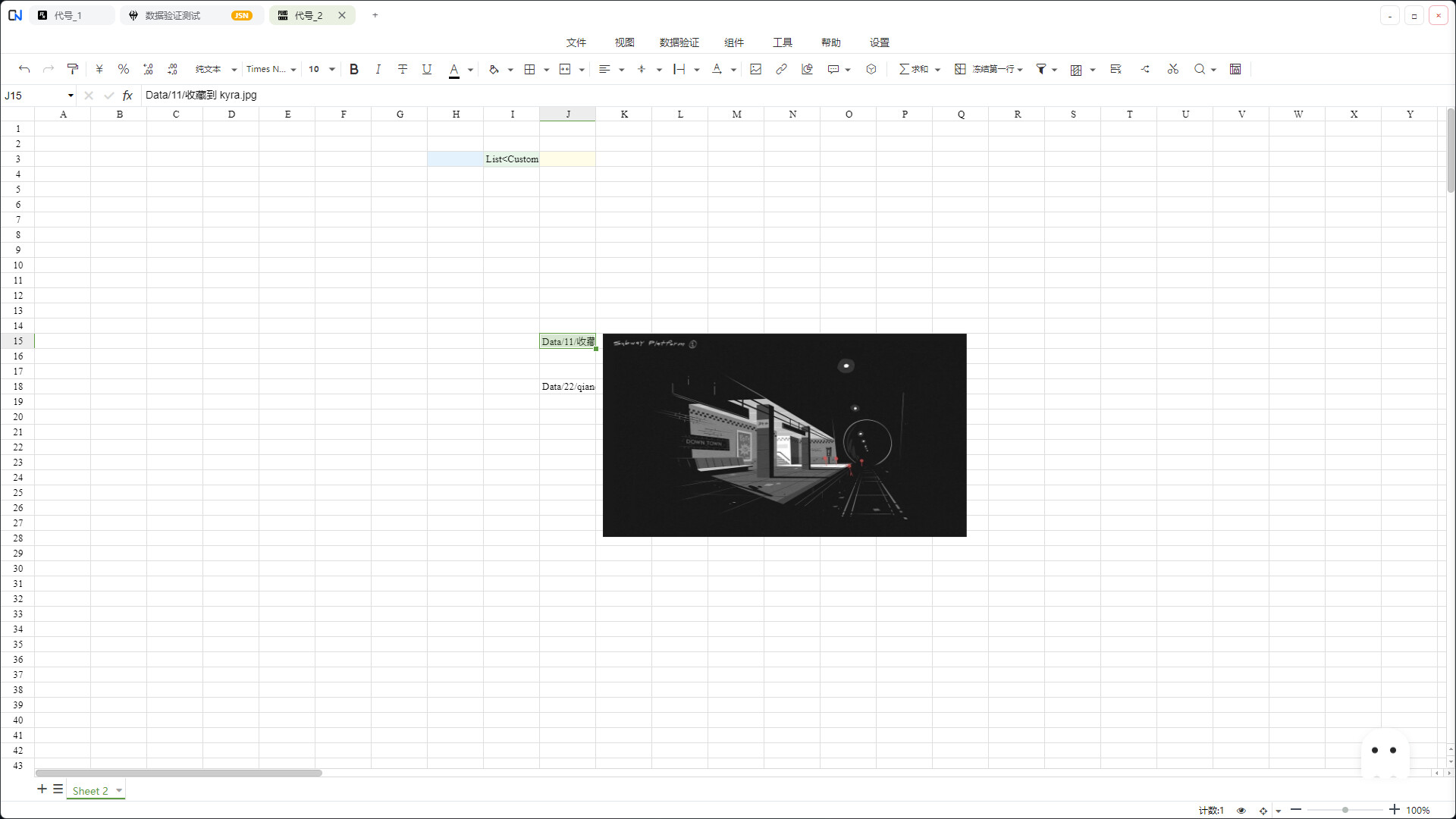
  • Native Excel Feel: Built on the Luckysheet core, it perfectly replicates Excel's operational habits. It supports core features like formula calculations, filtering and sorting, frozen rows/columns, and conditional formatting, ensuring zero learning curve.

  • Efficient Multi-tab Management: Adopts a WPS-like multi-tab architecture, supporting multiple table instances open simultaneously. Each tab runs independently without interference, significantly boosting multitasking efficiency.

  • Comprehensive Format Compatibility: Perfectly supports Excel files like .xlsx, .xlsm, .xls, as well as the import and editing of common data formats like .json and .csv.

2. Rigorous Data Validation System

  • Real-time Validation: Performs real-time data checking based on the field validation row, highlighting errors in red with instant feedback upon modification.

  • Flexible Rule Combination: Validation rules can be freely combined and chained using && (e.g., required && range(0, 100)). It is parenthesis-aware and will not mistakenly break down regex embedded within rules.

3. Diverse Data Export

One-click export of configuration tables into common game development formats to meet different project needs:

  • Text Formats: JSON · YAML · CSV · Protobuf (Text)

  • Code Files: Auto-generates C# Data Classes, requiring zero boilerplate code on the engine side.

  • Binary Formats: Bytes (custom compact format) · Binary (MessagePack) · Protobuf (Binary)

4. Powerful Editing System

ConfigNexus introduces a unique editing system tailored for game configuration, offering an experience beyond traditional spreadsheets:

  • 📚 Rich Text Editing: Provides a Notion-like WYSIWYG editing experience. Supports toggling between Markdown and HTML, and handles complex text styles (bold, colors, etc.), freeing narrative designers from tedious manual tag input.

  • 🧩 JSON Editor: Built-in Monaco + tree view JSON editor with bidirectional sync between left-side code mode and right-side structured tree view. Any node level supports visual modal editing—no need to handwrite large chunks of JSON in a cell, no matter how deep the nesting.

  • 🗂️ Multi-data Structure Editing: Visual editing views for complex array objects like [{},{}]. Define a schema for batch editing, completely solving the pain point of finding and modifying specific fields within long cell texts.

  • 📅 Smart Date Editing: Built-in date picker opens with a double-click, supporting standardized date and time input.

  • 🖼️ Resource Loader: Built-in resource manager. Double-click a cell to open the project resource (images, audio, etc.) selection panel, automatically fill in the path, and instantly preview icon thumbnails within the cell.

5. Deep Python Function Integration

A built-in Python engine unleashes powerful data processing capabilities:

  • Script Execution: Write Python scripts for batch processing table data, generating values, and formatting conversions.

  • Cell Functions: Call custom Python functions directly within cell formulas—handle complex numerical rules in a single line.

  • Persistent Script Library: Scripts are automatically saved to a library for write-once, permanent reuse across projects.

  • Smart Caching: Smooth execution without lag, even for large tables.

6. More Practical Toolboxes

  • ID Generation: Rule-based creation of the first-row IDs for data tables.

  • Smart Batch Modification: Visual batch find-and-replace for complex structures like arrays ([1,2]) and object arrays ([{...},{...}]).

  • Quick Calculation: Rapid numerical operations and processing on selected areas.

ความต้องการระบบ

    ขั้นต่ำ:
    • ระบบปฏิบัติการ:
    • โปรเซสเซอร์:
    • หน่วยความจำ: แรม 4 GB
    • กราฟิกส์:
    • DirectX: เวอร์ชัน 10
    • พื้นที่จัดเก็บข้อมูล: พื้นที่ว่างที่พร้อมใช้งาน 1 GB
    แนะนำ:
    • ระบบปฏิบัติการ:
    • โปรเซสเซอร์:
    • หน่วยความจำ: แรม 8 GB
    • กราฟิกส์:
    • DirectX: เวอร์ชัน 11
    • เครือข่าย: การเชื่อมต่ออินเทอร์เน็ตแบบบรอดแบนด์
    • พื้นที่จัดเก็บข้อมูล: พื้นที่ว่างที่พร้อมใช้งาน 2 GB
ตัวกรองบทวิจารณ์