HYPERVOX is a music video game where players perform the vocal melody of songs. When notes reach the judgement line, press the corresponding key to hit the note and recreate the vocal melody in real-time. Aim for the highest score possible by hitting each note with precise timing and accuracy.

登入以將此項目新增至您的願望清單、關注它,或標記為已忽略

不支援繁體中文

本產品尚不支援您的目前所在地的語言。購買前請先確認語言支援清單。

此遊戲尚未在 Steam 上發售

預計發行日期: 2026 年 2 月 17 日

此遊戲預計大約於 9 天後解鎖

感興趣嗎?
將這款遊戲加入願望清單,以便在發售時收到通知。
新增至您的願望清單
 

關於此遊戲

HYPERVOX is a music video game where players perform the vocal melody of songs.

The game uses 12 keys corresponding to each musical note (C through B), with each key having its own dedicated lane.

When notes reach the judgement line, press the corresponding key to hit the note and recreate the vocal melody in real-time.

Aim for the highest score possible by hitting each note with precise timing and accuracy.

Controls

The game uses 12 normal keys and 2 octave keys for gameplay.

Each lane corresponds to one normal key, which are assigned by default to: Z, S, X, D, C, V, G, B, H, N, J, M.

There are two octave keys in the game: octave up and octave down. By default, the octave up key is mapped to the Left Shift, and the octave down key is mapped to Spacebar.

All keys can be freely customized or reset to defaults in the settings menu.

MIDI keyboards are also supported. The 12 keys from C to B on your MIDI keyboard correspond to the 12 normal keys, regardless of which octave you play in. Tilting the pitch wheel up activates octave up, and tilting it down activates octave down.

How to Play

HYPERVOX features two types of notes: standard notes and octave notes.

Standard notes work like long notes in typical rhythm games — simply press and hold the corresponding lane key with proper timing to play the note. These notes appear in white or blue depending on the lane.

To play them: Press the corresponding lane key when the note reaches the start point. Hold the key through the note's duration, then release it when the note ends.

Octave notes require a different technique. Unlike standard notes, you must first hold the octave key, then use the lane key to actually play the note.

To play them: First, press and hold the octave key. Then, press the lane key when the note reaches the judgement line. Release the lane key when the note ends, matching the timing precisely.

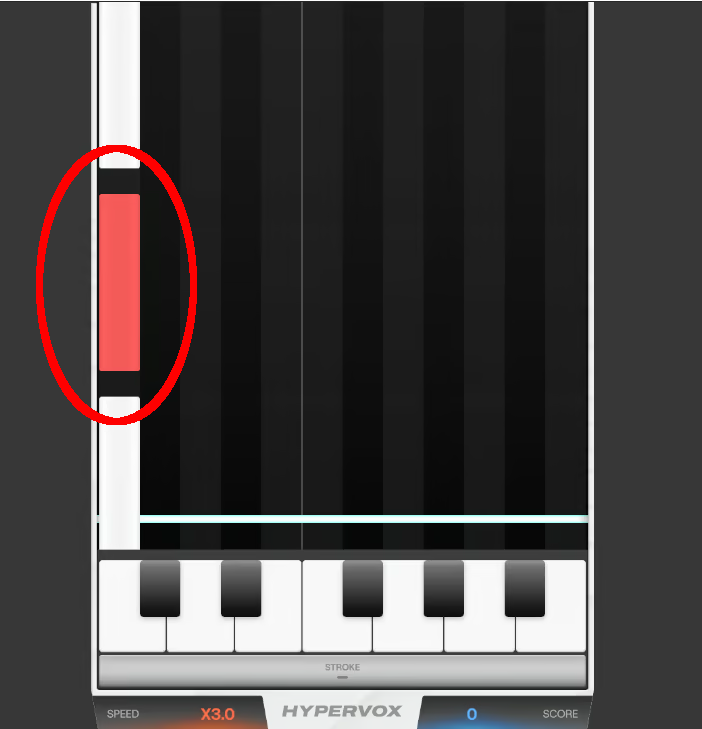
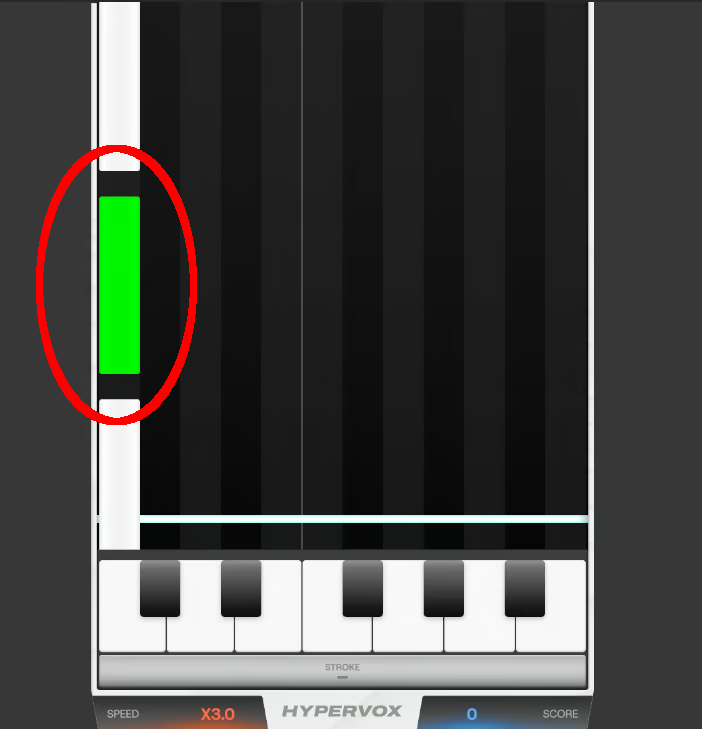
Octave up notes are displayed in red, while octave down notes are displayed in green.

When Colorblind Mode is enabled, octave up notes will be displayed in magenta, and octave down notes will be displayed in cyan.

Judgement System

In HYPERVOX, your timing accuracy is evaluated with five different judgement levels. Each judgement reflects how close your button press or release was to the perfect timing.

Precise

The highest level of accuracy. You've hit the note with perfect timing, within ±50 milliseconds of the target. This judgement awards maximum points and maintains your combo.

Great

Excellent timing that's slightly off from perfect, within ±50-100 milliseconds. You'll receive high points and your combo continues.

Fair

Acceptable timing that's noticeably off but still within the rhythm, within ±100-150 milliseconds. You'll earn moderate points and maintain your combo, though with reduced scoring.

Close

Your timing is significantly off, within ±150-300 milliseconds of the target. This results in minimal points but still maintains your combo streak.

Break

You've either missed the note entirely or your timing was too far off (beyond ±300 milliseconds). This judgement breaks your combo, resetting it to zero, and awards no points.

Speed Control

If you feel the notes pass too fast or too slow, you can adjust their scroll speed using F1 to decrease speed and F2 to increase speed by default.

This only changes the visual speed of the notes — the actual timing for hitting notes remains unchanged.

The speed control keys can also be customized in the settings menu.

Creating Song Data

To create a track data for HYPERVOX, follow these steps in the CREATE menu:

1. First, select the vocal and instrumental audio files. The recommended audio format is 44.1kHz/16bit WAV. Both audio files must have matching sampling frequencies for proper playback.

2. Select a MIDI file containing a single vocal track that matches the vocal audio. Harmonies are not supported. If you don't have a MIDI file, you can use AI to convert the vocal audio to MIDI. However, this is an experimental feature and conversion quality may decrease with longer songs (1m30s or longer). When using AI-generated MIDI files, some long notes may be split into multiple segments. In this case, apply the option to merge consecutive notes of the same pitch.

3. Finally, enter the chart information. For proper playback, you must input all information including accurate BPM. Album cover and background video are optional. If including a video, MP4 is recommended for Windows, while WebM with VP8 codec is recommended for other platforms.

Once the chart is successfully created, you can check it in the game's TRACKS menu.

AI 生成內容聲明

開發者針對他們的遊戲使用 AI 生成內容方式的說明如下:

This game uses Spotify's Basic Pitch, a machine learning model for audio-to-MIDI transcription. This technology assists in converting audio files into note data for gameplay purposes and is entirely optional—players can choose whether or not to use this feature. It does not generate music, artwork, or other creative content; all such elements are created by human artists and composers.

系統需求

Windows
SteamOS + Linux
    最低配備:
    • 需要 64 位元的處理器及作業系統
    • 作業系統: Windows 10 (64-bit)
    • 處理器: Intel Core i3-6100 / AMD FX-6300
    • 記憶體: 4 GB 記憶體
    • 顯示卡: Intel HD Graphics 530 / NVIDIA GeForce GT 730 / AMD Radeon R7 250
    • DirectX: 版本:11
    • 儲存空間: 1 GB 可用空間
    建議配備:
    • 需要 64 位元的處理器及作業系統
    最低配備:
    • 作業系統: Ubuntu 20.04 LTS / SteamOS 3.0 or later
    • 處理器: Intel Core i3-6100 / AMD FX-6300
    • 記憶體: 4 GB 記憶體
    • 顯示卡: Intel HD Graphics 530 / NVIDIA GeForce GT 730 / AMD Radeon R7 250
    • 儲存空間: 1 GB 可用空間
    建議配備:
    此產品無任何評論

    您可以撰寫評論來與社群分享您對於本產品的看法。請使用本頁面中位於購買按鈕上方的區塊來進行評論的編寫。