HYPERVOX is a music video game where players perform the vocal melody of songs. When notes reach the judgement line, press the corresponding key to hit the note and recreate the vocal melody in real-time. Aim for the highest score possible by hitting each note with precise timing and accuracy.

Zaloguj się, aby dodać tę pozycję do listy życzeń, zacząć ją obserwować lub oznaczyć jako ignorowaną

Polski język nie jest obsługiwany

Ten produkt nie obsługuje twojego lokalnego języka. Przed zakupem zapoznaj się z listą obsługiwanych języków, która znajduje się poniżej.

Ta gra nie jest jeszcze dostępna na Steam

Planowana data wydania: 17 lutego 2026

Ta gra planuje odblokowanie za około 9 dni

Interesuje cię ten produkt?
Dodaj go do swojej listy życzeń i otrzymaj powiadomienie, gdy stanie się dostępny.
Dodaj do listy życzeń
 

O tej grze

HYPERVOX is a music video game where players perform the vocal melody of songs.

The game uses 12 keys corresponding to each musical note (C through B), with each key having its own dedicated lane.

When notes reach the judgement line, press the corresponding key to hit the note and recreate the vocal melody in real-time.

Aim for the highest score possible by hitting each note with precise timing and accuracy.

Controls

The game uses 12 normal keys and 2 octave keys for gameplay.

Each lane corresponds to one normal key, which are assigned by default to: Z, S, X, D, C, V, G, B, H, N, J, M.

There are two octave keys in the game: octave up and octave down. By default, the octave up key is mapped to the Left Shift, and the octave down key is mapped to Spacebar.

All keys can be freely customized or reset to defaults in the settings menu.

MIDI keyboards are also supported. The 12 keys from C to B on your MIDI keyboard correspond to the 12 normal keys, regardless of which octave you play in. Tilting the pitch wheel up activates octave up, and tilting it down activates octave down.

How to Play

HYPERVOX features two types of notes: standard notes and octave notes.

Standard notes work like long notes in typical rhythm games — simply press and hold the corresponding lane key with proper timing to play the note. These notes appear in white or blue depending on the lane.

To play them: Press the corresponding lane key when the note reaches the start point. Hold the key through the note's duration, then release it when the note ends.

Octave notes require a different technique. Unlike standard notes, you must first hold the octave key, then use the lane key to actually play the note.

To play them: First, press and hold the octave key. Then, press the lane key when the note reaches the judgement line. Release the lane key when the note ends, matching the timing precisely.

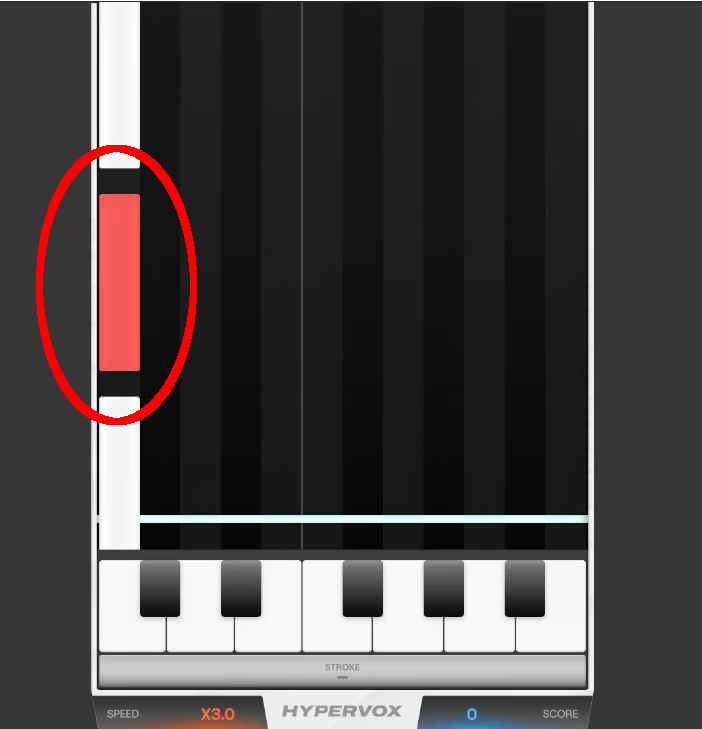
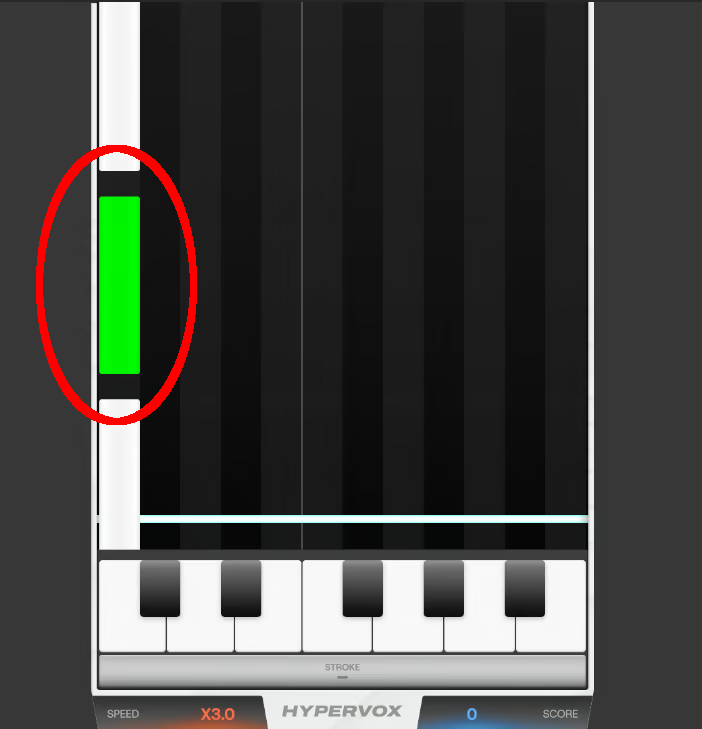
Octave up notes are displayed in red, while octave down notes are displayed in green.

When Colorblind Mode is enabled, octave up notes will be displayed in magenta, and octave down notes will be displayed in cyan.

Judgement System

In HYPERVOX, your timing accuracy is evaluated with five different judgement levels. Each judgement reflects how close your button press or release was to the perfect timing.

Precise

The highest level of accuracy. You've hit the note with perfect timing, within ±50 milliseconds of the target. This judgement awards maximum points and maintains your combo.

Great

Excellent timing that's slightly off from perfect, within ±50-100 milliseconds. You'll receive high points and your combo continues.

Fair

Acceptable timing that's noticeably off but still within the rhythm, within ±100-150 milliseconds. You'll earn moderate points and maintain your combo, though with reduced scoring.

Close

Your timing is significantly off, within ±150-300 milliseconds of the target. This results in minimal points but still maintains your combo streak.

Break

You've either missed the note entirely or your timing was too far off (beyond ±300 milliseconds). This judgement breaks your combo, resetting it to zero, and awards no points.

Speed Control

If you feel the notes pass too fast or too slow, you can adjust their scroll speed using F1 to decrease speed and F2 to increase speed by default.

This only changes the visual speed of the notes — the actual timing for hitting notes remains unchanged.

The speed control keys can also be customized in the settings menu.

Creating Song Data

To create a track data for HYPERVOX, follow these steps in the CREATE menu:

1. First, select the vocal and instrumental audio files. The recommended audio format is 44.1kHz/16bit WAV. Both audio files must have matching sampling frequencies for proper playback.

2. Select a MIDI file containing a single vocal track that matches the vocal audio. Harmonies are not supported. If you don't have a MIDI file, you can use AI to convert the vocal audio to MIDI. However, this is an experimental feature and conversion quality may decrease with longer songs (1m30s or longer). When using AI-generated MIDI files, some long notes may be split into multiple segments. In this case, apply the option to merge consecutive notes of the same pitch.

3. Finally, enter the chart information. For proper playback, you must input all information including accurate BPM. Album cover and background video are optional. If including a video, MP4 is recommended for Windows, while WebM with VP8 codec is recommended for other platforms.

Once the chart is successfully created, you can check it in the game's TRACKS menu.

Oświadczenie w sprawie treści generowanych przez SI

Producenci opisują, jak ich gra korzysta z treści generowanych przez SI, w następujący sposób:

This game uses Spotify's Basic Pitch, a machine learning model for audio-to-MIDI transcription. This technology assists in converting audio files into note data for gameplay purposes and is entirely optional—players can choose whether or not to use this feature. It does not generate music, artwork, or other creative content; all such elements are created by human artists and composers.

Wymagania systemowe

Windows
SteamOS + Linux
    Konfiguracja minimalna:
    • Wymaga 64-bitowego procesora i systemu operacyjnego
    • System operacyjny: Windows 10 (64-bit)
    • Procesor: Intel Core i3-6100 / AMD FX-6300
    • Pamięć: 4 GB RAM
    • Karta graficzna: Intel HD Graphics 530 / NVIDIA GeForce GT 730 / AMD Radeon R7 250
    • DirectX: Wersja 11
    • Miejsce na dysku: 1 GB dostępnej przestrzeni
    Konfiguracja zalecana:
    • Wymaga 64-bitowego procesora i systemu operacyjnego
    Konfiguracja minimalna:
    • System operacyjny: Ubuntu 20.04 LTS / SteamOS 3.0 or later
    • Procesor: Intel Core i3-6100 / AMD FX-6300
    • Pamięć: 4 GB RAM
    • Karta graficzna: Intel HD Graphics 530 / NVIDIA GeForce GT 730 / AMD Radeon R7 250
    • Miejsce na dysku: 1 GB dostępnej przestrzeni
    Konfiguracja zalecana:
    Brak recenzji dla tego produktu

    Możesz napisać swoją własną recenzję dla tego produktu, żeby podzielić się swoimi wrażeniami ze społecznością. Użyj obszaru, który znajduje się na tej stronie nad przyciskiem zakupu, żeby napisać swoją recenzję.