Для запуску цього вмісту необхідно мати придбану в Steam копію RustForge Sign Painter.

Увійдіть до акаунта, щоби додати цей продукт до списку бажаного чи позначити як ігнорований.

українська мова недоступна

Цей продукт не підтримує вашу мову. Будь ласка, перегляньте список підтримуваних мов перед купівлею.

Завантажуваний вміст

Для запуску цього вмісту необхідно мати придбану в Steam копію RustForge Sign Painter.

Придбати RustForge Premium Upgrade


Про цей вміст

💎 Premium Features (Unlock The Ultimate Quality)

Upgrade your artistry with advanced algorithms and essential quality-of-life tools:

  • Advanced Adaptive Palette: Utilize Hex Color codes and vibrant tones to achieve professional-grade color accuracy, including diverse skin tones and gradients.

  • VoidWatch Sentinel AutoSaves: Monitors the game’s UI layer in real-time. The VoidWatch Sentinel Monitoring System is an intelligent system that acts as your personal "Watch Dog", if you die, disconnect, the game crashes or the server restarts, the VoidWatch Sentinel instantly pauses the painting engine and triggers an emergency save of your progress. Set your custom Watch Point with F8 (Default) to track any static UI element like the trash can or save button. Never lose progress to a server restart, crash, disconnection, or a roaming raider again.

  • Canvas Sync: Automatically pulses the in-game save command (CTRL+S) every set X rows during the painting process, ensuring the server-side canvas data is preserved even if the game client crashes.

  • Resume Painting on Click (F5): Don't let a crash or a raid ruin your progress. Simply press F5 and click any point on the canvas to resume exactly where you left off.

  • Session Save & Load: Save your progress to a file. Indispensable for massive art projects that take multiple hours or sessions to complete.

  • Integrated Image Editor: Crop your images and add text overlays directly inside RustForge—no external photo editor required.

  • Timelapse MP4 Creator: Automatically capture your artwork coming to life and export it as an MP4 (with optional music) to share with your clan or social media.

Artistic Control & Filters

Fine-tune your masterpiece before the brush ever touches the sign:

  • Stylized Filters: Oil Paint, Charcoal Sketch, Comic Book, Watercolor, and more.

  • Technical Filters: Dithering, Pixel Art/Mosaic, and Line Art.

  • Image Enhancement: Gaussian Blur, Sharpening, and Median filtering to clean up noisy images.

  • Background Color Ignore: Tell RustForge to skip specific colors (like white borders or green screens) to save massive amounts of time.

How It Works

  • Load: Choose any image (JPG, PNG, WebP, SVG, ETC.) from your PC or a URL.

  • Capture: Use the hotkeys to quickly define your in-game palette and canvas area.

  • Set Sentinel Watch Area: Press F8 to pick a UI anchor point (Such as the Red "Trash Can" button, or another static UI element) for the VoidWatch safety monitor.

  • Configure: Select your painting speed, filter, and painting method.

  • Paint: Press Start and watch RustForge handle the rest.

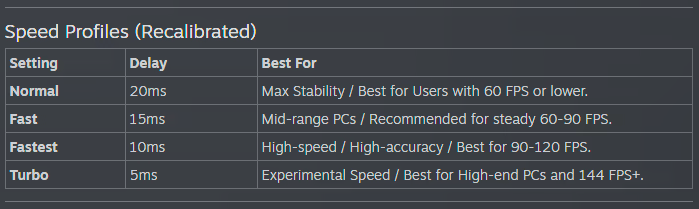
RustForge Sign Painter relies heavily on a stable framerate. The default settings are optimized for all systems, low-end or high-end. Higher FPS means you can have a faster Painting Speed, and a lower Precision Timing Delay value, Lower FPS means you should use lower Painting Speeds, and higher or the default Precision Timing Delay (20ms).

Below are the Recommended Painting Speed Settings based on your average FPS

⚠ Important Notes

• Supported aspect ratios: All standard and widescreen aspect ratios are now supported with built-in detection for Windows scaling. 

• Rust in-game UI Scale must be set to 1.0 for coordinate accuracy.

Other UI scales change element positions and will cause mis-clicks.

RustForge is built with stability in mind, featuring High-DPI Scaling Detection that automatically adjusts for Windows display scaling (125%, 150%, etc.), advanced painting methods, and tools, with optional Premium features available via DLC to unlock advanced high-fidelity painting methods and quality-of-life enhancements.

Системні вимоги

    Мінімальні:
    • ОС: Windows 10 64-bit
    • Процесор: Dual-core 2.0 GHz (Intel i3 / AMD Ryzen 3)
    • Оперативна пам’ять: 4 GB ОП
    • Відеокарта: Integrated Graphics
    • DirectX: версії 11
    • Мережа: широкосмугове підключення до Інтернету
    • Місце на диску: 3 GB доступного місця
    • Додаткові примітки: Requires .NET Desktop Runtime 8.0
    Рекомендовані:
    • ОС: Windows 10 64-bit
    • Процесор: Quad-core 3.0 GHz+ (Intel i5 / AMD Ryzen 5)
    • Оперативна пам’ять: 8 GB ОП
    • Відеокарта: Dedicated GPU (GTX 1050 or equivalent)
    • DirectX: версії 12
    • Мережа: широкосмугове підключення до Інтернету
    • Місце на диску: 4 GB доступного місця
    • Додаткові примітки: Requires .NET Desktop Runtime 8.0
Немає жодної рецензії на цей продукт

Ви можете написати вашу власну рецензію на цей продукт, щоб поділитися вашим досвідом зі спільнотою. Скористуйтеся полем над кнопками придбання на цій сторінці, щоб написати вашу рецензію.