เนื้อหานี้ต้องการแอปพลิเคชันหลัก RustForge Sign Painter บน Steam เพื่อเริ่มใช้งาน

เข้าสู่ระบบ เพื่อเพิ่มผลิตภัณฑ์นี้ลงในสิ่งที่อยากได้ของคุณ ติดตาม หรือทำเครื่องหมายเป็นถูกละเว้น

ไม่รองรับภาษาไทย

ผลิตภัณฑ์นี้ไม่รองรับภาษาท้องถิ่นของคุณ โปรดตรวจสอบรายชื่อภาษาที่รองรับก่อนทำการสั่งซื้อ

เนื้อหาดาวน์โหลด

เนื้อหานี้ต้องการแอปพลิเคชันหลัก RustForge Sign Painter บน Steam เพื่อเริ่มใช้งาน

ซื้อ RustForge Premium Upgrade

ข้อเสนอช่วงแนะนำ! ข้อเสนอจะจบลง 3 กุมภาพันธ์


เกี่ยวกับเนื้อหานี้

💎 Premium Features (Unlock The Ultimate Quality)

Upgrade your artistry with advanced algorithms and essential quality-of-life tools:

  • Advanced Adaptive Palette: Utilize Hex Color codes and vibrant tones to achieve professional-grade color accuracy, including diverse skin tones and gradients.

  • Resume Painting on Click (F5): Don't let a crash or a raid ruin your progress. Simply press F5 and click any point on the canvas to resume exactly where you left off.

  • Session Save & Load: Save your progress to a file. Indispensable for massive art projects that take multiple days or sessions to complete.

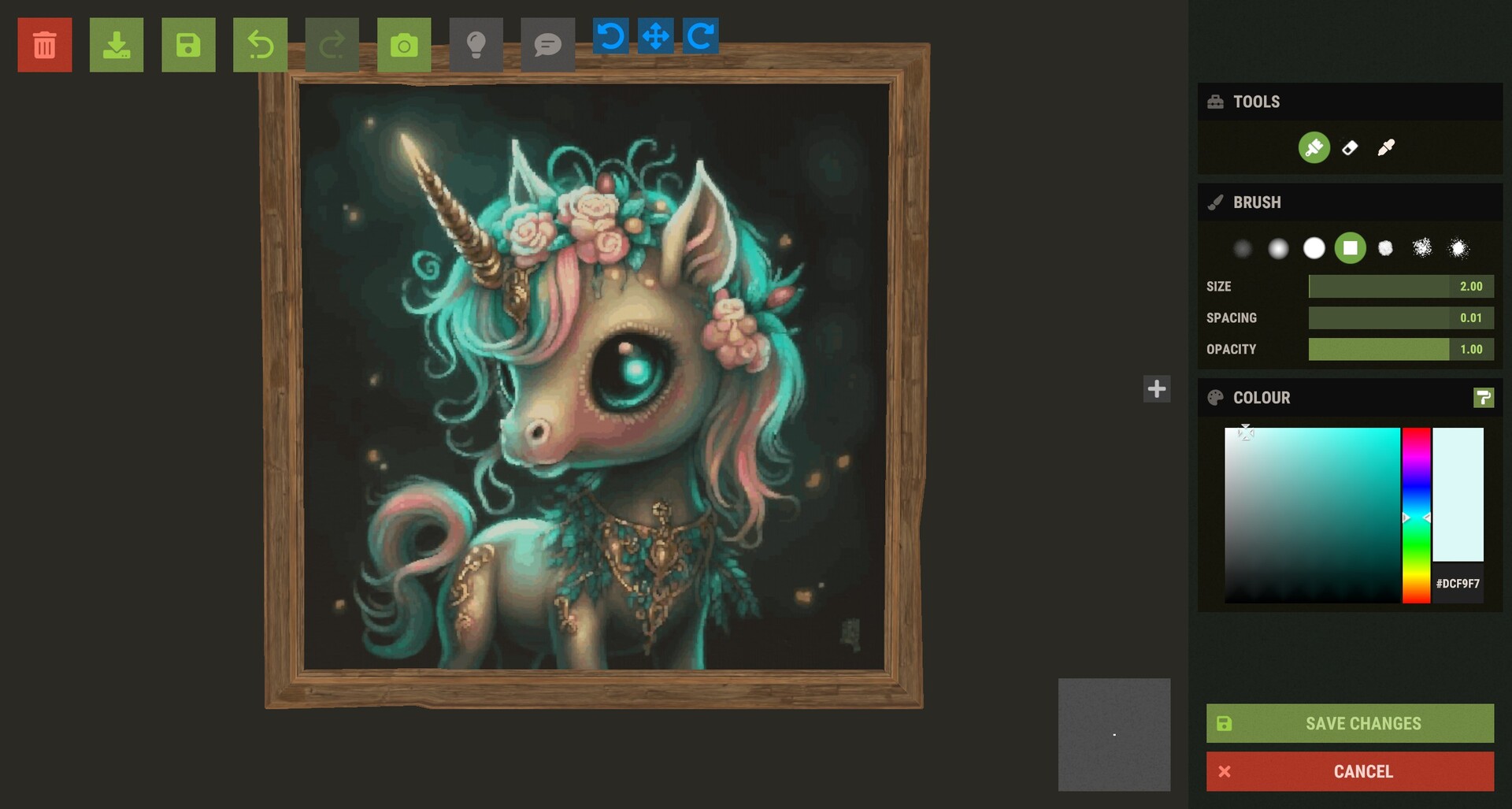
  • Integrated Image Editor: Crop your images and add text overlays directly inside RustForge—no external photo editor required.

  • Timelapse MP4 Creator: Automatically capture your artwork coming to life and export it as an MP4 (with optional music) to share with your clan or social media.

Artistic Control & Filters

Fine-tune your masterpiece before the brush ever touches the sign:

  • Stylized Filters: Oil Paint, Charcoal Sketch, Comic Book, Watercolor, and more.

  • Technical Filters: Dithering, Pixel Art/Mosaic, and Line Art.

  • Image Enhancement: Gaussian Blur, Sharpening, and Median filtering to clean up noisy images.

  • Background Color Ignore: Tell RustForge to skip specific colors (like white borders or green screens) to save massive amounts of time.

How It Works

  • Load: Choose any image from your PC or a URL.

  • Capture: Use the hotkeys to quickly define your in-game palette and canvas area.

  • Configure: Select your painting speed, filter, and painting method.

  • Paint: Press Start and watch RustForge handle the rest.

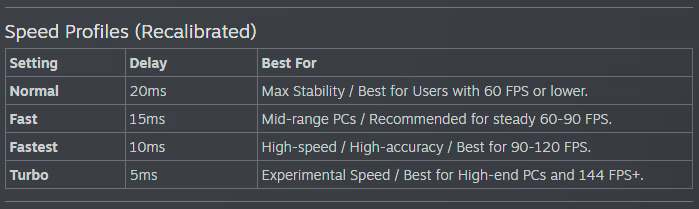
RustForge Sign Painter relies heavily on a stable framerate. The default settings are optimized for all systems, low-end or high-end. Higher FPS means you can have a faster Painting Speed, and a lower Precision Timing Delay value, Lower FPS means you should use lower Painting Speeds, and higher or the default Precision Timing Delay (20ms).

Below are the Recommended Painting Speed Settings based on your average FPS

⚠ Important Notes

• Supported aspect ratios: 4:3 and 16:9 only (standard 1080p / 1440p / 4K).

Ultrawide and other widescreen ratios are not supported.

• Rust in-game UI Scale must be set to 1.0.

Other UI scales change element positions and will cause mis-clicks.

RustForge is built with stability in mind, featuring high-DPI support, advanced painting methods, and tools.[/p]

ความต้องการระบบ

    ขั้นต่ำ:
    • ระบบปฏิบัติการ: Windows 10 64-bit
    • โปรเซสเซอร์: Dual-core 2.0 GHz (Intel i3 / AMD Ryzen 3)
    • หน่วยความจำ: แรม 4 GB
    • กราฟิกส์: Integrated Graphics
    • DirectX: เวอร์ชัน 11
    • เครือข่าย: การเชื่อมต่ออินเทอร์เน็ตแบบบรอดแบนด์
    • พื้นที่จัดเก็บข้อมูล: พื้นที่ว่างที่พร้อมใช้งาน 3 GB
    • หมายเหตุเพิ่มเติม: Requires .NET Desktop Runtime 8.0
    แนะนำ:
    • ระบบปฏิบัติการ: Windows 10 64-bit
    • โปรเซสเซอร์: Quad-core 3.0 GHz+ (Intel i5 / AMD Ryzen 5)
    • หน่วยความจำ: แรม 8 GB
    • กราฟิกส์: Dedicated GPU (GTX 1050 or equivalent)
    • DirectX: เวอร์ชัน 12
    • เครือข่าย: การเชื่อมต่ออินเทอร์เน็ตแบบบรอดแบนด์
    • พื้นที่จัดเก็บข้อมูล: พื้นที่ว่างที่พร้อมใช้งาน 4 GB
    • หมายเหตุเพิ่มเติม: Requires .NET Desktop Runtime 8.0
ไม่พบบทวิจารณ์สำหรับผลิตภัณฑ์นี้

คุณสามารถเขียนบทวิจารณ์ของคุณเองสำหรับผลิตภัณฑ์นี้เพื่อแบ่งปันประสบการณ์ของคุณให้กับชุมชน ใช้พื้นที่ด้านบนของปุ่มซื้อในหน้านี้เพื่อเขียนบทวิจารณ์ของคุณ