此内容需要在 Steam 上拥有基础应用程序 RustForge Sign Painter 才能畅玩。

想要将此项目添加至您的愿望单、关注它或标记为已忽略,请先登录

不支持简体中文

本产品尚未对您目前所在的地区语言提供支持。在购买请先行确认目前所支持的语言。

DLC

此内容需要在 Steam 上拥有基础应用程序 RustForge Sign Painter 才能畅玩。

购买 RustForge Premium Upgrade

首发优惠!截止时间:2 月 3 日

-20%
$9.99
$7.99
 

关于此内容

💎 Premium Features (Unlock The Ultimate Quality)

Upgrade your artistry with advanced algorithms and essential quality-of-life tools:

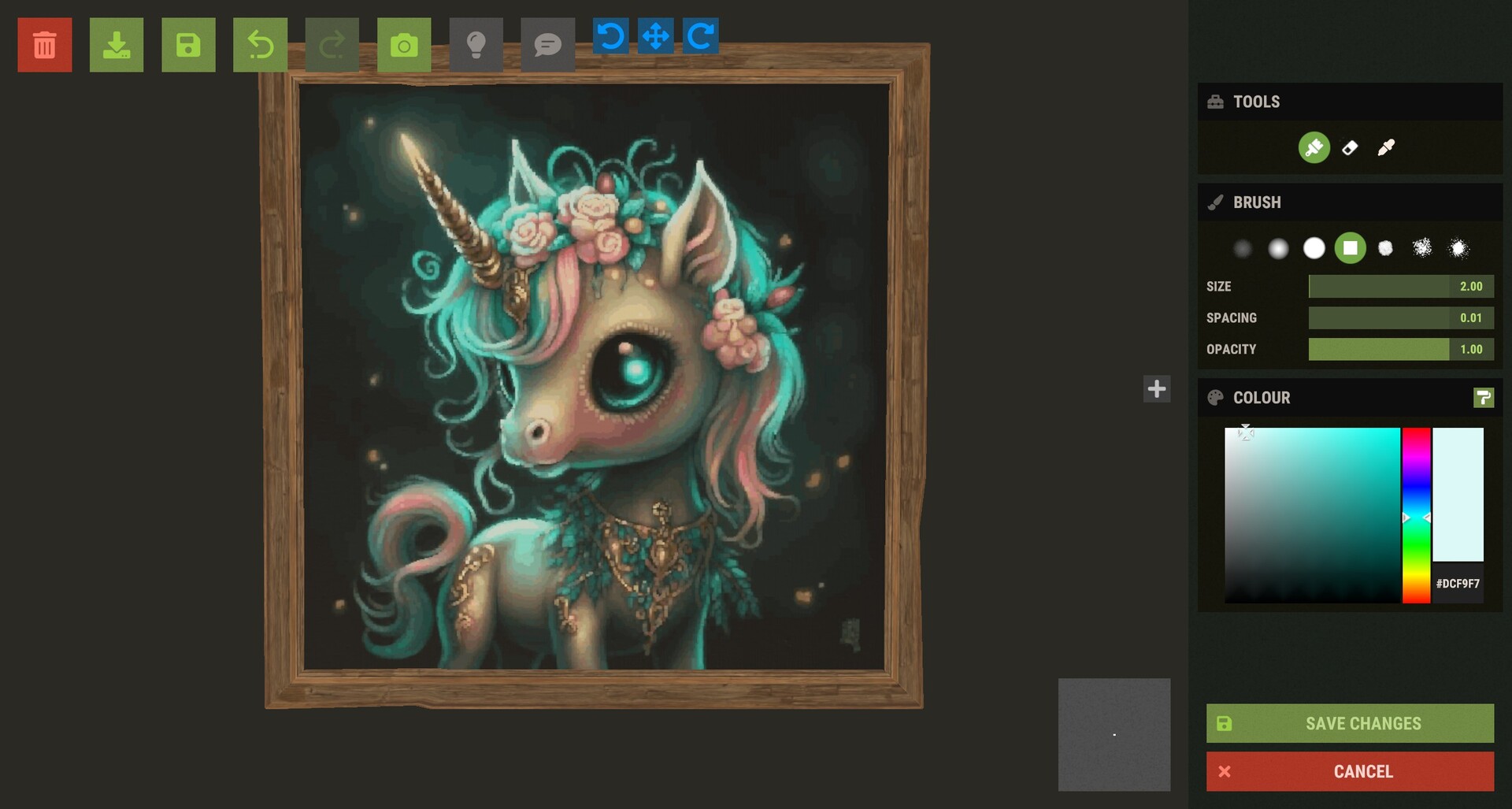
  • Advanced Adaptive Palette: Utilize Hex Color codes and vibrant tones to achieve professional-grade color accuracy, including diverse skin tones and gradients.

  • Resume Painting on Click (F5): Don't let a crash or a raid ruin your progress. Simply press F5 and click any point on the canvas to resume exactly where you left off.

  • Session Save & Load: Save your progress to a file. Indispensable for massive art projects that take multiple days or sessions to complete.

  • Integrated Image Editor: Crop your images and add text overlays directly inside RustForge—no external photo editor required.

  • Timelapse MP4 Creator: Automatically capture your artwork coming to life and export it as an MP4 (with optional music) to share with your clan or social media.

Artistic Control & Filters

Fine-tune your masterpiece before the brush ever touches the sign:

  • Stylized Filters: Oil Paint, Charcoal Sketch, Comic Book, Watercolor, and more.

  • Technical Filters: Dithering, Pixel Art/Mosaic, and Line Art.

  • Image Enhancement: Gaussian Blur, Sharpening, and Median filtering to clean up noisy images.

  • Background Color Ignore: Tell RustForge to skip specific colors (like white borders or green screens) to save massive amounts of time.

How It Works

  • Load: Choose any image from your PC or a URL.

  • Capture: Use the hotkeys to quickly define your in-game palette and canvas area.

  • Configure: Select your painting speed, filter, and painting method.

  • Paint: Press Start and watch RustForge handle the rest.

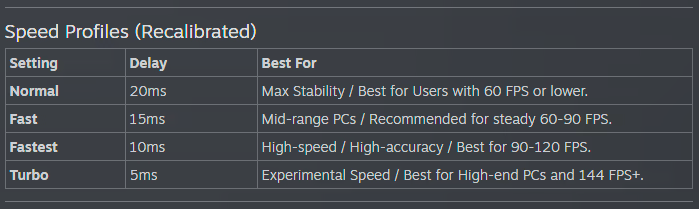
RustForge Sign Painter relies heavily on a stable framerate. The default settings are optimized for all systems, low-end or high-end. Higher FPS means you can have a faster Painting Speed, and a lower Precision Timing Delay value, Lower FPS means you should use lower Painting Speeds, and higher or the default Precision Timing Delay (20ms).

Below are the Recommended Painting Speed Settings based on your average FPS

⚠ Important Notes

• Supported aspect ratios: 4:3 and 16:9 only (standard 1080p / 1440p / 4K).

Ultrawide and other widescreen ratios are not supported.

• Rust in-game UI Scale must be set to 1.0.

Other UI scales change element positions and will cause mis-clicks.

RustForge is built with stability in mind, featuring high-DPI support, advanced painting methods, and tools.[/p]

系统需求

    最低配置:
    • 操作系统: Windows 10 64-bit
    • 处理器: Dual-core 2.0 GHz (Intel i3 / AMD Ryzen 3)
    • 内存: 4 GB RAM
    • 显卡: Integrated Graphics
    • DirectX 版本: 11
    • 网络: 宽带互联网连接
    • 存储空间: 需要 3 GB 可用空间
    • 附注事项: Requires .NET Desktop Runtime 8.0
    推荐配置:
    • 操作系统: Windows 10 64-bit
    • 处理器: Quad-core 3.0 GHz+ (Intel i5 / AMD Ryzen 5)
    • 内存: 8 GB RAM
    • 显卡: Dedicated GPU (GTX 1050 or equivalent)
    • DirectX 版本: 12
    • 网络: 宽带互联网连接
    • 存储空间: 需要 4 GB 可用空间
    • 附注事项: Requires .NET Desktop Runtime 8.0
此产品无任何评测

您可以为此产品撰写您自己的评测,与社区分享您的使用体验。在本页面购买按钮上方的区域撰写您的评测。