Transform your Rust base into a gallery with RustForge. Convert and paint high-fidelity images directly onto in-game signs with extreme precision. Features adaptive palettes, session saving, and advanced painting methods, it makes creating professional in-game artwork fast and effortless.

Inicia sesión para agregar este artículo a tu lista de deseados, seguirlo o marcarlo como ignorado.

No disponible en Español (Latinoamérica)

Este artículo no está disponible en tu idioma. Consulta la lista de idiomas disponibles antes de realizar la compra.

Utilizar RustForge Sign Painter

Free to Play
 

Acerca de este software

Transform Your Base Into a Gallery

RustForge is the ultimate automation tool for aspiring artists in the world of Rust. Gone are the days of spending hours manually pixel-painting a sign only to be raided mid-project. RustForge takes any image, from high-fidelity photos to pixel art, and automatically paints it directly onto your in-game canvas with machine precision.

Core Functionality (Free for All Users)

The foundation of RustForge provides everything you need to start creating:

  • Automated Precision Painting: Reproduce any image accurately onto in-game signs with automated mouse movements and color selection.

  • Configurable Painting Area: Use hotkey-driven overlays (F9/F10) to perfectly align your canvas and palette.

  • Standard Painting Methods: Methodical line-by-line painting and standard dithering for classic sign art.

  • VoidWeave Painting Method: Paints each pixel individually. This method produces the highest quality, most accurate results, with the limited 64 color in-game palette, especially for detailed images, gradients, and pixel art.

  • Input Stability Buffer (Safe Painting Mode): This is for "low-end" or low FPS PC's. This safe painting logic adds a few additional precision sleeps between each mouse move, and mouse input event, this ensures that every single pixel, even tiny details, gets processed by the game engine, eliminating unpainted "specks" on laggy servers, or if you have unstable FPS/low FPS.

  • Full Session Control: Pause, resume, or stop your painting at any time with customizable hotkeys. The new persistence engine ensures that when you resume, every pixel and palette color is exactly where you left it.

  • Adjustable Speed: Tailor the painting speed to match your PC performance and server lag.

  • Universal Aspect Ratio Support: Now featuring a high-precision mapping system. RustForge natively supports 16:9, 21:9 (Ultrawide), and 32:9 (Super Ultrawide) resolutions without "ghost lines" or alignment errors.

  • Native DPI Scaling Detection: Automatically detects if Windows is "stretching" your display (125%, 150%, etc.) and adjusts its internal math to ensure your painting and screen space/mouse input matches your display perfectly.

  • Painting Time Estimation: A completely overhauled time-calculation engine that provides accurate painting estimates based on your hardware, and speed settings.

Artistic Control & Filters

Fine-tune your masterpiece before the brush ever touches the sign:

  • Stylized Filters: Oil Paint, Charcoal Sketch, Comic Book, Watercolor, and more.

  • Technical Filters: Dithering, Pixel Art/Mosaic, and Line Art.

  • Image Enhancement: Gaussian Blur, Sharpening, and Median filtering to clean up noisy images.

  • Background Color Ignore: Tell RustForge to skip specific colors (like white borders or green screens) to save massive amounts of time.

How It Works

  • Load: Choose any image (JPG, PNG, WebP, SVG, ETC.) from your PC or a URL.

  • Capture: Use the hotkeys to quickly define your in-game palette and canvas area.

  • Configure: Select your painting speed, filter, and painting method.

  • Paint: Press Start and watch RustForge handle the rest.

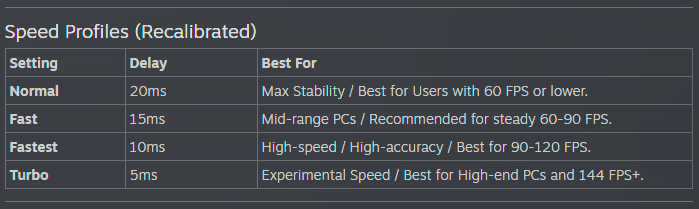
RustForge Sign Painter relies heavily on a stable framerate. The default settings are optimized for all systems, low-end or high-end. Higher FPS means you can have a faster Painting Speed, and a lower Precision Timing Delay value, Lower FPS means you should use lower Painting Speeds, and higher or the default Precision Timing Delay (20ms).

Below are the Recommended Painting Speed Settings based on your average FPS

⚠ Important Notes

• Supported aspect ratios: All standard and widescreen aspect ratios are now supported with built-in detection for Windows scaling. 

• Rust in-game UI Scale must be set to 1.0 for coordinate accuracy.

Other UI scales change element positions and will cause mis-clicks.

RustForge is built with stability in mind, featuring High-DPI Scaling Detection that automatically adjusts for Windows display scaling (125%, 150%, etc.), advanced painting methods, and tools, with optional Premium features available via DLC to unlock advanced high-fidelity painting methods and quality-of-life enhancements.

Requisitos del sistema

    Mínimo:
    • SO: Windows 10 64-bit
    • Procesador: Dual-core 2.0 GHz (Intel i3 / AMD Ryzen 3)
    • Memoria: 4 GB de RAM
    • Gráficos: Integrated Graphics
    • DirectX: Versión 11
    • Red: Conexión de banda ancha a Internet
    • Almacenamiento: 3 GB de espacio disponible
    • Notas adicionales: Requires .NET Desktop Runtime 8.0
    Recomendado:
    • SO: Windows 10 64-bit
    • Procesador: Quad-core 3.0 GHz+ (Intel i5 / AMD Ryzen 5)
    • Memoria: 8 GB de RAM
    • Gráficos: Dedicated GPU (GTX 1050 or equivalent)
    • DirectX: Versión 12
    • Red: Conexión de banda ancha a Internet
    • Almacenamiento: 4 GB de espacio disponible
    • Notas adicionales: Requires .NET Desktop Runtime 8.0

Reseñas de usuarios para RustForge Sign Painter Sobre las reseñas de usuarios Tus preferencias

Reseñas generales:
Positivas (10 reseñas)


Para ver las reseñas correspondientes a un intervalo de fechas, haz clic y arrastra en uno de los gráficos de arriba para crear una selección o haz clic en una barra específica.


Filtrar las reseñas según el tiempo de juego del usuario cuando se escribió la reseña:


Sin mínimo a Sin máximo

Mostrar las reseñas en el orden seleccionado


Más información
Filtros
Excluyendo actividad de reseñas fuera de tema
Tiempo de juego:
Jugado principalmente en Steam Deck
No hay más reseñas que coincidan con los filtros establecidos arriba.
Ajusta los filtros de arriba para ver otras reseñas.
Cargando reseñas...