Transform your Rust base into a gallery with RustForge. Convert and paint high-fidelity images directly onto in-game signs with extreme precision. Features adaptive palettes, session saving, and advanced painting methods, it makes creating professional in-game artwork fast and effortless.

Log på for at føje dette emne til din ønskeliste, følge det eller markere det som ignoreret

Brug RustForge Sign Painter

Gratis at spille
 

Om denne software

Transform Your Base Into a Gallery

RustForge is the ultimate automation tool for aspiring artists in the world of Rust. Gone are the days of spending hours manually pixel-painting a sign only to be raided mid-project. RustForge takes any image, from high-fidelity photos to pixel art, and automatically paints it directly onto your in-game canvas with machine precision.

Core Functionality (Free for All Users)

The foundation of RustForge provides everything you need to start creating:

  • Automated Precision Painting: Reproduce any image accurately onto in-game signs with automated mouse movements and color selection.

  • Configurable Painting Area: Use hotkey-driven overlays (F9/F10) to perfectly align your canvas and palette.

  • Standard Painting Methods: Methodical line-by-line painting and standard dithering for classic sign art.

  • VoidWeave Painting Method: Paints each pixel individually. This method produces the highest quality, most accurate results, with the limited 64 color in-game palette, especially for detailed images, gradients, and pixel art.

  • Input Stability Buffer (Safe Painting Mode): This is for "low-end" or low FPS PC's. This safe painting logic adds a few additional precision sleeps between each mouse move, and mouse input event, this ensures that every single pixel, even tiny details, gets processed by the game engine, eliminating unpainted "specks" on laggy servers, or if you have unstable FPS/low FPS.

  • Full Session Control: Pause, resume, or stop your painting at any time with customizable hotkeys. The new persistence engine ensures that when you resume, every pixel and palette color is exactly where you left it.

  • Adjustable Speed: Tailor the painting speed to match your PC performance and server lag.

  • Universal Aspect Ratio Support: Now featuring a high-precision mapping system. RustForge natively supports 16:9, 21:9 (Ultrawide), and 32:9 (Super Ultrawide) resolutions without "ghost lines" or alignment errors.

  • Native DPI Scaling Detection: Automatically detects if Windows is "stretching" your display (125%, 150%, etc.) and adjusts its internal math to ensure your painting and screen space/mouse input matches your display perfectly.

  • Painting Time Estimation: A completely overhauled time-calculation engine that provides accurate painting estimates based on your hardware, and speed settings.

Artistic Control & Filters

Fine-tune your masterpiece before the brush ever touches the sign:

  • Stylized Filters: Oil Paint, Charcoal Sketch, Comic Book, Watercolor, and more.

  • Technical Filters: Dithering, Pixel Art/Mosaic, and Line Art.

  • Image Enhancement: Gaussian Blur, Sharpening, and Median filtering to clean up noisy images.

  • Background Color Ignore: Tell RustForge to skip specific colors (like white borders or green screens) to save massive amounts of time.

How It Works

  • Load: Choose any image (JPG, PNG, WebP, SVG, ETC.) from your PC or a URL.

  • Capture: Use the hotkeys to quickly define your in-game palette and canvas area.

  • Configure: Select your painting speed, filter, and painting method.

  • Paint: Press Start and watch RustForge handle the rest.

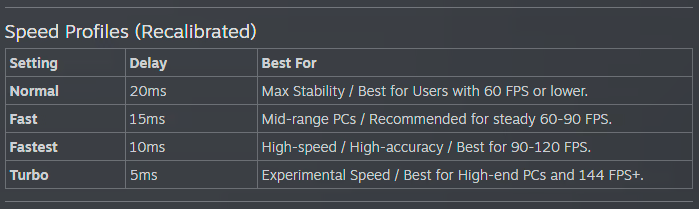
RustForge Sign Painter relies heavily on a stable framerate. The default settings are optimized for all systems, low-end or high-end. Higher FPS means you can have a faster Painting Speed, and a lower Precision Timing Delay value, Lower FPS means you should use lower Painting Speeds, and higher or the default Precision Timing Delay (20ms).

Below are the Recommended Painting Speed Settings based on your average FPS

⚠ Important Notes

• Supported aspect ratios: All standard and widescreen aspect ratios are now supported with built-in detection for Windows scaling. 

• Rust in-game UI Scale must be set to 1.0 for coordinate accuracy.

Other UI scales change element positions and will cause mis-clicks.

RustForge is built with stability in mind, featuring High-DPI Scaling Detection that automatically adjusts for Windows display scaling (125%, 150%, etc.), advanced painting methods, and tools, with optional Premium features available via DLC to unlock advanced high-fidelity painting methods and quality-of-life enhancements.

Systemkrav

    Minimum:
    • Styresystem: Windows 10 64-bit
    • Processor: Dual-core 2.0 GHz (Intel i3 / AMD Ryzen 3)
    • Hukommelse: 4 GB RAM
    • Grafik: Integrated Graphics
    • DirectX: Version 11
    • Netværk: Bredbåndsinternetforbindelse
    • Diskplads: 3 GB tilgængelig plads
    • Yderligere bemærkninger: Requires .NET Desktop Runtime 8.0
    Anbefalet:
    • Styresystem: Windows 10 64-bit
    • Processor: Quad-core 3.0 GHz+ (Intel i5 / AMD Ryzen 5)
    • Hukommelse: 8 GB RAM
    • Grafik: Dedicated GPU (GTX 1050 or equivalent)
    • DirectX: Version 12
    • Netværk: Bredbåndsinternetforbindelse
    • Diskplads: 4 GB tilgængelig plads
    • Yderligere bemærkninger: Requires .NET Desktop Runtime 8.0

Kundeanmeldelser for RustForge Sign Painter Om brugeranmeldelser Dine præferencer

Samlede anmeldelser:
8 brugeranmeldelser (8 anmeldelser)


For at se anmeldelser indenfor et datointerval kan du klikke og trække et interval på grafen ovenfor eller klikke på en specifik bjælke.


Sorter anmeldelser efter brugerens spilletid, da anmeldelsen blev skrevet:


Intet minimum til Intet maksimum

Vis anmeldelser i valgt visningsrækkefølge


Læs mere
Filtre
Eksklusive irrelevant anmeldelsesaktivitet
Spilletid:
Spillet mest på Steam Deck
Der er ingen anmeldelser, der passer med de valgte filtre ovenfor
Tilpas filtrene ovenfor for at se andre anmeldelser
Indlæser anmeldelser...