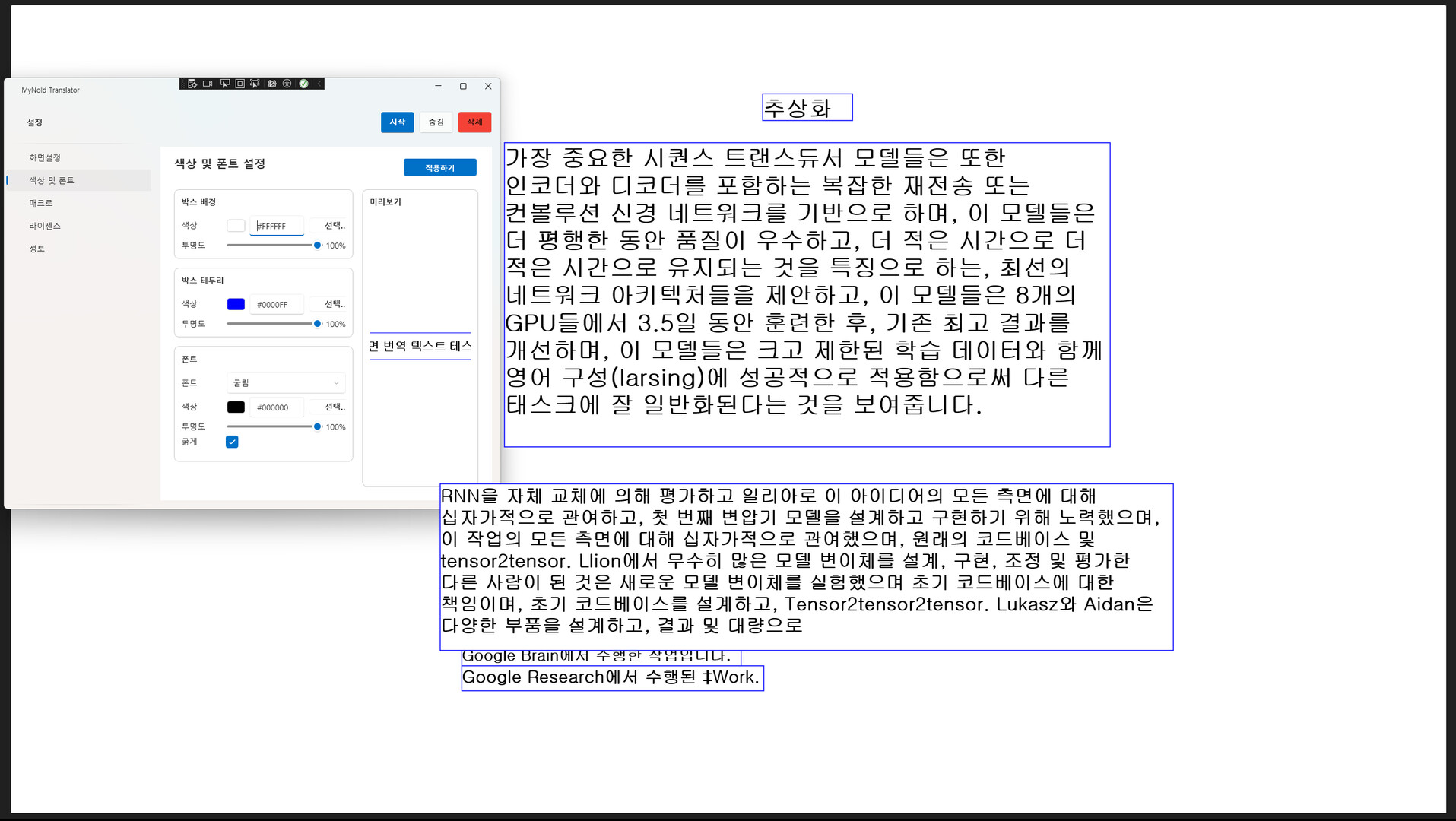
A desktop translator that recognizes text from any window and translates it on screen. Everything is processed locally for security, and once purchased, you can use it forever with no subscription. Future updates will add features such as real-time voice translation and keyboard input translation.
發行日期:
2026 第 1 季
開發人員:
發行商:
標籤

登入以將此項目新增至您的願望清單、關注它,或標記為已忽略

不支援繁體中文

本產品尚不支援您的目前所在地的語言。購買前請先確認語言支援清單。

此遊戲尚未在 Steam 上發售

預計發行日期: 2026 第 1 季

感興趣嗎?
將這款遊戲加入願望清單,以便在發售時收到通知。
新增至您的願望清單
 

關於此軟體

About This Application

MyNoid Translator is a desktop translation tool that recognizes any visible window as an image and translates the text on screen. Unlike Chrome extensions or web-based translators, it works consistently across all Windows applications, providing a much broader and more flexible usage environment.

All OCR and translation processes are performed entirely on your local machine. No data is sent to external servers, ensuring strong privacy and security. Because it doesn’t rely on network conditions or server availability, translation remains stable at all times.

Currently, the application focuses on screen translation (OCR + English → Korean), but it will continue to expand into a more versatile translation platform with additional input methods and translation features.

Key Features

  • Fully local processing with strong security
    From screen capture to OCR and translation, every step happens inside your PC.
    No external server requests — ideal for users concerned about privacy or sensitive content.

  • Works on any program
    Websites, games, documents, videos, software interfaces —
    if the text is visible on your screen, it can be recognized and translated.
    This provides powerful versatility without depending on specific browsers or apps.

  • One-time purchase, lifetime use
    Buy once and enjoy unlimited access to all features without any subscription.

  • Expanding translation capabilities
    Beyond the current English → Korean screen translation, upcoming updates will add:

    • English ↔ Korean bidirectional translation

    • Major languages ↔ Korean translation

    • Cross-language translation

    • Real-time voice translation

    • Keyboard input translation

    • Clipboard auto-translation
      and more input/output modes planned for future releases.

  • Overlay-based translation display
    Clean, unobtrusive overlay UI displays translations on screen
    without disrupting your workflow or overlapping with other applications.

系統需求

    最低配備:
    • 需要 64 位元的處理器及作業系統
    • 作業系統: Windows 11
    • 處理器: Intel Core i5-6400
    • 記憶體: 8 GB 記憶體
    • 顯示卡: NVIDIA GTX 1050 Ti / GTX 1650 or equivalent
    • 網路: 寬頻網際網路連線
    • 儲存空間: 4 GB 可用空間
    建議配備:
    • 需要 64 位元的處理器及作業系統
    • 作業系統: Windows 11
    • 處理器: Intel Core i5 or better
    • 記憶體: 16 GB 記憶體
    • 顯示卡: NVIDIA GTX 1660 / RTX 2060 or better
    • 網路: 寬頻網際網路連線
    • 儲存空間: 4 GB 可用空間
此產品無任何評論

您可以撰寫評論來與社群分享您對於本產品的看法。請使用本頁面中位於購買按鈕上方的區塊來進行評論的編寫。