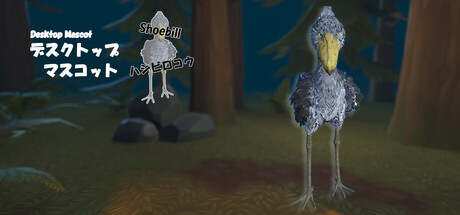
This application lets you float a "duck toy" on your computer desktop! It usually stands quietly, but sometimes it may show dynamic movements! * Supports multiple displays, including dual displays.

Sign in to add this item to your wishlist, follow it, or mark it as ignored


About This Software

This application lets you float a "duck toy" on your computer desktop!
It usually stands quietly, but sometimes it may show dynamic movements!
* Supports multiple displays, including dual displays.

Controls

Left-click and drag: Move the model
Right-click: Open the menu

How to Play

- This is a desktop mascot that runs on your PC desktop.
- You can move the model by left-clicking and dragging the mouse.
- Supports multiple displays, including dual displays!

Streaming Guidelines

This application may be used for video streaming and other purposes.
When using this application for video streaming and other purposes, please include the application name and Steam store page URL in the description section, if possible.
The developer assumes no responsibility for any problems that may arise from using this application for video streaming and other purposes.

System Requirements

    Minimum:
    • OS: Windows11
    • Processor: Corei5 3Ghz or better
    • Memory: 100 MB RAM
    • Graphics: GPU 1GB RAM
    • Storage: 100 MB available space

Customer reviews for Shoebill (Desktop Mascot) About user reviews Your preferences

Overall Reviews:
1 user reviews (1 reviews)


To view reviews within a date range, please click and drag a selection on a graph above or click on a specific bar.


Filter reviews by the user's playtime when the review was written:


No minimum to No maximum

Show reviews in selected display order


Learn More
Filters
Excluding Off-topic Review Activity
Playtime:
Played Mostly on Steam Deck
Operating System:
CPU:
GPU:
Device Type:
There are no more reviews that match the filters set above
Adjust the filters above to see other reviews
Loading reviews...