FoldHub is a powerful Windows customization tool that brings life to your boring folders. Transform your desktop organization with custom colors, gradients, and a vast library of beautiful icons spanning multiple themes including Anime, Space, Pixel Art, Neon, and Studio Ghibli styles.
Дата выхода:
9 дек. 2025 г.
Разработчик:
Издатель:
По меткам

Войдите, чтобы добавить этот продукт в список желаемого или скрыть его

Не поддерживается русский язык

Этот продукт не поддерживает ваш язык. Пожалуйста, перед покупкой ознакомьтесь со списком поддерживаемых языков.

Купить FoldHub

ОЗНАКОМИТЕЛЬНОЕ ПРЕДЛОЖЕНИЕ! Заканчивается 16 декабря

-40%
$4.99
$2.99
 

Об этом ПО

Advanced Color Customization

- Apply solid colors or stunning gradients to any folder

- Adjust brightness and direction for perfect gradient effects

- Save your favorite color combinations to your personal library

- Quick access to recently used colors

 Extensive Icon Library

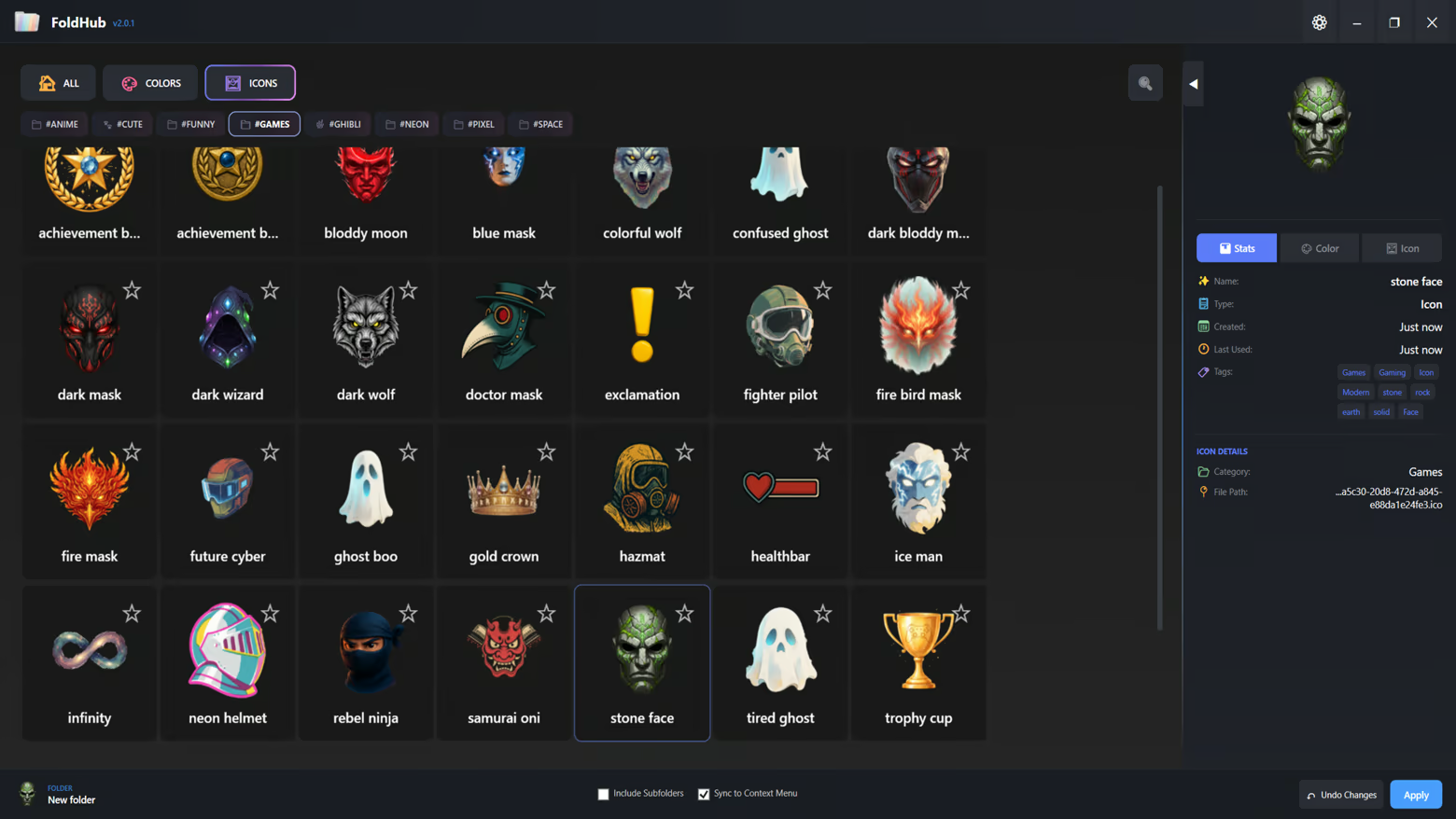
- 6 Curated Categories: Anime, Funny, Space, Pixel, Neon, and Ghibli

- Hundreds of high-quality icons ready to use

- Add your own custom icons (.ico format)

- Tag-based filtering system for quick discovery

- Favorites system to bookmark your most-used icons

Smart Organization

- Recent Items: Quick access to your recently applied styles

- My Library: Personal collection of custom colors and icons

- Favorites: Star your favorite items for instant access

- Tag Navigation: Filter by themes like "green", "warm", "cool", and more

User-Friendly Interface

- Modern dark-themed UI designed for comfort

- Drag-and-drop folder support

- Batch folder customization - apply to multiple folders at once

- Include subfolders option for recursive styling

- Live preview of colors and icons

Technical Features

- Native Windows integration

- Persistent folder customization (survives system restarts)

- No system modifications - safe and reversible

- Lightweight and fast performance

- Supports Windows desktop.ini customization

Perfect For

- Content Creators: Organize your project folders with visual themes

- Gamers: Categorize your game folders with matching icons

- Students: Color-code your study materials and assignments

- Professionals: Enhance workspace organization with visual hierarchy

- Creative Users: Express your personality through folder aesthetics

How It Works

1. Select one or multiple folders you want to customize

2. Choose from our extensive icon library or pick a custom color

3. Click Apply - your folders instantly transform

4. Save your favorite combinations for future use

Информация о контенте, созданном с помощью ИИ

Вот как разработчики описывают контент в игре, сгенерированный ИИ:

All visual assets within the application, including icons, backgrounds, and UI elements, were created using generative AI tools during the development process. These assets are pre-rendered and static. The application does not utilize AI to generate content in real-time.

Системные требования

    Минимальные:
    • 64-разрядные процессор и операционная система
    • ОС: Windows 10 (64-bit)
    • Процессор: Dual Core 2.0 GHz
    • Оперативная память: 2048 MB ОЗУ
    • Видеокарта: Integrated Graphics
    • Место на диске: 500 MB
    • Дополнительно: Requires .NET 8.0 Runtime (included)
    Рекомендованные:
    • 64-разрядные процессор и операционная система
    • ОС: Windows 10/11 (64-bit)
    • Процессор: Quad Core 2.5 GHz or higher
    • Оперативная память: 4096 MB ОЗУ
    • Видеокарта: Integrated Graphics
    • Место на диске: 500 MB
    • Дополнительно: SSD recommended for better performance
У этого продукта нет обзоров

Вы можете написать обзор этого продукта, чтобы поделиться своим опытом с сообществом. Для этого воспользуйтесь разделом над кнопками покупки.