FoldHub is a powerful Windows customization tool that brings life to your boring folders. Transform your desktop organization with custom colors, gradients, and a vast library of beautiful icons spanning multiple themes including Anime, Space, Pixel Art, Neon, and Studio Ghibli styles.

Zaloguj się, aby dodać tę pozycję do listy życzeń, zacząć ją obserwować lub oznaczyć jako ignorowaną

Polski język nie jest obsługiwany

Ten produkt nie obsługuje twojego lokalnego języka. Przed zakupem zapoznaj się z listą obsługiwanych języków, która znajduje się poniżej.

Kup FoldHub

OFERTA NA START! Kończy się 16 grudnia

-40%
$4.99
$2.99
 

O tym programie

Advanced Color Customization

- Apply solid colors or stunning gradients to any folder

- Adjust brightness and direction for perfect gradient effects

- Save your favorite color combinations to your personal library

- Quick access to recently used colors

 Extensive Icon Library

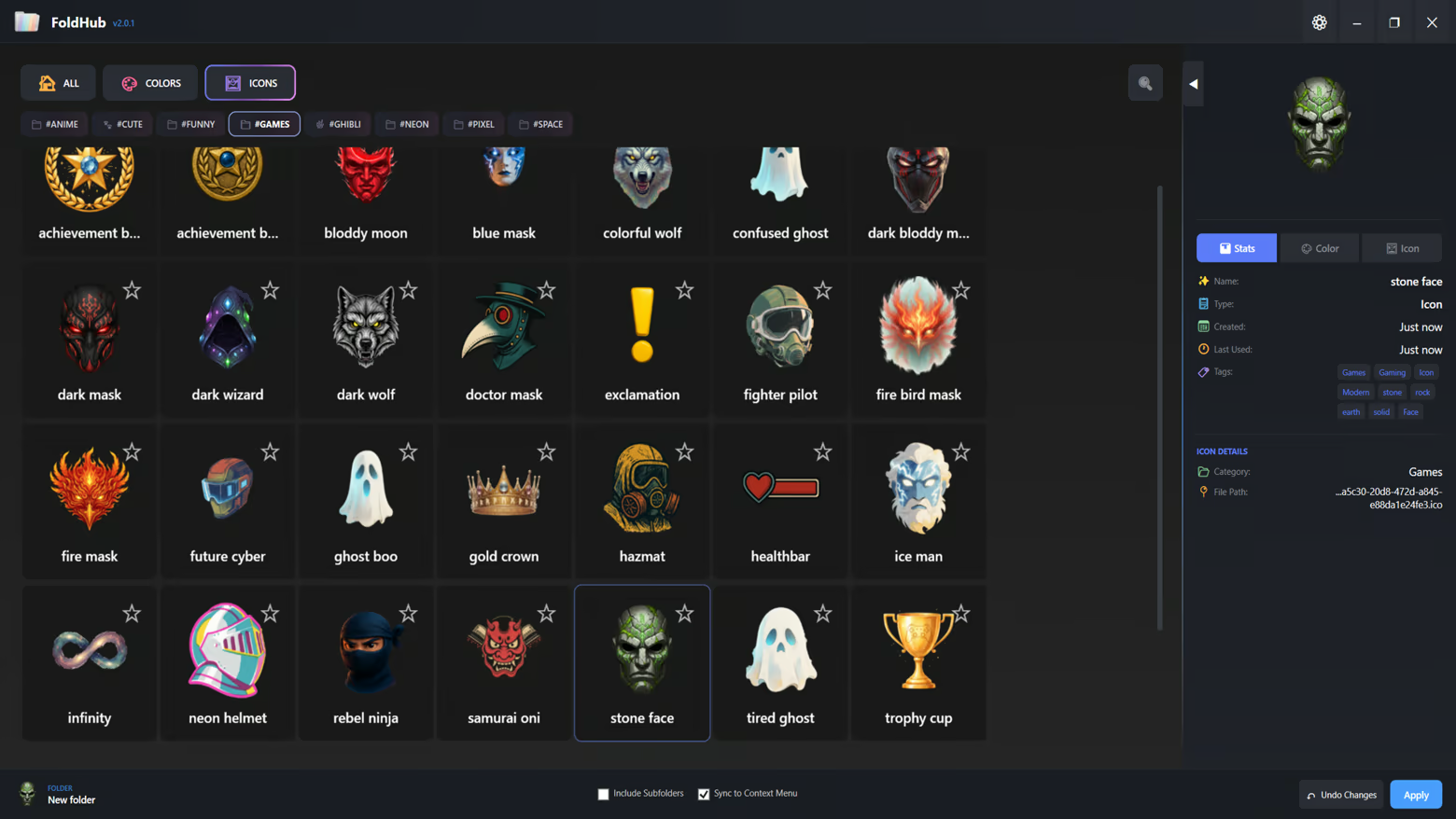
- 6 Curated Categories: Anime, Funny, Space, Pixel, Neon, and Ghibli

- Hundreds of high-quality icons ready to use

- Add your own custom icons (.ico format)

- Tag-based filtering system for quick discovery

- Favorites system to bookmark your most-used icons

Smart Organization

- Recent Items: Quick access to your recently applied styles

- My Library: Personal collection of custom colors and icons

- Favorites: Star your favorite items for instant access

- Tag Navigation: Filter by themes like "green", "warm", "cool", and more

User-Friendly Interface

- Modern dark-themed UI designed for comfort

- Drag-and-drop folder support

- Batch folder customization - apply to multiple folders at once

- Include subfolders option for recursive styling

- Live preview of colors and icons

Technical Features

- Native Windows integration

- Persistent folder customization (survives system restarts)

- No system modifications - safe and reversible

- Lightweight and fast performance

- Supports Windows desktop.ini customization

Perfect For

- Content Creators: Organize your project folders with visual themes

- Gamers: Categorize your game folders with matching icons

- Students: Color-code your study materials and assignments

- Professionals: Enhance workspace organization with visual hierarchy

- Creative Users: Express your personality through folder aesthetics

How It Works

1. Select one or multiple folders you want to customize

2. Choose from our extensive icon library or pick a custom color

3. Click Apply - your folders instantly transform

4. Save your favorite combinations for future use

Oświadczenie w sprawie treści generowanych przez SI

Producenci opisują, jak ich gra korzysta z treści generowanych przez SI, w następujący sposób:

All visual assets within the application, including icons, backgrounds, and UI elements, were created using generative AI tools during the development process. These assets are pre-rendered and static. The application does not utilize AI to generate content in real-time.

Wymagania systemowe

    Konfiguracja minimalna:
    • Wymaga 64-bitowego procesora i systemu operacyjnego
    • System operacyjny: Windows 10 (64-bit)
    • Procesor: Dual Core 2.0 GHz
    • Pamięć: 2048 MB RAM
    • Karta graficzna: Integrated Graphics
    • Miejsce na dysku: 500 MB dostępnej przestrzeni
    • Dodatkowe uwagi: Requires .NET 8.0 Runtime (included)
    Konfiguracja zalecana:
    • Wymaga 64-bitowego procesora i systemu operacyjnego
    • System operacyjny: Windows 10/11 (64-bit)
    • Procesor: Quad Core 2.5 GHz or higher
    • Pamięć: 4096 MB RAM
    • Karta graficzna: Integrated Graphics
    • Miejsce na dysku: 500 MB dostępnej przestrzeni
    • Dodatkowe uwagi: SSD recommended for better performance
Brak recenzji dla tego produktu

Możesz napisać swoją własną recenzję dla tego produktu, żeby podzielić się swoimi wrażeniami ze społecznością. Użyj obszaru, który znajduje się na tej stronie nad przyciskiem zakupu, żeby napisać swoją recenzję.