FoldHub is a powerful Windows customization tool that brings life to your boring folders. Transform your desktop organization with custom colors, gradients, and a vast library of beautiful icons spanning multiple themes including Anime, Space, Pixel Art, Neon, and Studio Ghibli styles.
출시일:
2025년 12월 9일
개발자:
배급사:
태그

로그인하셔서 게임을 찜 목록에 추가하거나, 팔로우하거나 또는 제외로 지정하세요.

한국어(을)를 지원하지 않습니다

이 제품은 귀하의 로컬 언어를 지원하지 않습니다. 구매하기 전에 아래에 있는 지원하는 언어 목록을 확인해주세요.

FoldHub 구매

출시 기념 할인! 종료일: 2025년 12월 16일


소프트웨어 정보

Advanced Color Customization

- Apply solid colors or stunning gradients to any folder

- Adjust brightness and direction for perfect gradient effects

- Save your favorite color combinations to your personal library

- Quick access to recently used colors

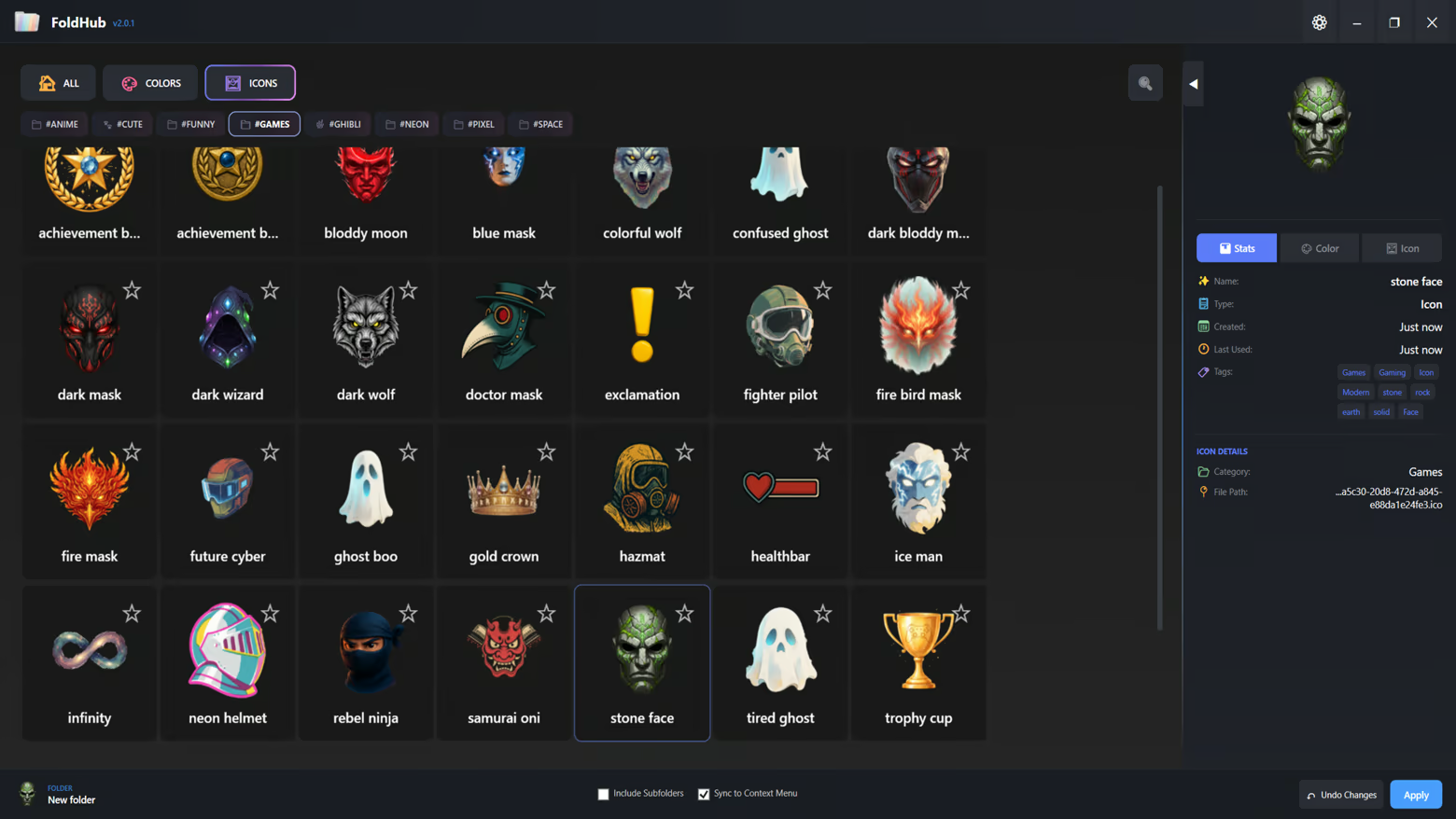
 Extensive Icon Library

- 6 Curated Categories: Anime, Funny, Space, Pixel, Neon, and Ghibli

- Hundreds of high-quality icons ready to use

- Add your own custom icons (.ico format)

- Tag-based filtering system for quick discovery

- Favorites system to bookmark your most-used icons

Smart Organization

- Recent Items: Quick access to your recently applied styles

- My Library: Personal collection of custom colors and icons

- Favorites: Star your favorite items for instant access

- Tag Navigation: Filter by themes like "green", "warm", "cool", and more

User-Friendly Interface

- Modern dark-themed UI designed for comfort

- Drag-and-drop folder support

- Batch folder customization - apply to multiple folders at once

- Include subfolders option for recursive styling

- Live preview of colors and icons

Technical Features

- Native Windows integration

- Persistent folder customization (survives system restarts)

- No system modifications - safe and reversible

- Lightweight and fast performance

- Supports Windows desktop.ini customization

Perfect For

- Content Creators: Organize your project folders with visual themes

- Gamers: Categorize your game folders with matching icons

- Students: Color-code your study materials and assignments

- Professionals: Enhance workspace organization with visual hierarchy

- Creative Users: Express your personality through folder aesthetics

How It Works

1. Select one or multiple folders you want to customize

2. Choose from our extensive icon library or pick a custom color

3. Click Apply - your folders instantly transform

4. Save your favorite combinations for future use

AI 생성 콘텐츠 사용 공개

개발사는 게임에서 AI 생성 콘텐츠를 사용하는 방법을 다음과 같이 설명합니다.

All visual assets within the application, including icons, backgrounds, and UI elements, were created using generative AI tools during the development process. These assets are pre-rendered and static. The application does not utilize AI to generate content in real-time.

시스템 요구 사항

    최소:
    • 64비트 프로세서와 운영 체제가 필요합니다
    • 운영 체제: Windows 10 (64-bit)
    • 프로세서: Dual Core 2.0 GHz
    • 메모리: 2048 MB RAM
    • 그래픽: Integrated Graphics
    • 저장 공간: 500 MB 사용 가능 공간
    • 추가 사항: Requires .NET 8.0 Runtime (included)
    권장:
    • 64비트 프로세서와 운영 체제가 필요합니다
    • 운영 체제: Windows 10/11 (64-bit)
    • 프로세서: Quad Core 2.5 GHz or higher
    • 메모리: 4096 MB RAM
    • 그래픽: Integrated Graphics
    • 저장 공간: 500 MB 사용 가능 공간
    • 추가 사항: SSD recommended for better performance
이 제품에는 아직 평가가 없습니다.

이 제품의 평가를 직접 써서 자신의 경험을 커뮤니티와 공유할 수 있습니다. 구매 버튼 위의 기입란을 이용하여 자신만의 평가를 써 보세요.